Warehouse WMS Integration Checklist: Your Path to a Seamless Implementation
Published: 12/20/2025 10:00 PM Updated: 12/21/2025 6:45 AM
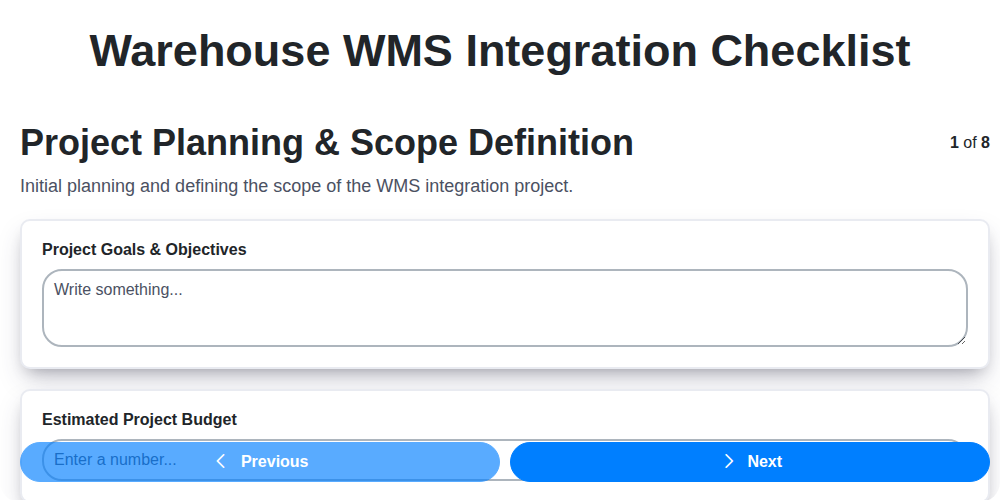
Table of Contents
- Introduction: Why Integrate Your Warehouse WMS?
- 1. Project Planning & Scope Definition
- 2. Defining Clear Objectives and KPIs
- 3. Data Mapping & Transformation: The Foundation of Integration
- 4. System Connectivity & APIs: Bridging the Gap
- 5. User Access & Permissions: Controlling Access
- 6. Testing & Validation: Ensuring Accuracy and Reliability
- 7. Training & Documentation: Empowering Your Team
- 8. Go-Live & Support: Navigating the Transition
- 9. Security & Compliance: Protecting Your Data
- 10. Data Migration Strategy: A Detailed Plan
- 11. Integration Architecture: Choosing the Right Approach
- 12. Risk Assessment and Mitigation
- 13. Post-Implementation Review & Optimization
- Resources & Links
TLDR: Integrating a Warehouse Management System (WMS)? Don't risk chaos! This checklist breaks down the entire process - from planning and data mapping to go-live and security - ensuring a smooth, successful integration and minimizing costly errors. Use it to stay organized, track progress, and avoid common pitfalls for a truly seamless WMS implementation.
Introduction: Why Integrate Your Warehouse WMS?
Your Warehouse Management System (WMS) is the brain of your warehouse operations - it manages inventory, directs workflows, and optimizes processes. But is it truly reaching its full potential? Often, a powerful WMS is siloed, not communicating effectively with other critical systems like your ERP, order management, or e-commerce platforms. This lack of integration leads to inefficiencies, data discrepancies, and ultimately, lost revenue.
Integrating your WMS with other systems unlocks a wealth of benefits. Imagine real-time inventory visibility across your entire organization, automated order fulfillment, reduced manual data entry, and improved forecasting accuracy. Integration streamlines operations, minimizes errors, and empowers your team with the data they need to make informed decisions. It's no longer a nice-to-have - it's a necessity for modern warehouses striving for agility and efficiency in today's competitive landscape. This blog post will guide you through a critical checklist to ensure a successful WMS integration.
1. Project Planning & Scope Definition
Integrating a Warehouse Management System (WMS) is a significant undertaking. Jumping into implementation without a solid foundation can lead to delays, cost overruns, and ultimately, a system that doesn't meet your needs. This crucial first step focuses on defining exactly what you're trying to achieve.
Begin with a clear articulation of your business objectives. What problems are you trying to solve? Increased efficiency? Improved inventory accuracy? Enhanced order fulfillment? Quantify these goals where possible - for example, reduce picking errors by 15%.
Next, meticulously define the scope of the integration. Which warehouse processes will be included? Which existing systems (ERP, e-commerce platform, etc.) need to interact with the WMS? What level of automation are you aiming for in each process? Document all assumptions and constraints.
Don't underestimate the importance of stakeholder involvement. Gather representatives from all departments that will be impacted - warehouse operations, IT, finance, sales - to ensure everyone's needs are considered and to secure buy-in. A well-defined scope document, reviewed and approved by all stakeholders, serves as your guiding light throughout the entire project. Failure to do so significantly increases the risk of scope creep and project derailment.
2. Defining Clear Objectives and KPIs
Before you even begin the technical heavy lifting of WMS integration, clearly defining your objectives and Key Performance Indicators (KPIs) is paramount. What problems are you trying to solve? What improvements are you hoping to see? Vague goals like improve efficiency are too broad. Instead, be specific.
Think about the areas your warehouse impacts: order fulfillment speed, inventory accuracy, labor productivity, shipping costs, and customer satisfaction. Define measurable targets. For example:
- Order Fulfillment Speed: Reduce average order processing time by 20%.
- Inventory Accuracy: Achieve 99.9% inventory accuracy.
- Labor Productivity: Increase picks per hour by 15%.
- Shipping Costs: Decrease shipping-related expenses by 10%.
- Customer Satisfaction: Increase Net Promoter Score (NPS) by 5 points.
These KPIs will serve as your guiding stars throughout the integration process. They're vital for tracking progress, measuring ROI, and ensuring the project delivers tangible business value. Regularly review these KPIs before, during, and after integration to confirm you're on track and make necessary adjustments. Furthermore, document these objectives and KPIs and share them with all stakeholders for complete alignment.
3. Data Mapping & Transformation: The Foundation of Integration
Successful WMS integration hinges on a robust data mapping and transformation strategy. It's more than just moving data from point A to point B; it's about ensuring that the right data, in the right format, gets to the WMS. This is where data mapping and transformation truly shine.
Understanding the Challenge: Your existing systems (ERP, legacy databases, spreadsheets - we've all been there) likely store data differently than your new WMS. Field names won't match, data types might be incompatible (text vs. number, for example), and units of measure could differ. Without careful planning, you'll end up with inaccurate data, frustrating users, and undermining the entire integration's value.
Key Steps in Data Mapping & Transformation:
- Detailed Data Dictionary Creation: Start with a comprehensive understanding of every data element in both systems. This means documenting field names, data types, descriptions, and business rules.
- Field Mapping: Clearly define how each field in the source system corresponds to a field in the WMS. This should include handling situations where a direct match doesn't exist (requiring combination, splitting, or creating new fields).
- Data Transformation Rules: Implement rules to convert data into the required format. Examples include:
- Unit Conversion: Transforming pounds to kilograms.
- Date Format Changes: Converting MM/DD/YYYY to YYYY-MM-DD.
- Code Translations: Mapping product codes between systems.
- Data Enrichment: Adding data elements during the transfer process (e.g., populating a default location based on product type).
- Error Handling & Validation: Establish rules to identify and handle data errors during transformation. This could involve flagging errors, assigning default values, or routing the data to a review queue.
- Data Cleansing: Use this opportunity to cleanse and standardize data. Remove duplicates, correct inaccuracies, and improve data quality.
Tools & Technologies: Many WMS integration platforms offer built-in data mapping and transformation capabilities. Alternatively, ETL (Extract, Transform, Load) tools can be used for more complex transformations.
Don't underestimate this critical step! A well-executed data mapping and transformation strategy sets the stage for a seamless and accurate WMS integration, ultimately delivering the benefits you're seeking.
4. System Connectivity & APIs: Bridging the Gap
Successful warehouse WMS integration hinges on seamless communication between your WMS and existing systems - ERP, accounting software, order management platforms, transportation management systems, and more. This isn't simply about plugging in; it's about architecting a robust and reliable data flow.
Understanding the Landscape:
- API-First Approach: Ideally, your WMS should offer a comprehensive API (Application Programming Interface). This allows for granular control and customization of data exchange. Evaluate the API's documentation - is it clear, well-maintained, and comprehensive? Does it support the data formats you require (e.g., REST, SOAP, XML, JSON)?
- Middleware Considerations: In some cases, direct API integration isn't feasible or optimal. Middleware platforms can act as a translator and facilitator, handling data transformation and routing between systems. Consider middleware if your systems have disparate technologies or complex integration requirements.
- Data Transmission Methods: Define the method of data transmission (real-time, batch, scheduled). Real-time integration offers immediate updates but requires more robust infrastructure. Batch processing is suitable for less time-sensitive data.
- Error Handling & Retry Mechanisms: A critical but often overlooked aspect. Implement robust error handling and retry mechanisms. Data failures during integration should be logged, and automated retries should be configured to ensure data integrity.
- Security Protocols: Secure all API connections using industry-standard protocols like HTTPS and OAuth. Data encryption at rest and in transit is paramount.
Key Questions to Ask:
- Does the WMS offer the necessary APIs or integration capabilities?
- What data formats are supported?
- What security protocols are in place?
- How will data errors be handled and resolved?
- What is the latency involved in data transfer?
5. User Access & Permissions: Controlling Access
Integrating a Warehouse Management System (WMS) dramatically changes how your warehouse team operates. With that increased power comes a critical responsibility: ensuring proper user access and permissions are in place. A poorly managed access control system can lead to errors, inefficiencies, and even security breaches.
This stage goes beyond simply assigning users accounts. It's about meticulously defining roles and permissions that align with employee responsibilities and minimize risk. Consider these key areas:
- Role-Based Access Control (RBAC): Implement RBAC, assigning users to pre-defined roles (e.g., Picker, Packer, Supervisor, Administrator). Each role should have a specific set of permissions-what tasks they can perform within the WMS.
- Principle of Least Privilege: Grant users only the minimum access needed to perform their jobs. This reduces the potential damage if an account is compromised.
- Granular Permissions: Don't just say Supervisor can do everything. Instead, specify which reports they can view, which adjustments they can make, and which areas of the warehouse they can access.
- Regular Reviews: Access rights shouldn't be 'set it and forget it.' Schedule regular reviews of user roles and permissions, especially when employees change roles or leave the company.
- Two-Factor Authentication (2FA): Implement 2FA where possible, adding an extra layer of security to prevent unauthorized access.
- Audit Trails: Ensure the system logs all user actions, creating an audit trail for accountability and troubleshooting.
Careful planning and ongoing management of user access and permissions are vital for a secure and efficient WMS integration.
6. Testing & Validation: Ensuring Accuracy and Reliability
Integrating a Warehouse Management System (WMS) is a significant undertaking, and robust testing and validation are absolutely critical to its success. Don't let a flawless integration plan fall apart during go-live due to overlooked errors! This phase goes beyond just confirming the systems connect; it's about verifying they work together accurately and reliably.
What's involved?
Testing should be a layered approach, starting with unit testing individual components and escalating to comprehensive end-to-end simulations. Consider these key areas:
- Data Accuracy: Verify data transferred between your existing systems and the WMS is complete, correct, and formatted properly. This includes inventory levels, product details, location data, and order information.
- Workflow Validation: Simulate real-world warehouse processes - receiving, putaway, picking, packing, shipping - to ensure seamless flow and accurate data updates at each stage. Include various scenarios: partial shipments, damaged goods, returns.
- Integration Point Verification: Thoroughly test each API connection and data exchange to confirm data integrity and avoid data loss or corruption.
- User Acceptance Testing (UAT): Involve key warehouse users in the testing process. Their firsthand experience will uncover usability issues and process flaws that automated tests might miss.
- Performance Testing: Assess system response times under load to ensure the WMS can handle peak warehouse activity.
- Regression Testing: After any bug fixes or system updates, perform regression testing to ensure no new issues have been introduced.
Documentation is Key: Meticulously document all testing procedures, results, and resolutions. This provides a clear audit trail and simplifies troubleshooting down the line. Don't just say it worked; describe how it worked and what was validated.
Remember: Testing isn't just about finding bugs; it's about building confidence in the new integrated system and minimizing disruptions during go-live.
7. Training & Documentation: Empowering Your Team
A technically flawless WMS integration is only as effective as the team using it. Don't underestimate the crucial role of thorough training and comprehensive documentation! This isn't just about showing users how to click buttons; it's about fostering understanding of why processes have changed and ensuring they can confidently navigate the new system.
Here's what a robust training & documentation plan should include:
- Role-Based Training: Not everyone needs to know everything. Tailor training modules to specific roles (warehouse managers, pickers, receivers, etc.) focusing on the tasks relevant to their daily responsibilities.
- Multiple Learning Formats: Cater to different learning styles. Offer a blend of instructor-led sessions, video tutorials, interactive simulations, and quick reference guides.
- Train-the-Trainer Approach: Identify and train key personnel within your team to become in-house experts who can provide ongoing support and address user questions.
- User-Friendly Documentation: Create clear, concise, and easily accessible documentation. Include FAQs, troubleshooting guides, and step-by-step instructions for common tasks. Consider a searchable online knowledge base.
- Post-Go-Live Support: Don't abandon your users after the system goes live. Provide ongoing support channels (help desk, email, dedicated support staff) to address issues and provide refresher training as needed.
- Documentation Updates: As processes evolve or new features are added, proactively update documentation to maintain accuracy and relevance.
- Feedback Loop: Regularly solicit feedback from users about the training and documentation. Use this feedback to identify areas for improvement and ensure your resources remain effective.
Investing in robust training and documentation minimizes user frustration, reduces errors, and maximizes the return on your WMS integration investment. A well-trained and informed team is your best asset for sustained success.
8. Go-Live & Support: Navigating the Transition
The go-live phase is arguably the most crucial, and often the most stressful, part of any WMS integration. It's not just about flipping a switch; it's about ensuring a smooth, functional transition with minimal disruption to warehouse operations. Here's what you need to consider for a successful launch and ongoing support:
Pre-Go-Live Preparation:
- Phased Rollout: Consider a phased implementation - starting with a specific area of the warehouse or a subset of products - to identify and address any remaining issues before a full deployment.
- Go/No-Go Decision: Establish clear criteria for the go/no-go decision, ensuring all critical tasks and tests have been completed satisfactorily. Don't rush!
- Cutover Plan: Develop a detailed cutover plan outlining the steps for switching from the legacy system to the new WMS, including data migration timelines and rollback procedures.
- Communication is Key: Keep all stakeholders informed throughout the go-live process with regular updates and clear channels for feedback.
Post-Go-Live Support:
- Dedicated Support Team: Assemble a dedicated support team, including representatives from both the WMS vendor and your internal IT and warehouse teams.
- Hypercare Period: Plan for a hypercare period immediately following go-live, where the support team is heavily involved to address urgent issues and provide intensive user assistance.
- Issue Tracking & Resolution: Implement a robust system for tracking and resolving issues, ensuring timely response and prioritization based on impact.
- Performance Monitoring: Continuously monitor the WMS performance and identify areas for optimization.
- Feedback Loop: Establish a feedback loop for users to report issues and suggest improvements, contributing to ongoing refinement of the system.
A successful go-live isn't just about getting the system running; it's about ensuring long-term operational efficiency and user satisfaction.
9. Security & Compliance: Protecting Your Data
Integrating a Warehouse Management System (WMS) introduces new potential vulnerabilities and compliance considerations. This isn't just about preventing unauthorized access; it's about ensuring data integrity, privacy, and adherence to industry regulations. Here's what you need to consider:
1. Access Control & Authentication: Implement robust role-based access control (RBAC) to limit user permissions based on their job function. Multi-factor authentication (MFA) adds an extra layer of security, minimizing the risk of unauthorized logins. Regularly review and update user access rights.
2. Data Encryption: Encrypt data both in transit (during communication between systems) and at rest (while stored). This protects sensitive information from unauthorized access even if a breach occurs.
3. Audit Trails & Logging: Maintain comprehensive audit trails that track all system activities. This allows for forensic analysis in case of security incidents and aids in identifying potential vulnerabilities. Regularly review these logs.
4. Compliance Requirements: Determine which industry-specific compliance regulations apply to your operations. (e.g., HIPAA for healthcare, PCI DSS for payment card processing, GDPR for data privacy). Ensure your WMS integration aligns with these requirements. This often involves data residency considerations (where data is stored).
5. Vulnerability Scanning & Penetration Testing: Conduct regular vulnerability scans and penetration testing to identify and address potential security weaknesses. Engage external security experts for unbiased assessments.
6. Data Backup & Disaster Recovery: Implement a robust data backup and disaster recovery plan to ensure business continuity in the event of a system failure or security incident. Test these procedures regularly.
7. Third-Party Vendor Risk Management: Assess the security practices of your WMS vendor and any other third-party providers involved in the integration. Ensure they meet your organization's security standards.
8. Ongoing Monitoring & Updates: Continuous monitoring of the integrated system is crucial. Stay current with vendor security patches and updates to mitigate emerging threats.
Addressing these security and compliance considerations upfront will protect your data, minimize risk, and ensure a successful and sustainable WMS integration.
10. Data Migration Strategy: A Detailed Plan
Migrating warehouse data into your new WMS is rarely a simple copy-and-paste operation. A poorly planned data migration can derail the entire integration, leading to inaccurate inventory, order fulfillment issues, and significant operational disruption. This section outlines a robust strategy for a successful data migration.
1. Data Assessment & Cleansing: Begin with a comprehensive assessment of your existing data sources (legacy WMS, spreadsheets, ERP, etc.). Identify data quality issues: inconsistencies, duplicates, missing values, and inaccurate information. A dedicated data cleansing phase is crucial - don't skip it! Address inaccuracies before migration to avoid propagating errors into your new WMS.
2. Define Data Scope & Prioritization: Determine which data is essential for the initial go-live versus what can be migrated later. Focus on core data like product information, location data, current inventory levels, and open orders. Less critical data (e.g., historical transaction logs) can be migrated in subsequent phases.
3. Data Mapping - The Blueprint: This is where you create a detailed mapping document. For each field in your old system, clearly define which field it corresponds to in the new WMS. Account for data type differences and potential transformations needed. This document is the roadmap for your data migration team.
4. Transformation Rules: Beyond a simple field-to-field mapping, define the rules for data transformation. Examples include unit conversions (e.g., kilograms to pounds), address standardization, and product categorization. Ensure these rules are documented and consistently applied.
5. Extraction, Transformation, and Loading (ETL) Process: Choose an ETL methodology. You can opt for a manual approach (often used for smaller datasets), a scripting-based solution (e.g., Python, SQL), or a dedicated ETL tool. Each option has its pros and cons in terms of complexity, cost, and scalability.
6. Phased Migration Approach: Consider a phased approach. Migrate a subset of your data (e.g., a single product category or warehouse location) first to test the entire process and identify any unforeseen issues. This allows for iterative improvements and minimizes risk.
7. Data Validation & Reconciliation: After the data is migrated, implement rigorous validation checks. Compare the data in the new WMS to the source data to ensure accuracy and completeness. Reconciliation reports are essential for identifying and correcting any discrepancies.
8. Rollback Plan: Always have a documented rollback plan. In case of critical errors during migration, you need a way to revert to the original data and system state. This requires regular backups and a clear procedure for restoring data.
9. Data Archiving: Consider an archiving strategy for older data that is not actively used but needs to be retained for compliance or historical purposes. This helps keep your WMS database clean and efficient.
10. Post-Migration Monitoring: After go-live, continuously monitor data quality and system performance. Regularly review reconciliation reports and address any emerging issues. This proactive approach ensures long-term data integrity.
11. Integration Architecture: Choosing the Right Approach
Choosing the right integration architecture is critical for a successful Warehouse Management System (WMS) integration. There's no one-size-fits-all solution; the optimal approach depends on your existing IT infrastructure, budget, scalability requirements, and real-time data needs. Here's a breakdown of common architectures:
Point-to-Point Integration: This is the simplest, directly connecting the WMS to other systems (ERP, eCommerce platform, etc.). It's quick to implement initially, but becomes difficult to manage and scale as the number of integrations grows - leading to a spaghetti architecture. Avoid this for complex WMS deployments.
Enterprise Service Bus (ESB): An ESB acts as a central hub, mediating communication between the WMS and other systems. It provides features like message transformation, routing, and data enrichment. This promotes flexibility and scalability but can be more complex and costly to implement.
Application Programming Interface (API) First: This approach prioritizes APIs for all system interactions. It's increasingly popular with modern systems, allowing for flexible and loosely coupled integrations. The WMS and connected systems expose APIs that other applications can consume. This requires well-defined and documented APIs from both the WMS and surrounding systems.
Message Queueing: Utilizing a message queue (like RabbitMQ or Apache Kafka) allows for asynchronous communication. The WMS publishes messages to a queue, and other systems consume them when ready. This is ideal for tasks that don't require immediate response and improves system resilience.
Considerations for Selection:
- Real-time vs. Batch Processing: Do you need immediate data synchronization, or can you tolerate a delay?
- Data Volume & Velocity: How much data needs to be exchanged, and how quickly?
- Future Scalability: Will the chosen architecture be able to handle future growth and changes?
- Team Skillset: Does your team have the expertise to implement and maintain the chosen architecture?
Careful assessment of these factors will guide you to the architecture that best supports your WMS integration goals.
12. Risk Assessment and Mitigation
Integrating a Warehouse Management System (WMS) is a complex undertaking, and proactively identifying potential risks is crucial for a successful implementation. Don't let unexpected hurdles derail your project. This section outlines common risks and suggests mitigation strategies.
Potential Risks:
- Data Migration Issues: Inaccurate or incomplete data migration can cripple warehouse operations.
- Integration Failures: Unexpected issues with API connections or data flow between systems.
- User Adoption Resistance: Employees reluctant to learn and utilize the new WMS.
- Scope Creep: Uncontrolled expansion of project scope, leading to delays and budget overruns.
- Technical Glitches: System downtime, bugs, or performance issues post-go-live.
- Vendor Dependency: Over-reliance on the WMS vendor for ongoing support and updates.
- Inadequate Infrastructure: Existing hardware or network limitations hindering WMS performance.
Mitigation Strategies:
- Data Validation Plan: Implement rigorous data cleansing and validation procedures before, during, and after migration. Conduct test migrations with representative datasets.
- Phased Rollout: Begin with a limited scope (e.g., a single warehouse or product line) to identify and resolve issues before a full-scale launch.
- Stakeholder Involvement: Maintain constant communication with all stakeholders (warehouse staff, IT, management) to manage expectations and address concerns.
- Contingency Planning: Develop backup plans for critical processes in case of system failures.
- API Monitoring & Error Handling: Implement robust monitoring of API connections and develop error handling procedures.
- Vendor Contract Review: Carefully review the vendor contract to clearly define responsibilities, service level agreements (SLAs), and escalation paths.
- Dedicated Support Team: Establish a dedicated support team (internal and/or vendor) to address user issues and provide ongoing maintenance.
13. Post-Implementation Review & Optimization
The successful launch of a Warehouse WMS integration isn't the finish line - it's the starting point for continuous improvement. A thorough post-implementation review is critical to ensuring long-term success and maximizing your investment.
Here's what to cover in your review:
- Performance Metrics: Track key performance indicators (KPIs) like order fulfillment rates, inventory accuracy, picking efficiency, and overall warehouse throughput. Compare these to pre-integration baselines to quantify the impact of the WMS.
- User Feedback: Actively solicit feedback from warehouse staff, supervisors, and management. What's working well? What's causing frustration? Are there areas where the system isn't meeting expectations?
- Process Validation: Re-examine workflows. Are they optimized? Can automation be further implemented? Identify any bottlenecks or inefficiencies that have emerged since go-live.
- Data Accuracy: Conduct periodic audits of data integrity. Are there discrepancies between the WMS and other systems? Address any root causes of data errors.
- System Adjustments: Based on the review findings, implement necessary adjustments to system configurations, workflows, and user access. This could include refining rules, updating mappings, or adjusting API integrations.
- Scheduled Optimization: Integrate optimization into a recurring schedule (e.g., quarterly or annually) to proactively address evolving needs and emerging technologies.
Remember, a post-implementation review isn't about finding fault; it's about ensuring that your WMS continues to deliver maximum value and supports your warehouse operations effectively.
Resources & Links
- WMS Integrations: A leading provider of Warehouse Management System integration services. Their site offers insights into various WMS systems and integration methodologies.
- Supply Chain Digital: Provides industry news, insights, and reports on supply chain technologies including WMS and integration solutions. Useful for staying up-to-date on trends.
- APICS (now ASCM): Offers resources, certifications, and best practices related to supply chain management, which are relevant to WMS integration planning and execution.
- Gartner: Provides research and analysis on enterprise software, including WMS, and offers insights into market trends and vendor selection (requires subscription for full access).
- Oracle: A major player in WMS and ERP systems. Their website details Oracle WMS Cloud and related integration capabilities.
- SAP: Another leading ERP and WMS provider. Their site offers information about SAP Extended Warehouse Management and integration options.
- Blue Harbor: Specializes in integrating business systems, including WMS solutions. Provides practical advice and case studies on integration best practices.
- IBM: Offers a range of services including systems integration and consulting, useful for understanding complex integration projects (particularly for larger organizations).
- Microsoft: Offers Azure services for cloud-based integrations, helpful for understanding connectivity and API options.
- Amazon Web Services (AWS): Provides a comprehensive suite of cloud computing services, including options for WMS integration and data management.
- SearchERP: Provides articles and resources related to ERP and WMS systems, useful for understanding integration challenges and best practices.
Frequently Asked Questions
What is a Warehouse Management System (WMS)?
A Warehouse Management System (WMS) is software that manages and controls warehouse operations from the receiving and put-away processes to picking, packing, and shipping. It optimizes inventory levels, streamlines workflows, and improves overall warehouse efficiency.
Why integrate my WMS with other systems?
Integration connects your WMS with critical systems like your ERP, e-commerce platform, or transportation management system (TMS). This eliminates data silos, automates processes, reduces errors, improves visibility, and creates a unified view of your supply chain.
What's included in this WMS integration checklist?
This checklist covers key considerations and steps from initial planning and data preparation to testing, training, and go-live. It addresses topics like scope definition, data mapping, system configurations, user access, and ongoing support.
What's the difference between a 'big bang' and phased WMS integration?
A 'big bang' integration implements the entire WMS across all warehouse functions simultaneously. A phased approach introduces the WMS in stages, focusing on specific areas or processes first. Big bang offers faster implementation but carries higher risk. Phased allows for gradual adaptation and reduced disruption, but takes longer overall.
What is data mapping and why is it important?
Data mapping is the process of aligning data fields between your existing systems and the WMS. It ensures data is transferred accurately and consistently, preventing errors and maintaining data integrity. Incorrect data mapping is a common cause of integration failures.
Who should be involved in the WMS integration project?
A cross-functional team is essential. This should include representatives from warehouse operations, IT, finance, procurement, and any departments that interact with the WMS. Executive sponsorship is also crucial for securing resources and driving adoption.
What are common challenges faced during WMS integration?
Common challenges include inaccurate data, scope creep, lack of stakeholder buy-in, inadequate testing, insufficient training, and poor project management. Proactive planning and open communication can help mitigate these risks.
How important is testing during WMS integration?
Testing is absolutely critical! It involves rigorous checks of data accuracy, process functionality, and system performance. Thorough testing identifies and resolves issues before go-live, minimizing disruption and ensuring a successful implementation.
What kind of training should be provided to users?
Training should be role-based and cover all relevant WMS functionalities. It should include hands-on exercises and address common use cases. Ongoing training and support are essential for user adoption and ongoing performance.
What post-implementation support is needed?
Post-implementation support includes monitoring system performance, resolving issues, providing ongoing training, and making necessary adjustments to configurations. A dedicated support team or vendor relationship is important for long-term success.
How do I measure the success of my WMS integration?
Success can be measured by key performance indicators (KPIs) like inventory accuracy, order fulfillment rate, warehouse efficiency, labor productivity, and shipping costs. Establish baseline metrics before integration to track improvement.
Found this Article helpful?
Comments
There are no comments yet. Be the first to add one!
WMS - Warehouse Management System Solution Demo
Optimize your warehouse operations & boost efficiency! ChecklistGuro's WMS streamlines inventory management, order fulfillment, and shipping. Reduce errors, improve accuracy, & maximize space utilization. Manage it all with our Work OS.
Related Articles

Seamless RFID Integration: Your WMS Checklist Template for Success

Mastering Warehouse Labeling: Your WMS Process Checklist Template
The Ultimate Supply Chain Inventory Accuracy Audit Checklist: A Step-by-Step Guide
Mastering Putaway: Your WMS Optimization Checklist

Mastering Your Yard: A Warehouse WMS Yard Management Checklist Template

Warehouse Data Integrity: Your WMS Checklist Template

WMS System Performance Monitoring Checklist: A Comprehensive Guide
Warehouse WMS Error Handling Checklist: A Proactive Guide to Minimizing Disruptions
We can do it Together
Need help with
Warehouse Management System (WMS)?
Have a question? We're here to help. Please submit your inquiry, and we'll respond promptly.