WMS System Upgrade Checklist: Your Step-by-Step Guide to Success
Published: 12/20/2025 10:00 PM Updated: 12/21/2025 6:48 AM
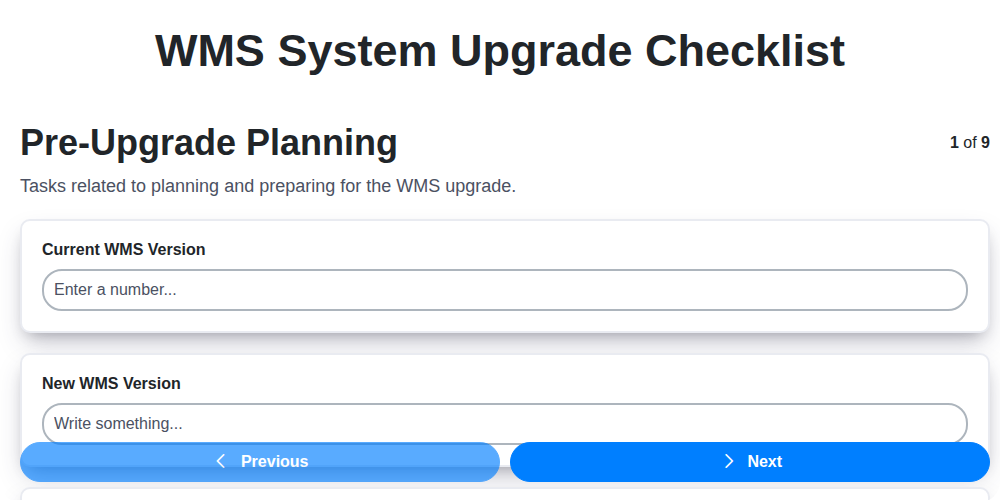
Table of Contents
- Introduction: Why a WMS Upgrade Needs a Checklist
- 1. Pre-Upgrade Planning: Laying the Foundation
- 2. Data Backup & Validation: Protecting Your Warehouse's Heart
- 3. Environment Preparation: Setting the Stage for Success
- 4. Software Installation & Configuration: Bringing the New System to Life
- 5. Integration Testing: Ensuring Seamless Connectivity
- 6. User Acceptance Testing (UAT): Getting User Buy-In
- 7. Cutover Planning & Execution: The Moment of Truth
- 8. Post-Upgrade Monitoring & Stabilization: Keeping Things Running Smoothly
- 9. Documentation & Training: Empowering Your Team
- 10. Defining Success Metrics: Measuring the Upgrade's Impact
- 11. Risk Assessment & Mitigation: Preparing for the Unexpected
- 12. Communication Plan: Keeping Stakeholders Informed
- 13. Rollback Plan: A Safety Net for Unexpected Issues
- Resources & Links
TLDR: Upgrading your Warehouse Management System (WMS)? Don't risk chaos! This checklist provides a structured, step-by-step guide covering everything from initial planning and data backup to post-upgrade monitoring and user training. Follow it to minimize disruptions, ensure data integrity, and guarantee a smooth, successful WMS upgrade.
Introduction: Why a WMS Upgrade Needs a Checklist
Upgrading your Warehouse Management System (WMS) is a significant undertaking, impacting nearly every aspect of your warehouse operations. It's more than just installing new software; it's a complex process involving data migration, system configuration, and extensive testing. Skipping steps or overlooking potential issues can lead to costly delays, disruptions in shipping and receiving, and ultimately, customer dissatisfaction. A comprehensive checklist isn't just a 'nice-to-have' - it's a critical tool for ensuring a smooth, successful upgrade. This structured approach minimizes risks, keeps the project on track, and helps guarantee that your upgraded WMS delivers the promised improvements in efficiency and accuracy. Without a detailed checklist, you're essentially navigating a complex upgrade blindfolded. Let's explore how a well-defined checklist can make all the difference.
1. Pre-Upgrade Planning: Laying the Foundation
A successful WMS (Warehouse Management System) upgrade isn't a spur-of-the-moment decision. It's the culmination of meticulous planning. This initial phase is arguably the most critical and sets the stage for everything that follows. Rushing this step is a recipe for headaches down the line.
Here's what you need to consider during pre-upgrade planning:
- Define Objectives: Clearly articulate why you're upgrading. Is it for improved performance, new features, compliance, or a combination? Specific, measurable objectives will guide your decisions throughout the process.
- Stakeholder Alignment: Engage key stakeholders - warehouse managers, IT, finance, and end-users - early on. Gather their input, address concerns, and secure buy-in. Communication is paramount.
- Scope Definition: Precisely define what's included in the upgrade. Will it be a full upgrade, a phased rollout, or a module-specific change? Avoid scope creep to maintain control and timelines.
- Resource Allocation: Identify the team members needed (internal and external) and assign responsibilities. Account for their time and expertise.
- Risk Assessment: Proactively identify potential risks (data corruption, downtime, system incompatibility) and develop mitigation strategies.
- Timeline Establishment: Create a realistic timeline that accounts for all phases of the upgrade, including testing and training. Pad the timeline to account for unforeseen issues.
- Upgrade Strategy Selection: Determine the optimal upgrade approach - big bang, phased, parallel - based on your specific needs and risk tolerance.
2. Data Backup & Validation: Protecting Your Warehouse's Heart
A WMS system upgrade is a significant undertaking, and the integrity of your warehouse data is paramount. Before any changes are made, a comprehensive data backup and validation process is absolutely critical. This isn't just about creating a backup; it's about ensuring that backup is usable and accurately reflects your current operational state.
Here's what your data backup & validation process should encompass:
- Full Backup: Initiate a full data backup of your entire WMS database. This serves as your primary recovery point.
- Verification of Backup Integrity: Don't just create the backup; verify it. This means restoring a small portion of the backup to a test environment to confirm its usability and completeness. Don't skip this step - a corrupt backup is worse than no backup at all.
- Data Validation: Before the upgrade, perform a data validation check. This involves scrutinizing key data points for accuracy and consistency. Look for discrepancies in inventory levels, order statuses, location data, and user permissions. Correct any identified errors before the upgrade. These pre-existing errors will only be magnified by a system change.
- Baseline Reporting: Capture baseline reports on key performance indicators (KPIs) like order fulfillment rates, inventory accuracy, and cycle time. These will serve as vital benchmarks to compare against post-upgrade performance.
- Documentation: Meticulously document the backup process, validation results, and any data corrections made. This documentation provides a clear audit trail and assists with troubleshooting if issues arise.
Data is the lifeblood of your warehouse operations. Protecting it should be a top priority throughout the WMS upgrade process.
3. Environment Preparation: Setting the Stage for Success
A successful WMS system upgrade hinges on a meticulously prepared environment. This isn't just about ensuring the servers are running; it's about crafting a space that allows for smooth installation, testing, and ultimately, minimal disruption to operations. Here's what that entails:
- Hardware Assessment: Review existing server specifications (CPU, RAM, storage) against the new WMS requirements. Upgrade hardware if necessary to meet or exceed recommended configurations. Don't underestimate the impact - insufficient resources can lead to performance bottlenecks post-upgrade.
- Operating System & Database Compatibility: Verify that your current operating system and database versions are compatible with the new WMS software. Upgrades to these underlying systems may be required - plan these well in advance.
- Network Readiness: Ensure adequate network bandwidth and stability. Consider the impact of increased data transfer during and after the upgrade.
- Dedicated Upgrade Environment: Ideally, set up a dedicated environment mirroring your production environment for the upgrade process. This isolates the upgrade from live operations, preventing unintended consequences. If this isn't possible, carefully schedule downtime and communicate clearly with all stakeholders.
- Security Considerations: Review and update security protocols within the upgrade environment. This includes user access controls, firewalls, and intrusion detection systems.
- Resource Allocation: Assign dedicated IT resources to manage the environment preparation, installation, and testing phases. Their focused attention is critical to a smooth upgrade.
- Environment Documentation: Create detailed documentation outlining the environment's configuration, including server details, network settings, and any custom configurations. This serves as a vital reference throughout the upgrade process and for troubleshooting.
4. Software Installation & Configuration: Bringing the New System to Life
This stage is where the new WMS software actually takes shape within your infrastructure. It's far more than just clicking an Install button; meticulous planning and execution are critical to avoid roadblocks later.
Key Tasks Include:
- Hardware Validation: Ensure your servers and hardware meet the new WMS's requirements. This might involve upgrades or adjustments to processing power, memory, or storage.
- Software Installation: Following the vendor's provided documentation, carefully install the WMS software on the designated server(s). Adhere strictly to version compatibility guidelines and dependencies.
- Initial Configuration: This involves setting up core system parameters. Think database connections, user roles and permissions, security protocols, and basic inventory and location definitions. Don't skip this! Incorrect settings here can have cascading effects.
- Parameter Customization: While initial configuration gets you started, fine-tuning parameters to match your specific warehouse processes is vital. This might involve adjusting picking strategies, putaway rules, cycle count frequencies, and reporting intervals.
- Security Hardening: Implement security best practices. This includes setting strong passwords, configuring firewalls, and enabling multi-factor authentication.
- Pilot Configuration (Recommended): Before rolling out globally, consider a pilot configuration on a smaller subset of your warehouse operations. This allows for early detection and correction of configuration errors without impacting the entire facility.
Pro Tip: Engage the WMS vendor's support team throughout this process. They can provide invaluable assistance with installation troubleshooting and configuration best practices. Keep a detailed log of all changes made during configuration for auditing and rollback purposes.
5. Integration Testing: Ensuring Seamless Connectivity
Upgrading a Warehouse Management System (WMS) rarely happens in isolation. Your WMS likely integrates with other critical systems - ERP, e-commerce platforms, shipping carriers, and more. Integration testing is absolutely vital to guarantee these connections remain intact and functional after the upgrade.
This phase goes beyond simply verifying the WMS itself works. It focuses on validating the data flow between the WMS and these connected systems. Think of it as a comprehensive check-up for your entire logistics ecosystem.
What's Involved:
- Define Test Scenarios: Identify all key integration points and create detailed test scenarios that mirror real-world business processes. This includes order processing, inventory updates, shipping confirmations, and any other data exchange.
- Data Mapping Verification: Double-check that data fields are mapped correctly between systems. Even minor discrepancies can lead to significant issues later on.
- Transaction Validation: Confirm that transactions initiated in one system are accurately reflected and processed in the other.
- Error Handling: Test how the system handles errors and exceptions that might arise during data exchange.
- Performance Monitoring: Assess the performance of integrations under load to identify potential bottlenecks.
Why It's Critical:
Skipping or rushing integration testing can lead to order fulfillment errors, inaccurate inventory levels, delayed shipments, and ultimately, dissatisfied customers. Thorough integration testing minimizes risk and ensures a smooth transition to the upgraded WMS.
6. User Acceptance Testing (UAT): Getting User Buy-In
User Acceptance Testing (UAT) is arguably the most critical phase of your WMS upgrade. It's not just about confirming the system works; it's about ensuring it works for your users and meets their needs within their daily workflows. This phase bridges the gap between technical validation and real-world application.
Why is UAT so vital? While technical teams can verify functionality, they often lack the intimate understanding of how users actually perform their tasks. UAT provides that crucial perspective. A flawless system from a technical standpoint can still fail if it's cumbersome or doesn't align with established processes.
Building Your UAT Plan:
- Select Representative Users: Don't just pick the 'tech-savvy' ones. Include users from all relevant departments, roles, and experience levels - picklers, packers, shippers, receivers, supervisors - the broader the representation, the better.
- Define Realistic Scenarios: Work with users to identify the most common and critical tasks they perform within the WMS. Create scenarios that mirror these tasks as closely as possible. Think through edge cases and unusual circumstances too.
- Provide Clear Instructions and Support: UAT can be daunting for some. Offer clear, step-by-step instructions and dedicated support personnel to answer questions and resolve issues during testing.
- Document Everything: Thoroughly document all test results - successes, failures, and observations. Encourage users to provide detailed feedback on their experience. A simple, standardized feedback form can be invaluable.
- Iterate and Refine: UAT isn't a pass/fail scenario. Be prepared to make adjustments to the system based on user feedback. This iterative approach ensures the final product is truly user-centric.
Getting User Buy-In is Key: Communicate the purpose of UAT, emphasize its importance in ensuring a smooth transition, and acknowledge the value of user input. Treat UAT participants as partners in the upgrade process - their feedback is essential for success. A positive UAT experience fosters acceptance and minimizes resistance to the new system.
7. Cutover Planning & Execution: The Moment of Truth
The cutover phase is arguably the most critical and potentially stressful part of a WMS upgrade. It's the transition from the old system to the new, and a well-executed plan can minimize disruption and ensure a smooth launch. This isn't just about flipping a switch; it's a carefully orchestrated sequence of events.
Key Elements of a Robust Cutover Plan:
- Detailed Timeline: This isn't just a schedule; it's a minute-by-minute breakdown of activities, including start and end times, responsible parties, and dependencies. Consider a phased rollout by warehouse or function if possible to mitigate risk.
- Communication Plan: Everyone involved - warehouse staff, IT, management, and any external partners - needs to know exactly what's happening, when, and what's expected of them. Regular updates, clear escalation paths, and designated communication channels are vital.
- Rollback Plan: A clear, documented plan to revert to the old system must be in place in case of critical issues during or after cutover. This isn't a sign of failure; it's responsible risk management. Define triggers for rollback and assign a rollback team.
- Freeze Periods: Establish periods where no data changes or transactions are permitted in either the old or new system to ensure data consistency during the migration.
- Data Migration Execution: This is the process of moving data from the old WMS to the new. This needs careful monitoring and validation during the migration itself.
- Go/No-Go Decision: A final assessment just before the cutover, involving key stakeholders, to determine if all prerequisites are met and the upgrade can proceed.
- Dedicated Cutover Team: A small, focused team responsible for managing the cutover activities and resolving any issues that arise. They are the first responders.
Pro Tip: Rehearse the cutover plan through a mock cutover (a dry run) to identify potential problems and refine the process. This can significantly reduce surprises and improve confidence.
8. Post-Upgrade Monitoring & Stabilization: Keeping Things Running Smoothly
The excitement of a successful WMS upgrade can quickly fade if the system isn't properly monitored and stabilized after go-live. This phase is crucial to identify and resolve any unforeseen issues, ensuring a seamless and productive operational environment.
Here's what you need to focus on:
- Intensive Monitoring: Implement comprehensive monitoring of key performance indicators (KPIs) like order processing time, inventory accuracy, picking efficiency, and system response times. Establish clear thresholds and alerts to flag anomalies immediately.
- Error Logging & Analysis: Diligently review error logs, tracking the frequency and nature of errors. This will provide valuable insight into recurring problems and areas needing further investigation.
- User Feedback Loop: Encourage users to report any issues or unexpected behavior. Designate a point person to collect, triage, and address user feedback promptly. This proactive approach can catch subtle problems that automated monitoring might miss.
- Performance Tuning: After a week or two, analyze performance data and identify areas for optimization. This might involve adjusting server resources, tweaking database queries, or refining WMS configurations.
- Rollback Plan Readiness: Even with rigorous testing, unforeseen issues can arise. Maintain a documented rollback plan, ensuring you can revert to the previous system version if necessary. The rollback team should be prepared and aware of their responsibilities.
- Stabilization Period: Designate a specific stabilization period (e.g., 1-2 weeks) where the focus remains solely on resolving post-upgrade issues and optimizing system performance. Limit changes and enhancements during this time.
Effective post-upgrade monitoring and stabilization are not just about fixing problems; they're about proactively ensuring long-term system reliability and maximizing your WMS investment.
9. Documentation & Training: Empowering Your Team
A successful WMS upgrade isn't just about the technology; it's about empowering your team to effectively use the new system. Neglecting documentation and training is a recipe for frustration, errors, and ultimately, a hindered return on investment.
Comprehensive Documentation is Key:
- Upgrade Scope & Changes: Clearly document what changed during the upgrade - new features, modified processes, interface changes. This acts as a quick reference for everyone.
- Updated Process Flows: Standard Operating Procedures (SOPs) need updating to reflect new workflows. Visual diagrams are invaluable here.
- System Configuration Details: Keep a detailed record of configuration settings, customizations, and integration parameters. This is crucial for troubleshooting and future upgrades.
- Troubleshooting Guides: Anticipate common issues and create concise guides for your team to resolve them independently.
Training - Tailored to Roles:
Generic training won't cut it. Segment your team by roles (warehouse supervisors, operators, administrators) and tailor training accordingly. Consider these formats:
- Classroom Sessions: Ideal for introducing core concepts and allowing for interactive Q&A.
- Online Tutorials: Flexible and accessible for ongoing reference.
- Train-the-Trainer Approach: Equipping a group of internal champions to train others.
- Quick Reference Guides: Condensed, task-specific guides for instant support on the warehouse floor.
Post-Upgrade Support:
Training doesn't end with the go-live. Provide ongoing support through a designated help desk, office hours with the upgrade team, and a feedback mechanism for continuous improvement. Remember, a well-trained and supported team is your biggest asset in maximizing the value of your upgraded WMS.
10. Defining Success Metrics: Measuring the Upgrade's Impact
An upgrade isn't just about installing new software; it's about achieving tangible improvements to your warehouse operations. To truly understand the success of your WMS upgrade, you need clearly defined metrics before the upgrade even begins. These metrics provide a baseline, allow you to track progress, and demonstrate the ROI of your investment.
What are your key performance indicators (KPIs)? Consider these examples, tailoring them to your specific business needs:
- Order Fulfillment Accuracy: Track the percentage of orders shipped correctly, minimizing returns and customer dissatisfaction. Aim for a measurable improvement post-upgrade.
- Order Cycle Time: How long does it take to process an order from receipt to shipment? A streamlined WMS should reduce this time.
- Inventory Accuracy: Verify the difference between recorded and actual inventory levels. The upgrade should contribute to more accurate stock counts.
- Throughput: Measure the volume of units processed per hour. Increased efficiency should lead to higher throughput.
- Warehouse Labor Productivity: How much work is each employee accomplishing? Aim for improvements through optimized workflows.
- Cost Reduction: Identify areas where the upgrade should lead to cost savings, such as reduced labor, fewer errors, or optimized inventory levels.
- User Satisfaction: Gauge how well the new WMS meets the needs of warehouse staff. Regular feedback is vital.
Document these metrics and establish a baseline before the upgrade. After implementation, consistently monitor these metrics to evaluate the upgrade's impact and make any necessary adjustments. A successful upgrade isn't just about functionality; it's about demonstrating a positive and measurable impact on your warehouse performance.
11. Risk Assessment & Mitigation: Preparing for the Unexpected
No WMS upgrade is entirely smooth sailing. Identifying potential pitfalls before they impact your operations is crucial. This stage isn't about predicting the future, but about proactively acknowledging what could go wrong and having plans in place to minimize disruption.
What Risks Should You Consider?
- Data Corruption/Loss: Despite robust backups, unforeseen errors can happen.
- Integration Breakage: Upgrades often impact integrations with other systems (ERP, shipping platforms, etc.).
- Performance Degradation: The new system might not perform as expected under load.
- User Adoption Challenges: Resistance to change and lack of training can hamper productivity.
- Unexpected Downtime: Even with careful planning, unforeseen issues can extend downtime.
- Compatibility Issues: The new version might not seamlessly work with existing hardware or custom integrations.
- Vendor Dependency: Reliance on the vendor for support and fixes.
Mitigation Strategies:
- Rollback Plan: A detailed, tested plan to revert to the previous WMS version is essential. This should outline steps, timelines, and responsible parties.
- Contingency Resources: Have extra support staff (internal or vendor) available during and immediately after the upgrade.
- Phased Rollout (if possible): Consider upgrading a subset of users or locations first to identify and resolve issues before a full deployment.
- Communication Plan: Keep stakeholders informed about the upgrade progress and any potential disruptions. Transparency breeds trust and reduces frustration.
- Vendor Collaboration: Maintain open communication with the WMS vendor to leverage their expertise and support.
- Stress Testing: Conduct thorough performance testing under realistic load conditions to identify bottlenecks and optimize settings.
- Detailed Issue Tracking: Implement a robust system for tracking and resolving issues identified during testing and post-upgrade.
By diligently assessing and mitigating risks, you can significantly improve the success of your WMS upgrade and minimize the impact on your warehouse operations.
12. Communication Plan: Keeping Stakeholders Informed
Throughout a WMS system upgrade, clear and consistent communication is paramount. A lack of it can lead to frustration, confusion, and even resistance to the new system. Your communication plan should identify key stakeholders - warehouse managers, operations staff, IT, finance, and potentially even customers - and detail how and when you's share information.
Consider these elements:
- Regular Status Updates: Provide weekly (or more frequent) updates on progress, potential roadblocks, and timelines.
- Dedicated Communication Channels: Utilize email, internal messaging platforms (like Slack or Microsoft Teams), and/or regular meetings to disseminate information.
- Escalation Procedures: Define how issues are reported and escalated, ensuring quick resolution and transparency.
- Pre-Cutover Notifications: Provide ample warning about the upcoming cutover, including downtime expectations.
- Post-Cutover Support Information: Clearly communicate who to contact for support after the upgrade goes live.
- Feedback Mechanisms: Create opportunities for stakeholders to provide feedback and ask questions throughout the process.
A well-defined communication plan fosters buy-in, minimizes disruption, and ultimately contributes to a smoother and more successful WMS upgrade.
13. Rollback Plan: A Safety Net for Unexpected Issues
Even with meticulous planning and rigorous testing, unforeseen complications can arise during a WMS system upgrade. That's why a well-defined rollback plan isn't just a good idea - it's essential. This plan acts as a safety net, allowing you to revert to the previous, stable version of the system if critical issues emerge that prevent a successful launch.
Your rollback plan should detail exactly how to return to the previous version, including:
- Clearly Defined Trigger Points: Specify the conditions that will trigger a rollback (e.g., critical functionality failure, unacceptable performance degradation, data corruption).
- Step-by-Step Reversal Procedures: Outline the precise steps needed to restore the previous version, including data restoration, system configuration changes, and software uninstallation. This needs to be documented in detail and tested beforehand.
- Responsible Parties: Assign clear ownership for each step of the rollback process.
- Communication Protocol: Establish how the rollback decision will be communicated to all stakeholders, including IT, management, and potentially users.
- Estimated Downtime: Provide a realistic estimate of the downtime required to complete the rollback.
- Testing the Rollback Plan: Crucially, you must test the rollback plan in a test environment to ensure its effectiveness and identify any potential bottlenecks. This isn't something to be skipped!
Having a robust rollback plan gives your team the confidence to proceed with the upgrade, knowing that you have a proven path to recovery if things go wrong.
Resources & Links
- WMS Providers (General Information): A starting point for understanding Warehouse Management System (WMS) functionality and vendor options. Useful for understanding upgrade context.
- Gartner - Magic Quadrant for WMS: Provides analysis and rankings of leading WMS vendors, helpful for understanding the market landscape and potential upgrade choices.
- APQC - Process Measurement & Benchmarking: APQC offers insights and benchmarks for supply chain and warehouse processes. Useful for defining success metrics and assessing upgrade impact.
- Supply Chain Digital: Features articles and insights on supply chain technologies, including WMS upgrades and best practices.
- Supply Chain Management Magazine: Provides coverage of supply chain and warehouse management topics, including implementation and upgrade strategies.
- ISACA - IT Governance & Risk Management: ISACA provides resources and training on IT governance and risk management. Important for risk assessment and mitigation within a WMS upgrade.
- Project Management Institute (PMI): Provides resources and best practices for project management, applicable to the overall upgrade process. Essential for Cutover Planning & Execution.
- SearchERP - ERP and WMS News: Provides news and information about ERP and WMS systems, including updates on vendor releases and implementation strategies.
- BMC - IT Operations Management: Provides resources on IT service management and change management, useful for managing the upgrade process and minimizing disruption.
- Microsoft - Azure (Cloud Considerations): If your WMS is cloud-based or moving to the cloud, Microsoft Azure provides infrastructure and platform services.
- Amazon Web Services (AWS) (Cloud Considerations): Similar to Azure, AWS is another major cloud provider. Consider for cloud-based implementations.
- Oracle - WMS Cloud: If considering Oracle WMS Cloud, this is the official website. Check for specific upgrade documentation.
- SAP - WMS Solutions: For SAP WMS implementations, this is the official resource for documentation and support.
Frequently Asked Questions
What is a WMS system upgrade and why is it necessary?
A WMS (Warehouse Management System) upgrade involves updating your existing WMS software to a newer version. It's necessary for several reasons, including incorporating new features, improving performance, addressing security vulnerabilities, complying with industry regulations, and ensuring compatibility with other systems. Upgrades often bring efficiency gains and cost savings in the long run.
Why should I use a checklist for a WMS system upgrade?
A checklist ensures a structured and methodical approach, minimizing errors and potential disruptions. It helps you identify all necessary tasks, assign responsibilities, track progress, and ultimately increases the likelihood of a successful upgrade with minimal downtime and risk.
Who should be involved in the WMS upgrade process?
A successful upgrade requires a cross-functional team, including representatives from IT, warehouse operations, finance, and any other departments heavily reliant on the WMS. Key roles involve a project manager, technical experts, and end-users who will be using the updated system.
What are the key phases of a WMS upgrade outlined in this guide?
The guide outlines phases including: Planning & Assessment, Data Preparation & Validation, Testing & Training, Go-Live, and Post-Implementation Review. Each phase has specific tasks to ensure a smooth transition.
What is Data Preparation & Validation and why is it important?
Data Preparation & Validation involves cleaning, transforming, and verifying the data within your WMS before the upgrade. It's crucial to ensure data integrity and accuracy in the new system, preventing errors and maintaining operational efficiency. This includes addressing duplicates, inconsistencies, and inaccuracies.
What kinds of testing are recommended before the go-live date?
Comprehensive testing is vital. This should include unit testing (testing individual modules), integration testing (testing interactions between different modules), user acceptance testing (UAT) with representative end-users, and regression testing to ensure existing functionality isn't impacted.
What does 'User Acceptance Testing' (UAT) entail?
UAT involves having end-users perform real-world tasks within a test environment using the upgraded WMS. This validates that the system meets their needs, is user-friendly, and functions correctly in their daily operations. Their feedback is crucial for identifying and resolving any remaining issues.
What is a 'rollback plan' and why is it important to have one?
A rollback plan details the steps to revert to the previous WMS version if significant issues arise during or after the upgrade. It's a safety net to minimize disruption and allows for a controlled return to the previous system while issues are resolved.
What steps should be taken during the 'Go-Live' phase?
The Go-Live phase requires careful coordination, including final data migration, system cutover, user communication, and ongoing monitoring. A phased rollout approach (starting with a small segment) is often recommended to minimize risk.
What should be included in a post-implementation review?
The post-implementation review assesses the upgrade's success, identifies lessons learned, and evaluates whether the objectives were met. It should cover performance, user satisfaction, and any unexpected issues encountered. This helps in future upgrade projects.
Found this Article helpful?
Comments
There are no comments yet. Be the first to add one!
WMS - Warehouse Management System Solution Demo
Optimize your warehouse operations & boost efficiency! ChecklistGuro's WMS streamlines inventory management, order fulfillment, and shipping. Reduce errors, improve accuracy, & maximize space utilization. Manage it all with our Work OS.
Related Articles

Seamless RFID Integration: Your WMS Checklist Template for Success

Mastering Warehouse Labeling: Your WMS Process Checklist Template
The Ultimate Supply Chain Inventory Accuracy Audit Checklist: A Step-by-Step Guide
Mastering Putaway: Your WMS Optimization Checklist

Mastering Your Yard: A Warehouse WMS Yard Management Checklist Template

Warehouse Data Integrity: Your WMS Checklist Template

WMS System Performance Monitoring Checklist: A Comprehensive Guide
Warehouse WMS Error Handling Checklist: A Proactive Guide to Minimizing Disruptions
We can do it Together
Need help with
Warehouse Management System (WMS)?
Have a question? We're here to help. Please submit your inquiry, and we'll respond promptly.