Mastering Voice Picking: Your Warehouse WMS Checklist Template
Published: 12/20/2025 10:00 PM Updated: 12/21/2025 6:57 AM
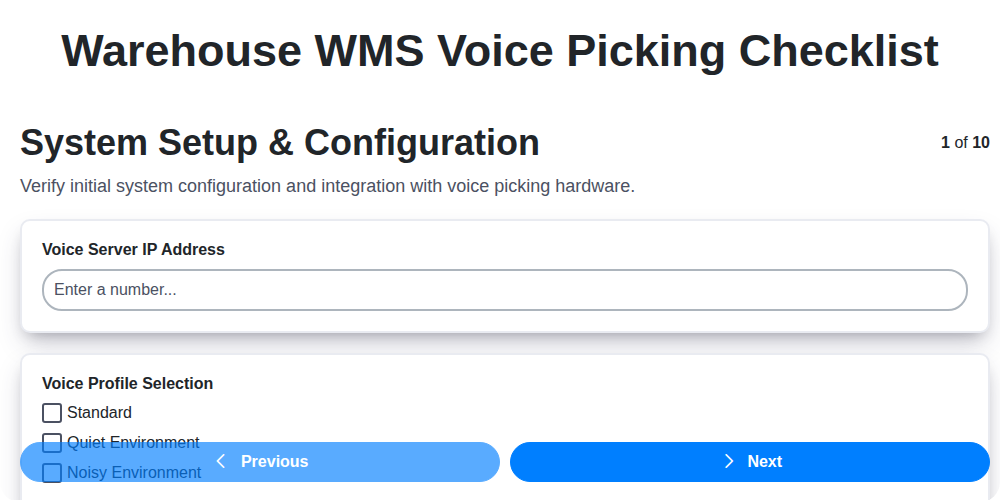
Table of Contents
- Introduction: The Power of Voice Picking
- 1. System Setup & Configuration: Laying the Foundation
- 2. Hardware Functionality: Microphone and Headset Validation
- 3. User Training & Proficiency: From Novice to Navigator
- 4. Order Accuracy & Verification: Minimizing Picking Errors
- 5. Workflow Efficiency & Time Savings: Optimizing Picking Routes
- 6. Error Handling & Troubleshooting: Addressing Common Issues
- 7. Seamless Integration with Your WMS: Data Synchronization
- 8. Security & Access Control: Protecting Sensitive Data
- 9. System Performance & Stability: Ensuring Reliable Operation
- 10. Regular Maintenance & Updates: Keeping Your System Current
- 11. Auditing and Performance Monitoring: Tracking Progress
- 12. Scalability and Future-Proofing Your Voice Picking System
- Conclusion: Achieving Voice Picking Excellence
- Resources & Links
TLDR: Implementing voice picking? This checklist template ensures a smooth rollout! It covers everything from system setup and user training to error handling and security, keeping your warehouse running efficiently and accurately. Download it to avoid common pitfalls and maximize your voice picking investment.
Introduction: The Power of Voice Picking
Voice picking is revolutionizing warehouse operations, moving beyond a futuristic concept to become a practical and increasingly essential tool. It's more than just speaking to a system; it's about fundamentally transforming how warehouse staff interact with orders, inventory, and the entire picking process. By freeing hands and eyes, voice picking allows pickers to focus entirely on the task at hand, increasing efficiency, reducing errors, and improving overall productivity. This technology empowers employees to work smarter, not harder, leading to significant gains in throughput and a more agile and responsive warehouse. Let's explore how ensuring a robust and well-maintained voice picking system is crucial for realizing these benefits.
1. System Setup & Configuration: Laying the Foundation
A successful voice picking implementation hinges on a rock-solid foundation, and that starts with meticulous system setup and configuration. This isn't just about plugging in hardware; it's about tailoring the voice system to your warehouse's specific needs and processes.
Here's a breakdown of critical elements:
- Warehouse Mapping: Accurate mapping of your warehouse layout is paramount. This includes defining zones, aisles, bin locations, and travel paths within the voice system. Incorrect mapping leads to misdirected pickers and inaccurate order fulfillment. Verify all location codes and structures within the WMS are replicated accurately in the voice system.
- Voice Profile Creation: Define user profiles with appropriate permissions and roles. This ensures the right users have access to the features they need and prevents unauthorized access to sensitive data.
- Order Routing Logic: Configure how the voice system directs pickers to orders based on priority, location, and other relevant factors. Optimize this logic to minimize travel time and congestion.
- Item Master Integration: Ensure seamless synchronization between the WMS item master data and the voice system. This includes details like item descriptions, weights, dimensions, and unit of measure. Any discrepancies can lead to picking errors.
- Customization & Task Flows: Tailor voice commands and prompts to align with your team's terminology and established workflows. Don't force your team to adapt to the system; adapt the system to them.
- Initial Testing & Validation: Conduct thorough testing with a small group of users to identify and rectify any configuration issues before a full rollout. Document all findings and resolutions.
2. Hardware Functionality: Microphone and Headset Validation
Voice picking relies heavily on reliable hardware - specifically, the microphone and headset. Regularly validating their functionality is critical to preventing disruptions and maintaining order accuracy. This section outlines essential checks to ensure your hardware is performing optimally.
Daily Checks (Performed by Users at Shift Start):
- Audio Clarity: Ask users to speak clearly and confirm that they can hear themselves and the system prompts distinctly. A muffled or distorted sound indicates a potential issue.
- Microphone Sensitivity: Test the microphone's responsiveness to varying volumes. A user should be able to be heard clearly even when speaking at a normal conversational tone.
- Headset Comfort & Fit: Check that the headset fits comfortably and securely. An uncomfortable fit can lead to distractions and impact performance.
- Cable Integrity: Visually inspect cables for any signs of wear and tear, fraying, or damage. Gently flex the cable while speaking to check for intermittent signal loss.
Weekly Checks (Performed by designated personnel):
- Noise Cancellation Testing: Simulate warehouse noise levels and confirm the system effectively filters out background interference.
- Range Testing: Verify the headset's operational range within the warehouse footprint. Identify and address any dead spots.
- Battery Life (for Wireless Headsets): Monitor battery performance and ensure adequate charging infrastructure is in place.
- Speaker Volume Calibration: Periodically check and adjust speaker volume levels to ensure optimal audibility for all users.
Troubleshooting:
- No Audio: Check connections, power supply, and volume settings. Consult the hardware manufacturer's documentation.
- Static or Interference: Move away from potential sources of interference (e.g., machinery, metal objects).
- Microphone Not Picking Up Voice: Adjust microphone placement and sensitivity settings.
Documentation:
- Record all hardware validation checks and any corrective actions taken.
Replacement Schedule:
- Establish a schedule for replacing headsets and microphones based on usage and wear.
3. User Training & Proficiency: From Novice to Navigator
Voice picking systems aren't plug-and-play. Successful implementation hinges on ensuring your warehouse team isn't just using the system, but mastering it. A poorly trained user can negate all the benefits of voice - leading to errors, frustration, and ultimately, a reduced ROI.
Here's a breakdown of essential training areas:
- Basic System Navigation: Start with the fundamentals. Users need to understand how to log in, access order information, and interpret voice prompts. This includes familiarizing them with common voice commands and the system's overall structure.
- Voice Command Mastery: Focus on pronunciation and clarity. Voice systems are sensitive to misinterpretations. Dedicated training on common commands (Pick, Confirm, Repeat, Cancel) and troubleshooting pronunciation issues is crucial. Role-playing scenarios are incredibly helpful here.
- Order Picking Best Practices: Voice picking often encourages specific picking strategies for efficiency. Train users on these techniques - like zone picking, wave picking, or cluster picking - and how the voice system guides them.
- Exception Handling: What happens when an item is missing, damaged, or the location is incorrect? Training on error protocols and how to effectively communicate issues with the system is paramount.
- Ongoing Refresher Courses: Voice picking systems are often updated or modified. Regularly scheduled refresher courses keep skills sharp and ensure users are capitalizing on new features.
- Train the Trainer Approach: Identify power users and empower them to support their colleagues. This creates a sustainable knowledge base within the warehouse.
Don't underestimate the importance of hands-on practice. Simulated picking scenarios and real-world application under supervision are key to building confidence and proficiency. A well-trained team isn't just using a voice system; they're leveraging it to optimize their performance and contribute to overall warehouse efficiency.
4. Order Accuracy & Verification: Minimizing Picking Errors
Voice picking's efficiency is only as good as its accuracy. A rushed pick, even with a voice system guiding the way, can lead to costly errors and dissatisfied customers. This section focuses on ensuring order accuracy and robust verification processes are integral to your voice picking implementation.
Layered Verification is Key: Don't rely solely on the voice system for accuracy. Implement multiple checkpoints:
- Initial Confirmation: The system should prompt for a confirmation of the first few items in each order, especially those with commonly confused SKUs. This acts as a 'sanity check' for both the picker and the system.
- Quantity Verification: Require explicit confirmation of the picked quantity, particularly for items with larger quantities or those with high-value implications. Don't assume the voice prompt is sufficient; a verbal Confirm quantity: 12 followed by a voice confirmation of Confirmed is a simple but effective method.
- Location Verification (Especially with Dense Storage): In high-density environments, double-check location codes. A slight misinterpretation can lead to picking from the wrong location.
- Weight Verification (Optional but Recommended): For high-value or weight-sensitive items, consider integrating weight checks into the verification process. This can be done through handheld devices or scales.
- Cycle Counts & Regular Audits: Implement regular cycle counts and audits to proactively identify and correct any systematic errors. These should be performed independently of the voice picking system.
- Feedback Loop: Establish a process for pickers to report potential system or product information errors. This feedback is crucial for continuous improvement.
Metrics & Monitoring: Track key performance indicators (KPIs) such as picking accuracy rates and error types to identify areas for further optimization. Analyze error data to understand root causes (misinterpreted voice prompts, incorrect product data, etc.) and implement corrective actions.
5. Workflow Efficiency & Time Savings: Optimizing Picking Routes
Voice picking isn't just about hands-free operation; it's about fundamentally reshaping warehouse workflows for maximum efficiency. A significant portion of these gains comes from optimized picking routes. Traditional paper-based picking often involves pickers backtracking, circling, and generally wasting time navigating the warehouse. Voice picking, when properly implemented, can dramatically reduce this wasted movement.
Here's how:
- Dynamic Route Optimization: A well-configured WMS coupled with voice picking can provide pickers with the optimal route for each order. This isn't just a fixed route; it's a dynamically calculated path based on current inventory locations, picker location, and order priorities. The system analyzes all variables in real-time to minimize travel distance.
- Zone Picking Integration: Voice picking seamlessly integrates with zone picking strategies. The system directs pickers to the specific zones relevant to their current tasks, eliminating unnecessary trips across the entire warehouse.
- Travel Time Reduction: Consistently shorter travel times directly translate to more orders picked per hour and increased throughput. Even a few seconds saved per pick accumulates to substantial time savings across a shift.
- Improved Picker Utilization: With less time spent traversing the warehouse, pickers can focus on the core task: picking items. This boosts their productivity and reduces overall labor costs.
- Data-Driven Route Analysis: The WMS can track picker movements and identify bottlenecks or inefficiencies in picking routes. This data allows for continuous improvement and refinement of the system.
By leveraging the data and capabilities of your WMS and voice picking system, you can transform your warehouse operations, improve order fulfillment speed, and achieve a significant return on your investment.
6. Error Handling & Troubleshooting: Addressing Common Issues
Voice picking systems, despite their benefits, aren't immune to hiccups. Having a proactive error handling and troubleshooting process is crucial for minimizing downtime and maintaining productivity. Here's a breakdown of common issues and how to address them:
1. Voice Recognition Errors:
- Problem: The system misinterprets spoken commands.
- Troubleshooting:
- Environment Noise: Assess ambient noise levels. Implement noise-canceling headsets or designate quieter picking zones.
- User Accent/Articulation: Voice profiles can be adjusted. Consider retraining the system with examples of the user's speech. Ensure users are speaking clearly and at a moderate pace.
- System Calibration: Periodically recalibrate the voice recognition engine to account for changing acoustic conditions.
- Vocabulary Issues: If a term isn't recognized, add it to the system's vocabulary.
2. Connectivity Problems:
- Problem: Loss of connection to the WMS or network.
- Troubleshooting:
- Network Check: Verify Wi-Fi signal strength and network availability.
- Hardware Inspection: Check headset connections and ensure batteries are charged.
- Server Status: Confirm the WMS server is online and accessible.
3. Data Discrepancies:
- Problem: Discrepancies between the voice picking instructions and the WMS data (e.g., incorrect location, quantity).
- Troubleshooting:
- Data Validation: Implement rigorous data validation processes in the WMS.
- Synchronization Checks: Regularly verify synchronization between the voice system and the WMS.
- User Feedback: Encourage users to report any data inconsistencies immediately.
4. Hardware Malfunctions:
- Problem: Headset failures, microphone issues, or other hardware failures.
- Troubleshooting:
- Regular Inspections: Implement routine hardware inspections to identify potential problems early.
- Backup Devices: Have backup headsets and equipment readily available.
- Vendor Support: Contact the hardware vendor for technical support and repairs.
5. System Freezes or Crashes:
- Problem: The voice picking application freezes or crashes unexpectedly.
- Troubleshooting:
- Restart the Application: The simplest solution often works.
- Check System Resources: Ensure sufficient memory and processing power are available.
- Review System Logs: Examine error logs to identify the root cause.
- Contact Support: Engage the voice picking system vendor for assistance.
Best Practices:
- Document Common Errors: Maintain a log of frequently occurring errors and their solutions.
- Develop a Troubleshooting Guide: Create a user-friendly guide for warehouse staff to resolve basic issues.
- Designate a System Champion: Assign a knowledgeable individual to oversee the voice picking system and act as a point of contact for troubleshooting.
By proactively addressing these common issues and implementing best practices, you can maximize the uptime and efficiency of your voice picking system.
7. Seamless Integration with Your WMS: Data Synchronization
Voice picking isn't a standalone solution; it's a powerful extension of your existing Warehouse Management System (WMS). A successful implementation hinges on robust and real-time data synchronization between the two. Think of it as ensuring the voice system always has the most accurate and up-to-date information flowing its way.
What does this integration look like in practice? We're talking about automatic updates to picking lists generated within the WMS being reflected in the voice system immediately. As orders are updated, picked, or fulfilled in the WMS, the voice system mirrors those changes, ensuring pickers are working with the latest instructions. Conversely, real-time updates from the voice system - quantities picked, location confirmations, and any discrepancies encountered - need to be fed back into the WMS.
This bidirectional data flow offers significant benefits:
- Reduced Data Entry Errors: Eliminating manual data entry minimizes the potential for human error, leading to increased accuracy across your warehouse operations.
- Real-Time Inventory Visibility: The WMS always reflects the accurate inventory position, preventing stockouts or overstocking.
- Improved Order Fulfillment: By streamlining the picking process and minimizing delays, order fulfillment cycles are significantly shortened.
- Enhanced Decision-Making: Access to real-time data enables warehouse managers to make more informed decisions regarding resource allocation and process optimization.
During implementation, careful planning is crucial. Mapping data fields between the voice system and WMS, defining synchronization triggers, and establishing robust error handling mechanisms are essential for a truly seamless and efficient integration. Poor integration can negate the benefits of voice picking, creating more headaches than solutions.
8. Security & Access Control: Protecting Sensitive Data
Voice picking systems handle sensitive warehouse data - inventory levels, order details, customer information, and more. Robust security and access control are therefore paramount. Simply put, unauthorized access can lead to inventory discrepancies, data breaches, and ultimately, significant financial and reputational damage.
Here's what a solid security and access control checklist for your voice picking system should include:
- Role-Based Access: Implement granular permissions based on employee roles. Not everyone needs access to the entire system. Limit access to specific functionalities and data based on job responsibilities. A picker shouldn't have the same access as a warehouse manager.
- Strong Password Policies: Enforce strong password requirements - length, complexity, and regular changes. Consider multi-factor authentication (MFA) for added security.
- Voice Profile Authentication: Utilize voice recognition for user identification. This ensures only authorized individuals can operate the system and prevents unauthorized use of headsets. Regularly review and update voice profiles.
- Data Encryption: Encrypt data both in transit and at rest. This protects information from unauthorized access even if a device is lost or stolen.
- Audit Trails: Maintain comprehensive audit trails of all system activity. This allows you to track user actions, identify potential security breaches, and facilitate investigations.
- Physical Security: Protect the hardware components (headsets, servers, network infrastructure) from physical theft or damage. Secure server rooms and implement access controls for equipment.
- Regular Security Audits: Conduct periodic security audits to identify vulnerabilities and ensure controls are effective. Engage with cybersecurity professionals for independent assessments.
- Network Segmentation: Isolate the voice picking system network from other warehouse networks to limit potential attack vectors.
- Compliance: Ensure your security practices align with relevant industry regulations (e.g., GDPR, HIPAA, PCI DSS).
9. System Performance & Stability: Ensuring Reliable Operation
Voice picking systems represent a significant investment, and their reliability is paramount to warehouse efficiency. Consistent downtime or sluggish performance can quickly negate any initial gains. This section of the checklist focuses on proactive measures to ensure a robust and dependable system.
Key Checks & Considerations:
- Latency Testing: Regularly assess response times between the voice system, the WMS, and the picking devices. High latency directly impacts picker productivity and frustration. Document baseline speeds and monitor for degradation.
- Network Health: A stable and high-bandwidth network is essential. Verify network infrastructure (Wi-Fi access points, cabling, routers) is functioning optimally and can handle the voice traffic load, especially during peak hours. Conduct periodic network performance tests.
- Resource Monitoring: Track server resource utilization (CPU, memory, disk I/O) for both the voice server and any associated WMS components. Identify bottlenecks and address them proactively.
- Voice Server Load Balancing: For larger warehouses, consider implementing load balancing across multiple voice servers to distribute the workload and prevent single points of failure.
- Hardware Redundancy: Explore redundant hardware options for critical components like servers and power supplies to minimize downtime in case of failures.
- Simulate Peak Load: Run simulations mimicking peak order volumes to assess the system's capacity and identify potential performance bottlenecks.
- Regular Audits: Conduct regular audits of the system's configuration and infrastructure to ensure best practices are being followed and to identify potential vulnerabilities.
- Failover Procedures: Document and test failover procedures to ensure a swift return to operation in the event of a system failure.
Addressing these points consistently will contribute to a voice picking system that is not just efficient, but also dependable and reliable, maximizing your return on investment.
10. Regular Maintenance & Updates: Keeping Your System Current
Like any technology, your Warehouse WMS voice picking system isn't a set it and forget it solution. Consistent maintenance and updates are absolutely crucial for sustained performance, security, and optimal return on investment. Neglecting this aspect can lead to slowdowns, vulnerabilities, and ultimately, a system that hinders, rather than helps, your warehouse operations.
Here's what regular maintenance and updates should encompass:
- Software Updates: The WMS vendor will regularly release updates to address bugs, improve functionality, and enhance security. Implement these promptly, ideally during scheduled downtime or a phased rollout to minimize disruption. Always review the release notes before applying updates to understand the changes and potential impact.
- Hardware Checks: Regularly inspect voice-picking headsets, speakers, and any associated equipment. Look for wear and tear, loose connections, and battery degradation. Replace damaged or failing components proactively.
- System Audits: Conduct periodic audits to ensure system configuration aligns with evolving warehouse processes and requirements. Verify data accuracy, user access permissions, and voice command profiles.
- Voice Command Optimization: Review and refine voice commands based on user feedback and operational data. Eliminate unnecessary commands and streamline the picking process.
- Security Patching: Stay vigilant about security vulnerabilities. Apply security patches immediately to protect sensitive data and prevent unauthorized access.
- Documentation Review: Keep system documentation up-to-date, reflecting any configuration changes or process modifications.
By prioritizing regular maintenance and updates, you ensure your warehouse WMS voice picking system remains a powerful asset, driving efficiency and accuracy for years to come.
11. Auditing and Performance Monitoring: Tracking Progress
Implementing a voice-directed warehouse system (WMS Voice Picking) isn't a set it and forget it scenario. Continuous monitoring and auditing are critical to ensuring optimal performance, identifying areas for improvement, and demonstrating ROI. Here's what to track:
- Pick Rates: Monitor average picks per hour per user. A decline could signal training gaps, system issues, or workflow bottlenecks.
- Order Accuracy: Track the percentage of orders picked correctly. Voice picking should improve accuracy-regularly verify this is the case.
- Cycle Time: Measure the time taken to complete an order from receipt to shipment. Identify areas where voice picking isn't contributing to time savings.
- User Adoption & Usage: Track how frequently users are utilizing the system. Low adoption indicates potential usability issues or a lack of perceived benefit.
- Error Logs: Regularly review error logs generated by the system. This highlights recurring problems and potential system glitches.
- Hardware Performance: Monitor battery life, connectivity, and overall hardware condition.
- System Uptime: Track system availability to ensure seamless operations.
- Key Performance Indicators (KPIs): Define specific KPIs relevant to your warehouse goals (e.g., reduced labor costs, increased throughput) and track progress against them.
- Regular User Feedback: Conduct periodic surveys or hold focus groups to gather user feedback on the system's usability and effectiveness.
Establish a schedule for these audits - monthly, quarterly, or annually - and document your findings. This data will inform adjustments to training, system configurations, and ongoing maintenance, ensuring your voice picking system continues to deliver its intended benefits.
12. Scalability and Future-Proofing Your Voice Picking System
Voice picking isn't a one-and-done investment; it's a strategic tool designed to evolve alongside your warehouse operations. As your business grows, your picking demands will increase. A voice picking system that can't scale will quickly become a bottleneck.
Here's how to ensure your voice picking system remains a valuable asset for years to come:
- Modular Design: Opt for a voice picking solution that utilizes a modular architecture. This allows you to add users, hardware, and functionality as needed, without requiring a complete system overhaul.
- Integration Flexibility: Future warehouse expansions might involve new WMS versions or the introduction of other automation technologies (like robotics or automated guided vehicles - AGVs). A voice picking system that easily integrates with these future technologies is crucial. Look for open APIs and established integration capabilities.
- Cloud-Based Considerations: Cloud-based voice picking systems often offer inherent scalability. They can handle increasing workloads and user populations with relative ease, and often include automated updates and maintenance.
- Data Analytics & Reporting: A scalable system should provide robust data analytics. Tracking key metrics like picking speed, accuracy, and error rates will help identify areas for optimization and predict future resource needs.
- Consider Hardware Longevity: While hardware replacement is inevitable, choose durable and easily replaceable equipment. Understand the vendor's upgrade paths for headsets and controllers.
By focusing on scalability from the outset, you're not just optimizing your current operations - you're investing in the long-term success and adaptability of your warehouse.
Conclusion: Achieving Voice Picking Excellence
Voice picking offers a transformative shift for warehouse operations, but its success isn't automatic. Implementing a robust system requires more than just deploying hardware and software; it demands a commitment to ongoing optimization and diligent adherence to a comprehensive checklist. As we've explored, from initial system configuration to continuous performance monitoring, each stage plays a crucial role in realizing the full potential of voice-directed workflows. By consistently reviewing and acting upon the points outlined in your warehouse WMS voice picking checklist - user proficiency, accuracy verification, integration stability, and more - you're not just deploying a technology; you're investing in a long-term strategy for enhanced productivity, reduced errors, and a more empowered workforce. Embrace the checklist as your guide to achieving voice picking excellence and unlocking a new level of operational efficiency in your warehouse.
Resources & Links
- ABC Logistics: Provides comprehensive warehouse solutions including WMS and voice picking integration expertise. Useful for understanding broader implementation strategies and potential partnerships.
- Infor: A prominent WMS provider. Their site offers insights into integrating voice picking solutions and can showcase case studies of successful implementations. Explore their WMS and supply chain management solutions.
- SAP: Another major WMS provider. Offers information on their integrated voice picking capabilities and a wide range of supply chain management resources.
- Zebra Technologies: A leading provider of voice picking hardware (microphones, headsets). Their site details the technical specifications and benefits of their hardware solutions for warehouse voice picking.
- Honeywell: Similar to Zebra, Honeywell offers robust voice picking hardware solutions. Their website provides details on their voice-enabled workflow technologies and hardware offerings.
- Dynamic Testing: While focused on software testing, their articles on warehouse automation and voice-enabled workflows can offer valuable insights into system validation and error handling procedures vital for voice picking systems.
- Supply Chain Digital: A digital publication covering supply chain and logistics technology. Search for articles on voice picking for insights on industry trends, best practices, and case studies.
- APick Systems: Focuses on voice picking solutions. Provides information about system features, benefits, and implementation strategies for different warehouse environments.
- VoiceTech: A company specializing in voice technology. Their site offers detailed information on voice recognition principles, system design considerations, and potential challenges.
- National Institute of Standards and Technology (NIST): NIST provides standards and resources related to data integrity, security, and performance evaluation which can be relevant for ensuring reliable and secure voice picking operations. Specifically, look for information on data security and quality.
Frequently Asked Questions
What is voice picking and why should my warehouse use it?
Voice picking uses voice commands and a headset to guide warehouse workers through picking tasks, replacing or supplementing traditional methods like paper pick lists or RF scanners. It can improve accuracy, speed, and free up workers' hands, ultimately boosting overall warehouse efficiency.
What does the 'Warehouse WMS Checklist Template' in this article cover?
The checklist template outlines the key steps involved in implementing a voice picking system within your Warehouse Management System (WMS). It covers areas like needs assessment, system selection, data preparation, integration, user training, go-live planning, and ongoing optimization.
Is this checklist suitable for all warehouse sizes and types?
While the checklist provides a comprehensive framework, its suitability depends on your specific warehouse environment. Larger, complex warehouses with high picking volumes will likely benefit most, but the checklist can be adapted for smaller operations as well. Consider your complexity, existing WMS capabilities, and budget.
My WMS doesn't explicitly support voice picking. Can I still use this checklist?
Yes, you can. The checklist focuses on the integration aspects and data preparation needed regardless of your WMS. It helps you identify what you need to configure or modify within your existing WMS or develop a custom integration solution. However, it may require more technical expertise and potentially a third-party integration provider.
What kind of data preparation is required before implementing voice picking?
Data preparation is crucial. This includes ensuring accurate item master data (descriptions, unit of measure), location data, picking rules, and task prioritization. Inaccurate data will lead to errors and frustration with the voice system. The checklist details data validation and cleansing steps.
What are the potential challenges when integrating voice picking with a WMS?
Common challenges include data mapping discrepancies, system compatibility issues, network latency, and user adoption resistance. The checklist addresses potential integration pitfalls and suggests mitigation strategies.
How long does it typically take to implement voice picking, following this checklist?
Implementation timelines vary greatly, from a few weeks for smaller operations to several months for larger, complex warehouses. The checklist provides a phased approach to help you estimate and manage the project duration.
What kind of training do warehouse workers need for voice picking?
Training needs to cover headset usage, voice command recognition, error handling, and best practices. Gradual introduction and ongoing support are key to ensuring user adoption and maximizing productivity. The checklist includes training considerations.
Where can I find additional resources or support for voice picking implementation?
The article provides links to industry associations, vendor websites, and online forums. Consulting with a WMS integration specialist or a voice picking vendor can also provide valuable assistance.
Found this Article helpful?
Comments
There are no comments yet. Be the first to add one!
WMS - Warehouse Management System Solution Demo
Optimize your warehouse operations & boost efficiency! ChecklistGuro's WMS streamlines inventory management, order fulfillment, and shipping. Reduce errors, improve accuracy, & maximize space utilization. Manage it all with our Work OS.
Related Articles

Seamless RFID Integration: Your WMS Checklist Template for Success

Mastering Warehouse Labeling: Your WMS Process Checklist Template
The Ultimate Supply Chain Inventory Accuracy Audit Checklist: A Step-by-Step Guide
Mastering Putaway: Your WMS Optimization Checklist

Mastering Your Yard: A Warehouse WMS Yard Management Checklist Template

Warehouse Data Integrity: Your WMS Checklist Template

WMS System Performance Monitoring Checklist: A Comprehensive Guide
Warehouse WMS Error Handling Checklist: A Proactive Guide to Minimizing Disruptions
We can do it Together
Need help with
Warehouse Management System (WMS)?
Have a question? We're here to help. Please submit your inquiry, and we'll respond promptly.