Mastering Your Warehouse: The Ultimate WMS Inventory Control Checklist
Published: 12/20/2025 10:00 PM Updated: 12/21/2025 6:57 AM
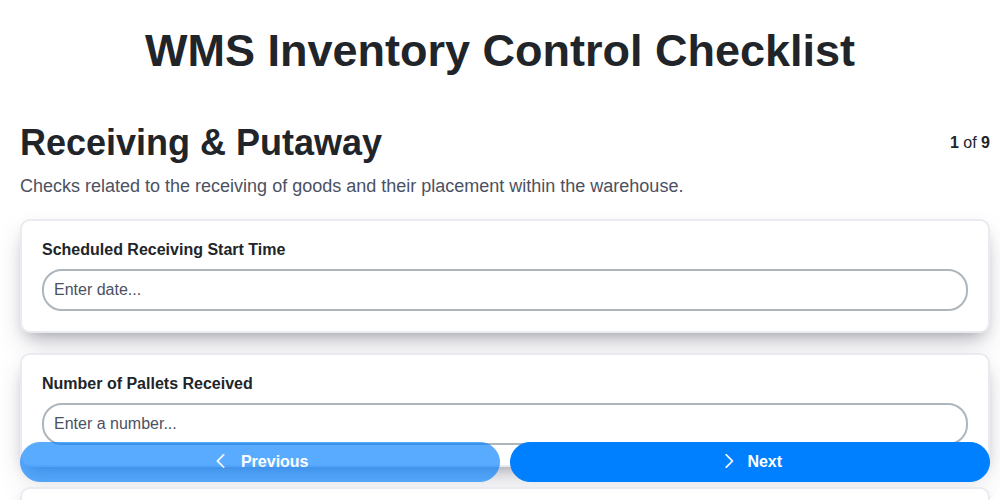
Table of Contents
- Introduction: Why a WMS Inventory Control Checklist Matters
- 1. Receiving & Putaway: The Foundation of Accuracy
- 2. Cycle Counting Procedures: Maintaining Continuous Visibility
- 3. Inventory Accuracy & Reconciliation: Identifying and Correcting Discrepancies
- 4. Picking & Packing Validation: Ensuring Order Fulfillment Precision
- 5. Shipping Verification: The Final Quality Check
- 6. WMS Data Synchronization: Keeping Everything in Sync
- 7. User Access & Permissions: Security and Accountability
- 8. Reporting & Analytics: Tracking Performance and Identifying Trends
- 9. System Configuration: Tailoring WMS to Your Operations
- 10. Regular Audits & Reviews: Staying Proactive
- 11. Training & Documentation: Empowering Your Team
- 12. Addressing Common WMS Inventory Control Challenges
- Conclusion: Optimizing Your Warehouse with a Solid Checklist
- Resources & Links
TLDR: Feeling overwhelmed by warehouse inventory? This checklist template - covering receiving, cycle counts, picking, shipping, data sync, security, and reporting - will help you optimize your WMS, boost accuracy, and prevent costly errors. Download it to systematically improve your warehouse operations!
Introduction: Why a WMS Inventory Control Checklist Matters
In today's fast-paced logistics landscape, maintaining tight control over inventory is paramount. A Warehouse Management System (WMS) is a powerful tool, but its effectiveness hinges on consistent and accurate processes. Simply implementing a WMS isn't enough - you need a robust framework to manage that system and ensure it's operating at peak performance. This is where a comprehensive WMS inventory control checklist becomes indispensable.
Think of it as your WMS's operating manual, a guide to best practices and essential checks. This checklist provides a structured approach to validating critical functions, reducing errors, minimizing discrepancies, and ultimately, optimizing your warehouse operations. Without one, you're essentially relying on chance and leaving yourself vulnerable to costly mistakes - lost inventory, order fulfillment errors, and decreased customer satisfaction. A well-defined checklist fosters accountability, standardizes procedures, and provides a proactive means of identifying and addressing potential issues before they escalate. Let's delve into the key areas a strong WMS inventory control checklist should cover.
1. Receiving & Putaway: The Foundation of Accuracy
The receiving and putaway process is the crucial first step in inventory control. Errors here compound down the line, impacting everything from order fulfillment to overall warehouse efficiency. This checklist section focuses on ensuring a solid foundation for accurate inventory management within your WMS.
Receiving Checklist:
- Advance Shipping Notifications (ASN) Verification: Are ASNs received and reviewed before goods arrive? Discrepancies should be flagged and addressed proactively.
- Receipt Confirmation: Is each shipment logged in the WMS immediately upon arrival, including date, time, carrier, and purchase order number?
- Physical Count Verification: Does the physical count of received goods match the purchase order and ASN? Document any overages or shortages immediately.
- Quality Inspection: Are goods subjected to quality checks as per established procedures? Damaged or defective items must be quarantined and recorded.
- Label Verification: Verify the accuracy of product labels against the PO and the WMS. Incorrect labeling is a common source of errors.
- Damage Documentation: Detailed records of any received damage - photos, descriptions, and notes - are essential for claims and future analysis.
Putaway Checklist:
- WMS Directed Putaway: Are operators consistently utilizing WMS-directed putaway to ensure optimal location assignments?
- Location Accuracy: Verify that items are placed in the designated locations specified by the WMS.
- Location Barcode Scanning: Confirm location barcode scanning during putaway to eliminate manual entry errors.
- Quantity Confirmation: Does the putaway quantity match the receiving quantity? Discrepancies require immediate investigation.
- Location Capacity Checks: Does the WMS alert users when a location is nearing capacity, preventing overstocking?
- Record Keeping: Maintain records of any exceptions or deviations from the standard putaway procedure.
2. Cycle Counting Procedures: Maintaining Continuous Visibility
Cycle counting isn't just a task; it's a cornerstone of robust WMS inventory control. Unlike a full physical inventory (which is disruptive and infrequent), cycle counts are ongoing, smaller-scale counts performed regularly. They proactively identify and correct discrepancies before they escalate into major stock imbalances.
Here's how to ensure your cycle counting procedures are working effectively within your WMS:
- Define Count Frequency & Scope: Don't just count randomly. Prioritize high-value items, fast-moving products, and locations with a history of inaccuracies. The WMS should help you generate count plans based on these criteria.
- Utilize WMS-Driven Selection: The WMS should select items and locations for counting based on pre-defined rules and risk factors. This minimizes bias and maximizes efficiency.
- Standardized Counting Methods: Ensure consistent counting methods are followed by all personnel. Clearly define how items are handled, counted, and recorded. Document these procedures within the WMS.
- Discrepancy Resolution Workflow: A crucial part of cycle counting is what happens when a discrepancy is found. The WMS needs a clear workflow for investigating discrepancies, documenting findings, and assigning corrective actions. Include fields for root cause analysis and responsible parties.
- Record and Analyze Results: The WMS should meticulously record all cycle count results, including the expected quantity, actual quantity, and any adjustments made. This data should be readily accessible for analysis.
- Regularly Review and Adjust: Don't set it and forget it. Periodically review your cycle counting plan - frequency, scope, and procedures - and adjust it based on performance data and changing business needs. A continuously improving cycle counting process is a sign of a healthy inventory control system.
3. Inventory Accuracy & Reconciliation: Identifying and Correcting Discrepancies
Maintaining accurate inventory records is paramount for efficient warehouse operations and customer satisfaction. This section delves into the critical processes of inventory accuracy checks and reconciliation within your WMS. It's not enough to simply have inventory data; it must be reliable.
Regular Cycle Counts are Key: While a full physical inventory is a significant undertaking, consistent cycle counts are the bedrock of ongoing accuracy. Your WMS should facilitate this by prioritizing locations for cycle counts based on factors like historical accuracy, value, and movement frequency (ABC analysis). Ensure your cycle count procedures are clear, documented, and consistently followed by your team.
Investigating Discrepancies: When discrepancies arise (and they will!), a systematic investigation is essential. Don't just correct the numbers; understand why the error occurred. This could be due to incorrect receiving, inaccurate putaway, picking errors, or even system glitches. Your WMS should allow for easy documentation of investigation findings and the root cause of errors.
Reconciliation Process: The reconciliation process involves comparing the physical count of inventory to the WMS records. When differences are found, your WMS should offer tools to adjust the records and clearly log the reason for the change. Consider using adjustment codes to categorize the type of error (e.g., Damage, Theft, Miscounted).
Data Validation & Verification: Implement checks to ensure data entered during reconciliation is accurate. This may include requiring multiple team members to verify adjustments or using barcode scanning to confirm quantities.
Continuous Improvement: Analyze reconciliation data to identify patterns and trends. Are specific locations consistently inaccurate? Are certain processes prone to error? Use these insights to refine procedures and address the underlying causes of discrepancies, driving ongoing improvement in inventory accuracy.
4. Picking & Packing Validation: Ensuring Order Fulfillment Precision
Picking and packing errors are a major headache for any warehouse - leading to customer dissatisfaction, costly returns, and wasted time. Robust validation processes are essential to minimize these issues and ensure accurate order fulfillment. Here's what your WMS checklist should cover:
- Pick Verification: Implement mechanisms to verify the correct items are being picked. This can include barcode scanning, weight verification, or even random quality checks by supervisors. The WMS should record the verification process and any discrepancies.
- Pack List Review: Before packing, the picker should cross-reference the picked items against the order details within the WMS. This double-checks that the correct quantities and items are being packed.
- Packaging Standards: Ensure adherence to packaging guidelines to prevent damage during transit. The WMS can guide users with required packaging types based on item characteristics and shipping carrier rules.
- Dimensional Weight Accuracy: Verify dimensional weight calculations within the WMS, especially when shipping via carriers that utilize this metric. Incorrect calculations can lead to unexpected shipping costs.
- Packing Slip Generation: The WMS should automatically generate accurate packing slips including the right items, quantities, and customer information. Verify the printed slip matches the order contents.
- Random Audits: Periodically conduct random audits of packed orders to identify any recurring issues and strengthen validation processes.
5. Shipping Verification: The Final Quality Check
Shipping verification is the last, crucial step in ensuring customer satisfaction and minimizing costly errors. It's more than just slapping a label on a box; it's a validation process that confirms the right product is going to the right place.
Here's what your shipping verification checklist within your WMS should cover:
- Order Confirmation: Double-check the shipping address and order details against the original order placed by the customer. Discrepancies here lead to returns and frustrated customers.
- Product Count & Condition: Verify the quantity of items being shipped matches the WMS record. Visually inspect each item for damage - a quick scan can prevent returns and warranty claims.
- Label Accuracy: Ensure the shipping label is accurate, legible, and securely attached. Verify the barcode scans correctly. A misplaced decimal in the zip code can send a shipment across the country!
- Packaging Integrity: Confirm the packaging is appropriate for the product and adequately protects it during transit. Consider weather conditions or fragile items.
- Documentation Review: Check for any required packing slips, invoices, or other relevant documentation.
- Carrier Manifesting: Ensure the shipment is properly manifested with the carrier and tracking information is accurate in the WMS.
Consistent adherence to this checklist minimizes shipping errors, boosts customer trust, and streamlines your logistics process.
6. WMS Data Synchronization: Keeping Everything in Sync
Data synchronization is often the unsung hero of a well-functioning Warehouse Management System (WMS). It's the process of ensuring that all data across your WMS and connected systems - your ERP, e-commerce platforms, accounting software, and more - are consistently updated and accurate. Without robust synchronization, you're essentially working with fragmented information, leading to costly errors, delays, and customer dissatisfaction.
Why is it Critical?
Imagine discrepancies between your WMS inventory levels and your online store's stock availability. Orders get placed, but you don't have the product to fulfill, leading to cancellations and frustrated customers. Or picture discrepancies between your WMS and your accounting system impacting financial reporting. These scenarios highlight the importance of a reliable data synchronization process.
Key Synchronization Points:
- Real-time Updates: Strive for near real-time updates whenever possible. While batch updates might suffice for certain data points, high-value information like order status and inventory levels should be synchronized promptly.
- Order Management: Ensure seamless flow of order information from your sales channels to the WMS for picking, packing, and shipping.
- Inventory Levels: Accurate and up-to-date inventory levels are paramount. Synchronization should account for receiving, putaway, cycle counting, picking, and shipping activities.
- Location Data: Maintain consistency in warehouse location data to optimize picking routes and ensure proper item placement.
- Product Information: Keep product details (SKUs, descriptions, weights, dimensions) synchronized to avoid errors in order processing and shipping calculations.
Best Practices:
- API Integrations: Utilize Application Programming Interfaces (APIs) for direct and automated data exchange.
- Scheduled Syncs: Implement scheduled synchronization jobs for data that doesn't require real-time updates.
- Error Handling & Monitoring: Set up robust error handling and monitoring to identify and resolve synchronization issues promptly.
- Data Validation: Incorporate data validation rules to ensure data accuracy during the synchronization process.
- Regular Audits: Conduct periodic audits of your data synchronization process to identify areas for improvement.
Proper data synchronization isn't just a technical detail - it's the foundation of a reliable and efficient warehouse operation.
7. User Access & Permissions: Security and Accountability
In a Warehouse Management System (WMS), data integrity and operational security hinge on meticulously controlling user access and permissions. It's not enough to simply grant everyone access; a well-defined system ensures the right people have the right access to the right data and functions, preventing errors, fraud, and unauthorized modifications.
Here's what your WMS user access & permissions checklist should cover:
- Role-Based Access Control (RBAC): Implement RBAC to assign permissions based on job function. Define clear roles (e.g., Receiver, Packer, Shipper, Supervisor, Administrator) and associate specific functionalities to each. This minimizes the risk of accidental errors and ensures users only interact with what they need.
- Least Privilege Principle: Adhere to the principle of least privilege - grant users the minimum necessary access to perform their duties. Don't give a packer administrative privileges; they shouldn't be modifying system configurations.
- Regular Access Reviews: Conduct periodic reviews (at least quarterly) of user access rights. Ensure roles are still relevant, and access remains appropriate for current job responsibilities. When employees leave or change roles, immediately revoke or modify their access.
- Password Management: Enforce strong password policies, including minimum length, complexity requirements, and mandatory periodic changes. Consider multi-factor authentication (MFA) for added security.
- Audit Trails: The WMS should maintain detailed audit trails of all user actions, including logins, data changes, and system modifications. This allows for investigation of errors or security breaches.
- Training and Awareness: Train all users on proper access procedures and the importance of security. Emphasize the consequences of unauthorized access or data manipulation.
- Segmentation of Sensitive Data: If your WMS handles particularly sensitive data (e.g., pricing information, customer details), implement stricter access controls and consider data encryption.
8. Reporting & Analytics: Tracking Performance and Identifying Trends
Your Warehouse Management System (WMS) is a goldmine of data - but that data is useless if you don't regularly analyze it. Robust reporting and analytics are crucial for continuous improvement in your inventory control processes. Here's what to focus on:
Key Reports to Monitor:
- Inventory Turnover Rate: This shows how quickly you're selling and replenishing stock. A low turnover might indicate slow-moving inventory or overstocking.
- Order Fulfillment Rate: Tracks the percentage of orders shipped accurately and on time. Low rates highlight potential picking, packing, or shipping issues.
- Picking Accuracy: Measures the percentage of items picked correctly. High error rates point to problems with pick paths, location accuracy, or picker training.
- Receiving Accuracy: Shows the accuracy of goods received against purchase orders. Discrepancies could indicate receiving errors or supplier issues.
- Cycle Count Variance: Monitors the differences found during cycle counts and helps identify areas with persistent inaccuracies.
- Inventory Aging Report: Reveals how long inventory has been in stock. Helps identify obsolete or slow-moving items.
Beyond the Numbers:
- Trend Analysis: Don't just look at snapshots. Analyze reports over time to identify trends. Are picking errors increasing? Is inventory aging slower than expected?
- Customized Dashboards: Create dashboards that visualize key performance indicators (KPIs) and allow for quick identification of areas needing attention.
- Root Cause Analysis: When variances or negative trends are identified, drill down to understand the underlying causes. Use data to pinpoint process bottlenecks or training gaps.
- Regular Review: Schedule regular review meetings with your team to discuss report findings, implement corrective actions, and track progress.
9. System Configuration: Tailoring WMS to Your Operations
Your WMS isn't a one-size-fits-all solution. Effective system configuration is crucial to ensure it truly reflects your specific operational needs and optimizes performance. This goes beyond the initial setup and requires ongoing refinement.
Key areas to consider within system configuration include:
- Location Management: Fine-tune how locations are defined - consider zone designations, bin types, and slotting rules based on product characteristics (size, weight, velocity). Incorrect location assignments are a significant contributor to inaccuracies and inefficiencies.
- User Interface Customization: While standardization is helpful, allowing users to personalize their interfaces (e.g., dashboards, frequently used functions) can boost productivity and reduce errors.
- Workflow Automation: Define automated workflows for common tasks like receiving, putaway, picking, and packing. This minimizes manual intervention and potential for human error.
- Integration Settings: Verify seamless integration with other systems like ERP, TMS, and e-commerce platforms. Ensure data flows accurately and in real-time.
- Device Management: Configure settings for handheld scanners, printers, and other devices to ensure proper functionality and data capture.
- Parameter Adjustments: Regularly review and adjust system parameters (e.g., tolerance levels for cycle counts, safety stock levels) to align with changing business needs and seasonal fluctuations.
- Security Settings: Regularly review security protocols and implement necessary updates to protect sensitive data.
Ongoing configuration and refinement should be a collaborative effort involving warehouse managers, system administrators, and key users. Document all changes and maintain a version control system to ensure traceability and allow for easy rollback if needed.
10. Regular Audits & Reviews: Staying Proactive
Regular audits and reviews are the unsung heroes of a robust WMS inventory control system. They aren't about fixing problems after they arise; they's about preventing them. Think of it as a preventative maintenance schedule for your inventory management.
These audits shouldn't be a one-time event. Implement a schedule - quarterly, semi-annually, or annually - depending on your business volume and risk tolerance. During these audits, you should be looking at:
- Process Adherence: Are your teams following the documented procedures for receiving, putaway, picking, packing, and shipping? Observe workflows and interview personnel.
- Data Integrity: Compare physical inventory counts with WMS records. Look for discrepancies and investigate their root causes.
- System Configuration: Ensure settings haven't drifted from the intended state, especially after updates or user modifications.
- User Roles & Permissions: Verify that access levels are appropriate and haven't been inadvertently broadened.
- Report Accuracy: Assess the data presented in key WMS reports to ensure they accurately reflect your inventory position.
Document your findings, outline corrective actions, and assign responsibility for implementation. These reviews aren't about blame; they are opportunities to continuously improve your WMS and maintain peak inventory control performance.
11. Training & Documentation: Empowering Your Team
A powerful WMS is only as effective as the team using it. Comprehensive training and readily available documentation are absolutely critical for maximizing your investment and ensuring consistent, accurate inventory control.
Initial Training: When initially implementing your WMS, provide thorough training for all users, covering their specific roles and responsibilities. This should include hands-on exercises, real-world scenarios, and dedicated time for Q&A. Don't just focus on how to use the system; explain why processes are in place and how the WMS contributes to overall efficiency and accuracy.
Ongoing Training & Refresher Courses: Inventory processes and WMS features evolve. Schedule regular refresher courses to reinforce best practices, introduce new functionalities, and address any emerging challenges. Consider role-specific training for warehouse staff, supervisors, and management.
Detailed Documentation: Create easily accessible documentation that covers all aspects of the WMS, including:
- Standard Operating Procedures (SOPs): Step-by-step guides for common tasks (receiving, putaway, picking, packing, shipping, cycle counting).
- Troubleshooting Guides: Solutions to frequent user errors and system issues.
- WMS Glossary: Define key terms and acronyms.
- Contact Information: Clearly designate who to contact for support and assistance.
Accessibility & Updates: Make sure documentation is easily accessible - a shared drive, internal wiki, or even integrated within the WMS itself. Crucially, keep documentation updated whenever processes or system configurations change. Empowered, well-trained users are the key to a smoothly functioning WMS and a competitive edge.
12. Addressing Common WMS Inventory Control Challenges
Even with a robust Warehouse Management System (WMS), achieving flawless inventory control isn't always a given. Here's how to proactively tackle frequently encountered hurdles:
1. Data Entry Errors & Human Factor: No system is perfect if the data entering it isn't accurate. Implement rigorous training programs for all personnel involved in receiving, putaway, picking, and packing. Consider barcode scanning or RFID technology to minimize manual data entry errors. Regular audits of entered data are essential.
2. Integration Issues: A WMS is only as good as its integrations. Problems often arise when the WMS doesn't seamlessly connect with ERP, accounting, or e-commerce platforms. Invest in thorough integration testing and ongoing maintenance to ensure data flows correctly and in real-time. Designated IT support for integration troubleshooting is crucial.
3. Process Deviations: Sometimes, shortcuts or manual overrides are taken to expedite processes. While seemingly efficient in the short term, these deviations can quickly erode inventory accuracy. Enforce strict adherence to documented procedures and create a culture of accountability. Root cause analysis should be performed on any process deviation.
4. System Complexity & User Adoption: A complex WMS can lead to user frustration and incorrect usage, ultimately impacting data integrity. Provide ongoing training, create user-friendly documentation, and actively solicit feedback for improvements. Simplify workflows where possible and consider phased rollouts for new features.
5. Seasonality & Demand Fluctuations: Rapid shifts in demand require a flexible WMS. Ensure your system can handle surges in orders and adjust inventory levels accordingly. Forecasting capabilities and automated reorder points become vital during peak seasons.
These challenges are common, but by addressing them proactively, you can maximize the benefits of your WMS and maintain a tightly controlled inventory.
Conclusion: Optimizing Your Warehouse with a Solid Checklist
Ultimately, a comprehensive WMS inventory control checklist isn't just a document - it's a cornerstone of operational efficiency and profitability. By diligently working through these steps, from receiving to shipping and everything in between, you're proactively minimizing errors, maximizing inventory accuracy, and building a resilient warehouse operation. Don't view it as a burden, but as an investment. Regularly reviewing and updating your checklist, adapting it to your specific processes and technology, will ensure it remains a powerful tool for continuous improvement and a safeguard against costly inventory discrepancies. Embrace the checklist, own the process, and watch your warehouse thrive.
Resources & Links
- WMS Experts (Generic - Represents broader WMS providers): A general resource for understanding Warehouse Management Systems and their capabilities. Explore various WMS solutions and features.
- Zebra Technologies: Zebra offers scanning, printing, and data capture solutions often integrated with WMS. Provides insight into how hardware supports accurate inventory control.
- Blue Yonder (formerly JDA): Blue Yonder offers WMS and supply chain solutions. Their website provides a good overview of advanced warehouse management features and integrations.
- Oracle WMS Cloud: Oracle's WMS Cloud solution offers comprehensive inventory control features. Provides in-depth information about WMS functionality.
- Infor WMS: Infor's WMS provides tailored inventory control solutions. Learn about their approach to managing warehouse operations and accuracy.
- NetSuite WMS: NetSuite's WMS module offers integrated inventory management. Provides insight into ERP and WMS synergy.
- Barcodesoft: Provides barcode scanning software and solutions, crucial for efficient receiving, putaway, and picking processes often integrated with WMS. Illustrates practical application of technology.
- ABC Logistics: A third-party logistics provider that often discusses best practices in warehouse management, including inventory control. Offers real-world insights into operational efficiency.
- Apick Software: Provides pick-to-light and voice picking solutions to improve accuracy and speed in picking and packing. Showcases specific hardware and system integrations that improve efficiency.
- National Institute of Standards and Technology (NIST): While not WMS-specific, NIST provides valuable data and standards related to quality control and measurement accuracy, which underpin effective inventory management.
Frequently Asked Questions
What is a WMS and why is it important for inventory control?
A Warehouse Management System (WMS) is a software solution that manages and optimizes warehouse operations from the receiving of goods to shipping. It's crucial for inventory control because it provides real-time visibility, improves accuracy, streamlines processes, and reduces errors - all leading to better inventory management and lower costs.
What types of warehouses benefit most from using a WMS?
While any warehouse can benefit, WMS solutions are especially valuable for businesses with: high inventory turnover, complex fulfillment requirements (e.g., e-commerce), multiple storage locations, a large number of SKUs, or frequent shipping activities. This includes retailers, distributors, and manufacturers.
This checklist mentions 'cycle counting.' What is that and why is it included?
Cycle counting is a method of auditing inventory records by counting a small portion of the total inventory each day or week. It's included because it's a proactive approach to identifying and correcting inventory discrepancies, reducing the need for full physical inventories and improving ongoing accuracy.
What does 'location accuracy' refer to in the checklist?
Location accuracy refers to ensuring that each item is stored in its designated location within the warehouse and that the WMS reflects that location accurately. Inaccurate locations lead to wasted time searching for items and order fulfillment errors.
The checklist mentions 'SKU standardization.' Why is that important?
Standardizing SKUs (Stock Keeping Units) ensures consistent identification and tracking of products across your entire organization. It prevents confusion, improves data integrity, and streamlines processes related to receiving, picking, and shipping.
How can I determine if my current WMS is effectively managing my inventory?
Assess your WMS's performance by tracking key metrics like inventory accuracy rate, order fulfillment time, picking error rate, and the frequency of full physical inventories. If these metrics are consistently below your targets, it may indicate the WMS isn't optimized or isn's suitable for your needs.
What's the difference between 'FIFO' and 'LIFO' inventory valuation methods and how does a WMS help manage them?
FIFO (First-In, First-Out) assumes the oldest inventory is sold first, while LIFO (Last-In, First-Out) assumes the newest inventory is sold first. A WMS helps manage these methods by automatically tracking inventory movement and calculating costs based on the chosen valuation method, ensuring accurate financial reporting.
Can I implement this checklist without a full WMS implementation?
While a full WMS offers the most comprehensive solution, you can implement some aspects of the checklist using spreadsheets or other basic inventory tracking tools. However, a WMS provides a much more efficient and accurate approach as your operations grow.
How often should I review and update this inventory control checklist?
This checklist should be reviewed at least annually, or more frequently if your business experiences significant changes, such as increased order volume, new product introductions, or changes in warehouse layout. Regularly updating it ensures it remains relevant and effective.
What should I do if I find a significant discrepancy during a physical inventory count?
Investigate the cause of the discrepancy immediately. This may involve reviewing receiving logs, picking records, and shipping documentation. Correct any errors in the WMS and implement corrective actions to prevent future occurrences.
Found this Article helpful?
Comments
There are no comments yet. Be the first to add one!
WMS - Warehouse Management System Solution Demo
Optimize your warehouse operations & boost efficiency! ChecklistGuro's WMS streamlines inventory management, order fulfillment, and shipping. Reduce errors, improve accuracy, & maximize space utilization. Manage it all with our Work OS.
Related Articles

Seamless RFID Integration: Your WMS Checklist Template for Success

Mastering Warehouse Labeling: Your WMS Process Checklist Template
The Ultimate Supply Chain Inventory Accuracy Audit Checklist: A Step-by-Step Guide
Mastering Putaway: Your WMS Optimization Checklist

Mastering Your Yard: A Warehouse WMS Yard Management Checklist Template

Warehouse Data Integrity: Your WMS Checklist Template

WMS System Performance Monitoring Checklist: A Comprehensive Guide
Warehouse WMS Error Handling Checklist: A Proactive Guide to Minimizing Disruptions
We can do it Together
Need help with
Warehouse Management System (WMS)?
Have a question? We're here to help. Please submit your inquiry, and we'll respond promptly.