WMS System Performance Checklist: Ensure Peak Efficiency and Reliability
Published: 12/20/2025 10:00 PM Updated: 12/21/2025 6:55 AM
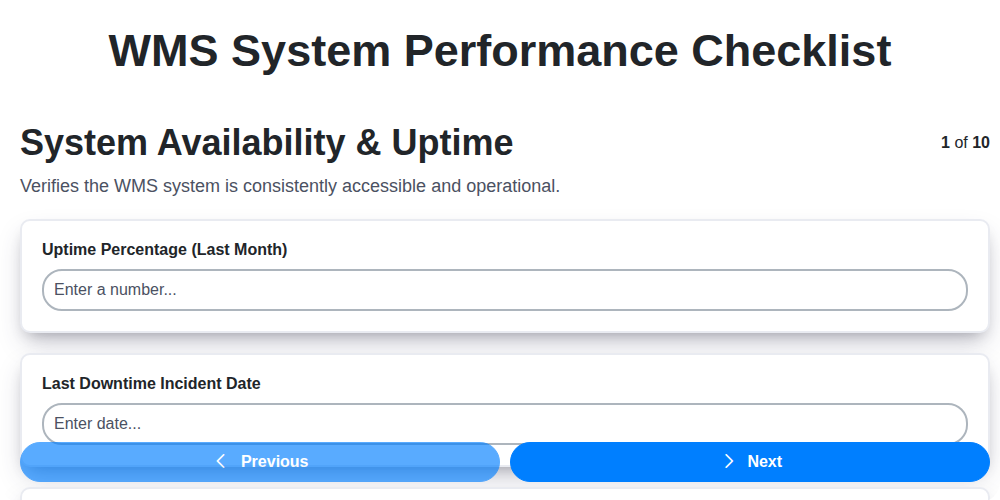
Table of Contents
- Introduction: Why a WMS Performance Checklist Matters
- 1. System Availability & Uptime: The Foundation of Operations
- 2. Data Accuracy & Integrity: Maintaining Trustworthy Information
- 3. Inventory Management Performance: Optimizing Stock Levels
- 4. Order Fulfillment Efficiency: Speed and Accuracy in Picking & Packing
- 5. Receiving & Putaway Processes: Streamlining Inbound Logistics
- 6. User Interface & Functionality: Empowering Your Team
- 7. System Security & Access Controls: Protecting Sensitive Data
- 8. Integration with Other Systems: Seamless Data Flow
- 9. Reporting & Analytics: Insights for Continuous Improvement
- 10. System Maintenance & Updates: Proactive Upkeep
- 11. Performance Bottlenecks: Identifying and Addressing Issues
- 12. User Adoption & Training: Maximizing System Utilization
- 13. Scalability: Preparing for Future Growth
- Conclusion: Sustaining WMS Performance
- Resources & Links
TLDR: Worried your WMS isn't performing at its best? This checklist provides a quick, step-by-step guide (covering availability, data accuracy, order fulfillment, security & more) to assess your WMS's health and identify areas for improvement, ensuring you're maximizing efficiency and minimizing costly errors.
Introduction: Why a WMS Performance Checklist Matters
A Warehouse Management System (WMS) is the backbone of modern logistics, but its effectiveness isn't guaranteed simply by its presence. Like any critical system, a WMS requires ongoing monitoring and optimization to ensure it's truly delivering on its promises. A WMS performance checklist acts as a proactive tool, allowing you to regularly evaluate key areas impacting warehouse efficiency, accuracy, and overall profitability. Neglecting to do so can lead to hidden bottlenecks, costly errors, and ultimately, a diminished return on your WMS investment. This checklist isn't about assigning blame; it's about identifying areas for improvement and ensuring your WMS continues to evolve alongside your business needs. From ensuring data accuracy to verifying system security, this guide will help you systematically assess your WMS performance and pinpoint opportunities for ongoing success.
1. System Availability & Uptime: The Foundation of Operations
A Warehouse Management System (WMS) is only useful if it's available when you need it. Downtime, even for short periods, can cripple warehouse operations, leading to delays, missed deadlines, and ultimately, lost revenue. This section of the checklist focuses on ensuring your WMS is consistently operational and reliable.
Key Considerations:
- Uptime Percentage: What is the documented and historical uptime percentage of your WMS? Aim for 99.9% or higher.
- Scheduled Downtime: Are scheduled maintenance windows clearly communicated in advance and minimized?
- Failover Capabilities: Does the system have failover mechanisms in place (e.g., redundant servers, backup systems) to handle unexpected failures? Are these tested regularly?
- Disaster Recovery Plan: Is there a documented and tested disaster recovery plan to restore operations quickly in the event of a major outage?
- Monitoring & Alerting: Are there robust monitoring tools in place to proactively detect potential issues and trigger alerts to the appropriate personnel? What metrics are being monitored (e.g., server response times, database performance, network latency)?
- Root Cause Analysis: Are incidents thoroughly investigated to determine root causes and prevent future occurrences?
Addressing these points proactively will ensure the bedrock of your warehouse operations - the WMS - remains stable and dependable.
2. Data Accuracy & Integrity: Maintaining Trustworthy Information
Inaccurate data in your Warehouse Management System (WMS) can snowball into a cascade of problems, impacting everything from order fulfillment to financial reporting. It's not just about having a lot of data; it's about having correct data. A robust WMS relies on the consistent accuracy and integrity of its information.
Here's what to scrutinize regarding data accuracy and integrity within your WMS:
- Barcode/RFID Scanning Accuracy: Are scanners consistently reading data correctly? Investigate misreads, damaged labels, and scanner maintenance.
- Data Validation Rules: Does the system have validation rules in place to prevent erroneous data entry? Review these rules and ensure they are comprehensive.
- Cycle Count Verification: Regular cycle counts are crucial. Analyze cycle count discrepancies and address the root causes (e.g., training, process flaws). Don't just count; investigate.
- Lot/Serial Number Tracking: If applicable, are lot and serial numbers accurately recorded and tracked throughout the warehouse lifecycle?
- Unit of Measure Consistency: Ensure consistent use of units of measure (e.g., inches vs. centimeters) across all processes and data entry.
- Data Reconciliation: Regularly compare WMS data with physical inventory and other relevant systems (ERP, accounting). Look for and resolve discrepancies.
- Audit Trails: Does the system maintain audit trails to track data modifications and identify potential errors or unauthorized changes? Review these trails periodically.
- User Training: Ensure warehouse staff are properly trained on data entry procedures and understand the importance of accuracy.
- Data Quality Reporting: Implement reporting to identify data quality trends and problem areas.
Neglecting data accuracy and integrity isn's just a minor inconvenience - it's a risk to your entire operation. Prioritize these checks to safeguard your warehouse's reliability and efficiency.
3. Inventory Management Performance: Optimizing Stock Levels
Effective inventory management is the backbone of a successful WMS. Poor performance here can lead to stockouts, overstocking, obsolescence, and ultimately, lost revenue. This section of your WMS performance checklist should focus on ensuring your inventory is accurate, accessible, and aligns with demand.
Key Areas to Assess:
- Inventory Accuracy: Are physical counts consistently matching system records? Regular cycle counts and physical inventory checks are crucial. A high discrepancy rate signals data entry errors, picking inaccuracies, or process breakdowns.
- Stock Turnover Rate: Analyze how quickly inventory is being sold and replenished. A low turnover rate may indicate overstocking or slow-moving items. Conversely, a very high turnover could suggest insufficient safety stock.
- Safety Stock Levels: Evaluate if your safety stock levels are adequate to buffer against unexpected demand spikes or supply chain disruptions. Too little can lead to stockouts; too much ties up capital.
- Dead Stock/Obsolescence: Identify and manage slow-moving or obsolete inventory. Strategies might include promotional discounts, donations, or disposal.
- Location Accuracy: Ensure that items are stored in the correct locations within the warehouse. Misplaced inventory leads to wasted time and picking errors.
- ABC Analysis Effectiveness: Are your ABC classifications (categorizing inventory based on value and usage) being effectively utilized to prioritize management efforts? High-value items deserve closer monitoring.
- Demand Forecasting Accuracy: How closely do your demand forecasts align with actual sales? Inaccurate forecasts lead to inefficient inventory decisions.
Regularly reviewing these metrics, alongside investigating root causes for any performance gaps, will help you refine your inventory management practices and maximize the value of your WMS.
4. Order Fulfillment Efficiency: Speed and Accuracy in Picking & Packing
Order fulfillment is the lifeblood of any warehouse operation. Slow or inaccurate order fulfillment leads to frustrated customers, increased returns, and ultimately, lost revenue. Your WMS should be a key driver of efficiency here. Let's examine how to assess its performance in this critical area.
Key Areas to Evaluate:
- Pick Rates: Are your pickers meeting established performance targets? Monitor average picks per hour and identify bottlenecks in the picking process. Is your WMS optimizing pick paths and suggesting the most efficient routes?
- Packing Accuracy: A high error rate in packing is incredibly costly. Track the percentage of orders packed correctly the first time. Are there automated checks within the WMS to minimize packing errors (e.g., weight verification, item verification)?
- Throughput: Assess the number of orders processed per shift or per day. Is the system handling peak season volumes effectively? Analyze processing times at each stage (picking, packing, labeling, shipping).
- Shipping Cost Optimization: Does the WMS integrate with shipping carriers to provide rate shopping and automated label generation? Is it suggesting the most cost-effective shipping methods based on order size, destination, and service level?
- Wave Management Effectiveness: If you utilize wave picking, evaluate the efficiency of wave creation and release. Are waves optimally sized and sequenced to maximize picker productivity? Are you tracking wave completion times and analyzing for improvements?
- Real-time Visibility: Do warehouse staff have access to real-time order status and information within the WMS? Lack of visibility can lead to delays and miscommunication.
A poorly performing order fulfillment process can quickly derail your entire operation. Regularly reviewing these metrics within your WMS will help you identify areas for improvement and ensure you're delivering orders quickly and accurately.
5. Receiving & Putaway Processes: Streamlining Inbound Logistics
Receiving and putaway are foundational to a well-functioning warehouse. Inefficiencies here ripple outwards, impacting inventory accuracy, order fulfillment, and overall warehouse productivity. This section of the WMS performance checklist focuses specifically on these critical inbound logistics steps.
Key Areas to Evaluate:
- Receiving Accuracy: Are goods being received against purchase orders correctly? Discrepancies (quantity, items) should be flagged and resolved quickly. Track receiving error rates - a high rate signals training gaps or systemic issues.
- Speed of Receiving: How long does it take to unload, inspect, and register received goods in the WMS? Bottlenecks during unloading or inspection can significantly delay the entire warehouse operation.
- Putaway Optimization: Is the WMS directing putaway tasks efficiently? Are putaway locations optimized based on product velocity, storage type, and proximity to picking locations? Random or directed putaway - which is performing better? Analyze travel time and congestion during putaway tasks.
- Dock Door Utilization: Are dock doors being used effectively? Is there sufficient door capacity to handle incoming shipments without delays? Consider scheduled receiving and cross-docking opportunities.
- Equipment Availability & Maintenance: Are forklifts, conveyors, and other material handling equipment readily available and properly maintained for receiving and putaway tasks?
- Labeling Accuracy: Are received goods accurately labeled with barcodes or other identifiers for seamless WMS integration?
- Exception Handling: How are damaged goods, overages, or shortages handled during the receiving process? Are clear procedures in place and followed consistently?
By carefully assessing these areas, you can pinpoint opportunities to streamline your receiving and putaway operations, reduce errors, and improve overall warehouse efficiency.
6. User Interface & Functionality: Empowering Your Team
A powerful WMS is useless if your team struggles to use it. The user interface (UI) and overall functionality are critical for adoption, productivity, and error reduction. Don't underestimate the impact of a clunky or unintuitive system!
Here's what to evaluate:
- Intuitive Navigation: Can users easily find what they need? Are menus logical and well-organized? Look for clear pathways to common tasks.
- Ease of Use for All Roles: Consider the different user roles within your warehouse (pickers, packers, supervisors, administrators). Each role should have a UI tailored to their specific needs and tasks.
- Customization Options: Can users personalize their dashboards and views to prioritize the information most relevant to them? This can significantly boost efficiency.
- Mobile Accessibility: In today's warehouse environment, mobile access is often essential. Is the WMS accessible and functional on mobile devices, enabling real-time updates and task management on the warehouse floor?
- Task Guidance & Prompts: Does the system provide clear instructions and guidance for each task, minimizing errors and training time?
- Error Prevention: Does the system incorporate features like data validation, auto-completion, and visual cues to reduce user errors?
- Feedback Mechanisms: Are there ways for users to provide feedback on the system's usability, allowing for continuous improvement?
A user-friendly WMS empowers your team, reduces training costs, and ultimately improves overall warehouse performance.
7. System Security & Access Controls: Protecting Sensitive Data
Your WMS holds a wealth of sensitive information - inventory levels, customer data, order details, and more. Robust security and access controls are paramount to protecting this data from unauthorized access, breaches, and potential misuse. A weak security posture can lead to costly repercussions, including financial losses, reputational damage, and legal liabilities.
This checklist section focuses on ensuring your WMS security isn't just present, but actively effective. Here's what to assess:
- User Authentication: Are strong password policies enforced (complexity, expiration, lockout)? Is multi-factor authentication (MFA) implemented for all users, especially those with elevated privileges?
- Role-Based Access Control (RBAC): Are user permissions strictly limited based on their roles and responsibilities? Verify that users only have access to the functionality and data they absolutely need to perform their jobs. Regularly review and update role definitions.
- Audit Trails: Does the system maintain comprehensive audit trails of user activity, including logins, data modifications, and system configuration changes? Regularly review these logs to identify suspicious activity.
- Data Encryption: Is sensitive data encrypted both at rest (stored in the database) and in transit (when being transmitted)?
- Vulnerability Scanning & Penetration Testing: Are regular vulnerability scans and penetration tests performed to identify and address potential security weaknesses?
- Security Incident Response Plan: Is there a documented and tested plan in place to respond to security incidents? Ensure your team understands their roles and responsibilities.
- Physical Security: If applicable, are physical access controls in place to protect the servers and infrastructure supporting the WMS?
- Regular Security Awareness Training: Do your users receive regular training on security best practices and how to identify and report suspicious activity?
8. Integration with Other Systems: Seamless Data Flow
A Warehouse Management System (WMS) rarely operates in a silo. Its true power is unlocked when it seamlessly integrates with other crucial business systems, like your ERP (Enterprise Resource Planning), e-commerce platforms, shipping carriers, and potentially even transportation management systems (TMS). Poor integration can lead to data silos, manual reconciliation, increased errors, and ultimately, a less efficient overall operation.
Here's what to assess regarding your WMS integration:
- Real-time Data Synchronization: Is data flowing bi-directionally and in real-time? Delays or one-way data flow severely limit the WMS's value. Verify inventory levels, order status, and shipment information are accurate across all systems.
- Data Mapping Accuracy: Confirm that data fields are correctly mapped between systems. Misaligned data types or incorrect mapping can result in misinterpretations and inaccurate information. Regularly review data mapping rules.
- API Functionality & Reliability: Evaluate the APIs (Application Programming Interfaces) used for integration. Are they robust and reliable? Are they documented adequately for troubleshooting? Unexpected API errors can disrupt data flow.
- Error Handling & Reporting: What processes are in place to handle integration errors? Are you alerted to these errors promptly, and are there clear procedures for resolution? A robust error reporting system is critical.
- Scalability: As your business grows, your integration needs will evolve. Is your integration architecture scalable to accommodate increased data volume and complexity?
- Testing & Validation: Regularly test your integrations - don't just set it and forget it. Simulate various scenarios to ensure data integrity and proper functionality.
Poor integration is a common pain point. A proactive assessment and ongoing maintenance of your system integrations are key to maximizing the benefits of your WMS.
9. Reporting & Analytics: Insights for Continuous Improvement
A robust Warehouse Management System (WMS) isn't just about managing day-to-day operations; it's a powerful engine for continuous improvement. The quality of your reporting and analytics capabilities is crucial for identifying bottlenecks, optimizing processes, and ultimately, boosting overall warehouse efficiency.
What to Look For:
- Key Performance Indicators (KPIs): Does your WMS track and present essential KPIs like order cycle time, picking accuracy, putaway efficiency, and inventory turnover? These metrics provide a clear picture of performance.
- Customizable Reports: Can you generate reports tailored to specific needs and departments? Generic reports often miss critical nuances. The ability to filter, sort, and aggregate data is vital.
- Real-Time Visibility: Ideally, your WMS should provide real-time data, allowing you to react quickly to unexpected issues and opportunities. Delayed reports are less actionable.
- Trend Analysis: Can you easily identify trends over time? This helps predict future needs, anticipate problems, and measure the impact of process changes.
- Exception Reporting: Are you alerted to critical exceptions - discrepancies in inventory, order errors, or slow processing times - immediately? Proactive alerting prevents escalation.
- Data Visualization: Are reports presented in a clear, understandable format, using charts, graphs, and dashboards? Visual representation makes insights more accessible to a wider audience.
Pro Tip: Don't just generate reports. Actively analyze them. Regularly schedule review meetings with relevant teams to discuss findings and formulate action plans for optimization.
10. System Maintenance & Updates: Proactive Upkeep
Your Warehouse Management System (WMS) isn't a "set it and forget it" solution. Just like any vital piece of equipment, it requires consistent and proactive maintenance to ensure optimal performance and longevity. Neglecting updates and maintenance can lead to slowdowns, errors, security vulnerabilities, and ultimately, reduced operational efficiency.
This section of the checklist focuses on the critical processes involved in keeping your WMS in top shape. Here's what to assess:
- Scheduled Maintenance Windows: Are regular maintenance windows scheduled and adhered to? Document these and track any disruptions.
- Software Updates & Patching: Is there a documented process for applying software updates and security patches? Are updates tested in a staging environment before deployment to production? Track the frequency and success rate of these updates.
- Database Maintenance: Regularly scheduled database maintenance, including backups, indexing, and optimization, is crucial for performance. Verify the frequency and verification processes.
- Hardware Monitoring: For on-premise WMS deployments, monitor hardware health (servers, network devices) for performance bottlenecks and potential failures.
- Disaster Recovery Plan: A robust disaster recovery plan is essential. Regularly test your backup and recovery procedures to ensure data can be restored quickly and efficiently in the event of a system failure.
- Vendor Support Agreements: Review your vendor support agreements to ensure they are up-to-date and provide adequate support for maintenance and updates.
- Documentation: Maintain comprehensive documentation of all maintenance procedures, system configurations, and updates applied.
Addressing these points ensures your WMS remains a reliable and effective asset for years to come.
11. Performance Bottlenecks: Identifying and Addressing Issues
Even with a well-implemented WMS, performance bottlenecks can creep in over time. These slowdowns impact efficiency, accuracy, and ultimately, your bottom line. Identifying and resolving these issues requires proactive monitoring and a systematic approach.
Common Bottleneck Areas & How to Tackle Them:
- Database Issues: Slow query performance, inadequate indexing, and database size limitations are frequent culprits. Regularly review database performance metrics and optimize queries. Consider database upgrades or sharding for larger datasets.
- Network Latency: High latency between the WMS server and workstations can significantly impact user experience. Investigate network infrastructure, including bandwidth and hardware, and consider moving the WMS server closer to users.
- Hardware Limitations: Insufficient RAM, CPU power, or storage speed can constrain WMS performance. Monitor resource utilization and upgrade hardware as needed.
- Customizations & Integrations: While customizations can enhance functionality, poorly designed or inefficient integrations can introduce bottlenecks. Review and optimize custom code and integration points.
- Workflow Design: Inefficient workflows, such as excessive scanning or manual intervention, can slow down processes. Analyze workflows and identify opportunities for automation and streamlining.
- User Training & Adoption: Even a powerful system is only as good as its users. Lack of proper training can lead to inefficient usage and increased errors, slowing everything down.
- Lack of Monitoring: Without consistent performance monitoring, it's difficult to identify issues before they significantly impact operations. Implement robust monitoring tools and regularly review the data.
Proactive Steps to Prevent Bottlenecks:
- Regular Performance Reviews: Schedule routine performance reviews involving key stakeholders.
- Capacity Planning: Anticipate future growth and plan for necessary hardware and software upgrades.
- Code Optimization: Regularly review and optimize WMS code, especially customizations and integrations.
- Load Testing: Simulate peak load conditions to identify potential bottlenecks before they impact real-time operations.
12. User Adoption & Training: Maximizing System Utilization
A powerful WMS is only as effective as the people using it. Robust functionality means little if your warehouse team isn't comfortable and proficient with the system. Low user adoption can lead to workarounds, inaccurate data entry, and ultimately, a failure to realize the promised benefits of your WMS investment.
This checklist item isn't just about initial training; it's about ongoing support and fostering a culture of system utilization. Consider these points:
- Initial Training Effectiveness: Was the initial training comprehensive? Did it cover all critical functions relevant to each user's role? Regularly assess knowledge retention through quizzes or practical exercises.
- Role-Based Training: Recognize that different user roles (e.g., pickers, packers, receiving clerks, supervisors) require tailored training. Generic training often misses key nuances.
- Ongoing Support & Resources: Provide readily accessible help documentation, FAQs, and a dedicated support contact for quick issue resolution.
- Super User Program: Identify and train super users within each department who can act as local experts and provide peer-to-peer support.
- Continuous Improvement: Regularly solicit feedback from users about their experience and use it to refine training materials and system processes.
- New Feature Rollout: Ensure thorough training and communication whenever new features or functionalities are introduced.
- Performance Metrics: Track key adoption metrics like login frequency, use of specific functionalities, and error rates. Use these to identify areas where additional training or support is needed.
By prioritizing user adoption and investing in ongoing training, you ensure your team is empowered to leverage the full potential of your WMS, driving efficiency and optimizing warehouse operations.
13. Scalability: Preparing for Future Growth
A robust WMS isn't just about handling current operations; it's about anticipating and accommodating future growth. Consider whether your system can readily scale to meet increasing volumes of inventory, orders, and users.
Here's what to evaluate:
- Hardware Capacity: Can your servers and infrastructure handle a significant increase in data and processing demands without performance degradation?
- Software Licensing: Understand your WMS licensing model. Does it allow for easy addition of users, locations, or functionalities as your business expands? Are there tiered pricing structures, and what are the costs associated with each tier?
- Modular Design: A modular WMS allows you to add functionality as needed, rather than requiring a complete system overhaul. Assess if your WMS offers this flexibility.
- Cloud vs. On-Premise: Cloud-based WMS solutions inherently offer greater scalability compared to on-premise systems, as resources can be readily adjusted.
- Future Feature Requirements: Consider potential future business needs - e.g., e-commerce integration, automation, or new warehouse locations. Ensure the WMS can adapt.
Regularly review your system's capacity and projected growth to ensure your WMS remains a strategic asset, not a bottleneck, as your business evolves.
Conclusion: Sustaining WMS Performance
Ultimately, maintaining a high-performing WMS isn't a one-time project - it's an ongoing commitment. This checklist provides a robust framework for regular assessments, but remember that your warehouse's specific needs and processes will evolve. Frequent and proactive monitoring across these ten areas - System Availability, Data Accuracy, Inventory Management, Order Fulfillment, Receiving & Putaway, User Interface, Security, Integration, Reporting, and Maintenance - is critical. Don't just react to problems; actively seek opportunities to optimize, adapt, and innovate within your WMS. By embedding this checklist into your routine and empowering your team to champion performance, you can ensure your warehouse operates at peak efficiency and continues to support your business's growth.
Resources & Links
- WMS Vision: Provides a comprehensive overview of WMS solutions and their benefits. Useful for understanding the broader context of WMS performance.
- Blue Harbor: Offers consulting services related to WMS and supply chain optimization. Their insights can help understand performance challenges and solutions.
- Infor WMS: A major WMS vendor. Their website offers detailed information about WMS functionality and features, helpful for understanding what a WMS should do.
- Oracle WMS Cloud: Another leading WMS provider. Their website offers insights into WMS features and capabilities, relevant for understanding performance metrics.
- SAP Extended Warehouse Management (EWM): Provides a good overview of functionalities and potential performance concerns within a robust WMS like SAP EWM.
- Supply Chain Digital: A digital publication covering various aspects of supply chain management, including WMS, with articles and insights on performance optimization.
- APICS (The Association for Supply Chain Management): A professional organization offering resources, certifications, and knowledge related to supply chain and warehouse management, helpful for understanding best practices.
- DC Edge: Offers insights and articles on warehouse and distribution center operations, including WMS performance, efficiency, and optimization.
- JCS Group: Provides consulting services related to warehouse management and automation, useful for understanding advanced performance considerations.
- Soft Solutions: Offers specialized WMS and supply chain consulting to improve processes and address potential bottlenecks.
Frequently Asked Questions
What is a WMS and why is its performance important?
A Warehouse Management System (WMS) is a software application designed to manage and optimize warehouse operations. Its performance directly impacts efficiency, accuracy, and overall cost-effectiveness. Poor performance can lead to delays, errors, and reduced productivity.
Who should use this checklist?
This checklist is beneficial for warehouse managers, IT professionals responsible for WMS maintenance, and anyone involved in optimizing warehouse processes.
What are the key areas covered in this checklist?
The checklist covers areas such as server health, network connectivity, database performance, application code efficiency, user experience, and security.
How often should I review this checklist?
We recommend reviewing the checklist at least quarterly, or more frequently if you experience performance issues or make significant changes to your WMS or warehouse operations.
What does 'latency' mean in the context of WMS performance?
Latency refers to the delay or lag time in responding to user requests or system processes. High latency can make the WMS feel slow and unresponsive.
What is a 'bottleneck' in a WMS system?
A bottleneck is a point in the system where performance is significantly reduced, creating a slowdown. Identifying and resolving bottlenecks is crucial for optimization.
What is the difference between 'throughput' and 'response time'?
Throughput measures the volume of work completed within a given time (e.g., orders processed per hour). Response time measures the time it takes for the system to respond to a specific action or request.
How can I troubleshoot slow WMS response times?
Start by checking server resources (CPU, memory, disk I/O), network connectivity, database performance, and application code. Consult WMS vendor documentation and consider profiling tools to pinpoint the source of the slowdown.
What is the role of the database in WMS performance?
The database is critical. Slow database queries, inadequate indexing, and insufficient resources can severely impact WMS performance. Regular database maintenance and optimization are essential.
How can I improve the user experience within my WMS?
Optimize workflows, provide clear instructions and training, ensure user roles are appropriately configured, and consider using device-specific optimization for handheld scanners and other mobile devices.
Found this Article helpful?
Comments
There are no comments yet. Be the first to add one!
WMS - Warehouse Management System Solution Demo
Optimize your warehouse operations & boost efficiency! ChecklistGuro's WMS streamlines inventory management, order fulfillment, and shipping. Reduce errors, improve accuracy, & maximize space utilization. Manage it all with our Work OS.
Related Articles

Seamless RFID Integration: Your WMS Checklist Template for Success

Mastering Warehouse Labeling: Your WMS Process Checklist Template
The Ultimate Supply Chain Inventory Accuracy Audit Checklist: A Step-by-Step Guide
Mastering Putaway: Your WMS Optimization Checklist

Mastering Your Yard: A Warehouse WMS Yard Management Checklist Template

Warehouse Data Integrity: Your WMS Checklist Template

WMS System Performance Monitoring Checklist: A Comprehensive Guide
Warehouse WMS Error Handling Checklist: A Proactive Guide to Minimizing Disruptions
We can do it Together
Need help with
Warehouse Management System (WMS)?
Have a question? We're here to help. Please submit your inquiry, and we'll respond promptly.