Ensuring Accuracy: Your WMS Task Management Validation Checklist
Published: 12/19/2025 10:00 PM Updated: 12/20/2025 12:19 PM
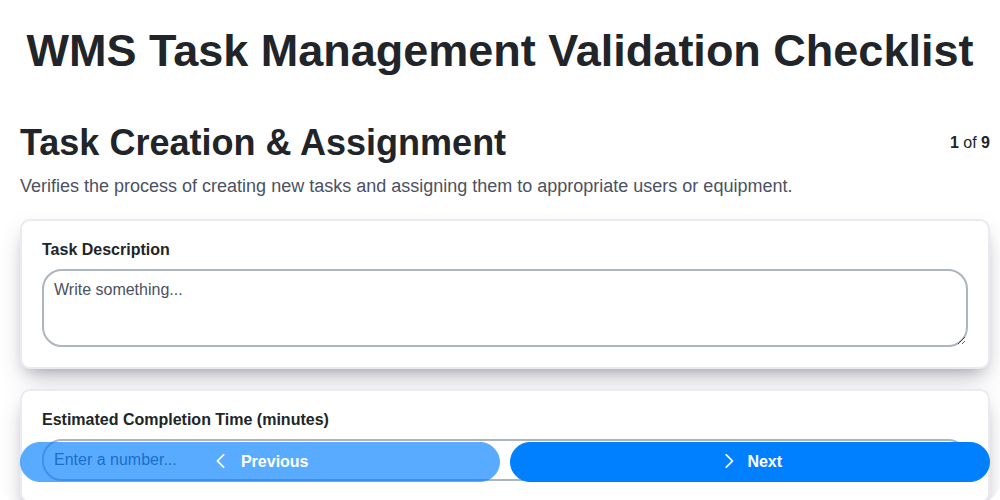
Table of Contents
- Introduction: Why Validate Your WMS Task Management?
- 1. Task Creation & Assignment: Setting the Foundation
- 2. Task Prioritization & Sequencing: Getting the Right Things Done, Right Away
- 3. Task Dependencies Verification: Avoiding Bottlenecks
- 4. Task Status Updates & Tracking: Real-Time Visibility
- 5. Task Completion & Validation: Confirming Accuracy
- 6. Exception Handling & Escalation: Addressing the Unexpected
- 7. User Permissions & Access Control: Maintaining Security
- 8. Reporting & Analytics: Measuring Performance
- 9. Integration with Other Systems: Ensuring Data Flow
- 10. Checklist Best Practices: Tips for Effective Validation
- 11. Common Validation Errors & How to Prevent Them
- 12. Automation Opportunities in Task Management Validation
- Conclusion: Continuous Improvement in WMS Task Management
- Resources & Links
TLDR: Running a Warehouse Management System (WMS) effectively means constantly verifying your task management processes. This checklist (Task Creation & Assignment to Reporting & Analytics) ensures accuracy by covering all crucial aspects - from assigning tasks to tracking completion and handling exceptions - so you can catch errors early, boost efficiency, and keep your warehouse running smoothly.
Introduction: Why Validate Your WMS Task Management?
Warehouse Management Systems (WMS) are the backbone of efficient logistics operations. However, even the most sophisticated WMS is only as effective as its task management processes. Poorly managed tasks - whether they's picking, packing, receiving, or put-away - lead to delays, errors, increased labor costs, and ultimately, dissatisfied customers.
Simply having a WMS task management system isn't enough. You need to ensure it's functioning correctly and consistently. This is where validation comes in. A robust validation checklist isn't just about ticking boxes; it's about actively verifying that your WMS task management processes are reliable, accurate, and aligned with your business needs. It helps identify potential vulnerabilities and allows for proactive improvements, ensuring your warehouse runs smoothly and delivers the performance you expect. This article will outline a comprehensive checklist to validate your WMS task management, empowering you to optimize your operations and maximize your return on investment.
1. Task Creation & Assignment: Setting the Foundation
The entire WMS task management process hinges on accurate and efficient task creation and assignment. A poorly executed initial step can cascade into issues throughout the workflow. This section outlines key validation points to ensure a solid foundation.
Checklist Items:
- Task Definition Clarity: Is each task clearly defined with a concise description of what needs to be done? Ambiguity leads to errors and rework.
- Accurate Task Types: Are tasks correctly categorized (e.g., Receiving, Picking, Packing, Shipping)? Proper categorization enables accurate reporting and process optimization.
- Appropriate User Assignment: Are tasks assigned to users with the correct skill set and availability? Consider workload balance and individual expertise.
- Mandatory Fields Populated: Does the system enforce completion of all required fields during task creation (e.g., Location, Quantity, Due Date)?
- Location Accuracy: Is the location associated with the task accurate (aisle, bin, pallet)? Verify location codes and ensure they are up-to-date.
- Equipment Association: If equipment (e.g., forklift, scanner) is required, is it correctly linked to the task?
- Mobile Device Compatibility: If tasks are assigned via mobile devices, are the assignments displayed correctly and are all necessary details accessible?
- Notification Delivery: Confirm users receive notifications regarding new task assignments promptly and through the configured channels.
A robust task creation and assignment process sets the stage for a streamlined and error-free WMS operation. Failing to validate these foundational elements can lead to significant downstream complications.
2. Task Prioritization & Sequencing: Getting the Right Things Done, Right Away
In a busy warehouse, not all tasks are created equal. Simply piling tasks onto your WMS without a clear understanding of urgency and dependencies can lead to bottlenecks, delays, and frustrated staff. Effective prioritization and sequencing are vital for maximizing efficiency and ensuring critical operations aren't compromised.
Your WMS task management validation checklist should rigorously examine how your system handles prioritization. Key questions to ask include:
- Are prioritization rules clearly defined and configurable? This includes factors like order due date, product criticality, customer priority, and resource availability. Can these rules be adjusted based on changing business needs?
- Can users easily assign priorities to tasks? A cumbersome process will inevitably lead to inconsistent prioritization. Ideally, the system should offer clear, intuitive options for assigning priority levels (e.g., Urgent, High, Medium, Low).
- Does the system automatically sequence tasks based on priority and dependencies? This automation significantly reduces manual effort and ensures the most important tasks are tackled first. Consider whether the system can intelligently group tasks for optimal workflow.
- Are dependencies clearly visible and accounted for? A task that relies on another cannot start until its predecessor is complete. The system should visually represent these dependencies and prevent tasks from being started prematurely.
- Can prioritization be overridden in exceptional circumstances? While automation is key, flexibility is also necessary. A mechanism to temporarily adjust priorities for critical situations (e.g., emergency orders) should be in place.
By meticulously validating your WMS's task prioritization and sequencing capabilities, you're laying the groundwork for a more responsive, efficient, and reliable warehouse operation.
3. Task Dependencies Verification: Avoiding Bottlenecks
In a warehouse, tasks rarely exist in isolation. One process often hinges on the completion of another. Failing to properly verify task dependencies can lead to frustrating delays, bottlenecks, and ultimately, inefficiencies that impact order fulfillment and customer satisfaction.
This checklist item dives deep into ensuring a clear understanding of how tasks relate to each other within your WMS. It's not enough to simply create tasks; you need to know which tasks need to be completed before others can begin.
Here's what needs to be validated:
- Identify Dependencies: Thoroughly map out which tasks rely on others. For example, Picking might depend on Receiving and Putaway being completed.
- Define Sequencing: Establish a logical order for task execution. The WMS should enforce this sequence wherever possible, preventing tasks from being started prematurely.
- Visual Representation: Utilize visual tools like Gantt charts or dependency diagrams within your WMS to clearly illustrate task relationships. This makes dependencies easily understandable for all users.
- Automated Enforcement: Configure the WMS to automatically prevent users from starting dependent tasks until their prerequisites are completed. Consider using soft locks (warnings) as an alternative to prevent user frustration.
- Exception Handling for Dependencies: What happens when a dependency is blocked or delayed? The WMS should have a clear escalation path and notifications for these situations.
- Regular Review: Task dependencies can change as processes evolve. Periodically review and update your dependency mappings to ensure accuracy.
By rigorously verifying and managing task dependencies, you'll prevent costly delays, optimize workflow, and keep your warehouse running smoothly.
4. Task Status Updates & Tracking: Real-Time Visibility
In a dynamic warehouse environment, knowing the current status of every task is critical. A robust WMS should provide clear, real-time visibility into task progress. This isn't just about knowing if a task is open or closed; it's about granular insights into where a task is in its lifecycle.
Your validation checklist should confirm the WMS facilitates:
- Automated Status Updates: Can task status be automatically updated based on actions taken (e.g., scanning a barcode at a pick location automatically updates the task to Picking)? Manual updates should be possible but minimized for accuracy.
- Visual Progress Indicators: Are there clear visual cues (color-coding, progress bars, icons) that instantly communicate the status of a task to users on the warehouse floor?
- Timestamped Activity Logs: Is there a detailed history of task activity, including who performed each step and when? This is invaluable for troubleshooting and auditing.
- Customizable Status Definitions: Can you tailor the task status labels to align with your warehouse's specific processes and terminology? (e.g., "Picking - Staging," "Putaway - Awaiting Quality Check").
- Mobile Accessibility: Can task status updates be made easily and accurately via mobile devices used by warehouse staff?
- Real-Time Dashboards: Are dashboards available that provide a consolidated view of task status across the warehouse, enabling supervisors to identify bottlenecks and proactively address issues?
5. Task Completion & Validation: Confirming Accuracy
Simply marking a task as complete isn't enough. Robust Warehouse Management System (WMS) task management requires a thorough validation process to ensure accuracy and prevent costly errors. This validation step is your final line of defense against discrepancies and provides a crucial audit trail.
Here's what a solid Task Completion & Validation process should include:
- Data Verification: Does the completed task's data (e.g., quantity picked, location confirmed, shipment details) match the original task requirements and system records? Implement checks to confirm quantities, lot numbers, serial numbers, and any other critical data points.
- Physical Inspection: Depending on the task type (e.g., receiving, picking, packing), a visual inspection of the completed work is often essential. This could involve verifying the correct items are in a container, the label is accurate, or the pallet is properly secured.
- Quality Control Checks: Integrate QC checks directly into the task completion flow, particularly for tasks involving temperature-sensitive goods or high-value items. This might involve digital signatures or formal sign-offs.
- System-Driven Confirmation: The WMS should prompt for and record confirmation from the user completing the task. This creates a traceable record of who validated the work.
- Exception Recording: If discrepancies are found during validation, the system must allow for easy recording of the exception. Include details like the nature of the error, corrective actions taken, and who was responsible for resolution.
A well-defined validation process doesn't just confirm accuracy; it also provides valuable data for continuous improvement in your warehouse operations.
6. Exception Handling & Escalation: Addressing the Unexpected
Warehouse Management Systems (WMS) rarely operate in perfect conditions. Unexpected issues - damaged goods, system errors, incorrect picking quantities - will arise. A robust exception handling and escalation process is crucial to maintain operational efficiency and minimize disruption.
This section of your WMS task management validation checklist should focus on verifying how your system deals with these deviations from the norm. Key questions to ask include:
- Clear Exception Categories: Does the WMS define specific categories for different types of exceptions (e.g., Damage, Discrepancy, System Error)? Clear categorization facilitates efficient resolution.
- Automated Notifications: Are users immediately notified of exceptions with sufficient detail to understand the problem? Configuration should allow for different notification routes (email, dashboard alerts, etc.) based on exception severity.
- Defined Escalation Paths: Is there a defined process for escalating exceptions that cannot be resolved at the initial level? This includes specifying who is responsible for taking over and what timelines are expected.
- Root Cause Analysis Support: Does the system allow for recording notes, observations, and potential root causes alongside the exception? This supports ongoing improvement efforts.
- Exception Resolution Tracking: Can you track the resolution status of each exception? Knowing how long exceptions linger highlights bottlenecks in the process.
- Audit Trail: Is there a clear audit trail documenting the exception, the actions taken, and the personnel involved in its resolution?
Without a well-defined exception handling and escalation procedure, minor issues can quickly snowball into major operational headaches. This checklist validation ensures your WMS has the resilience needed to weather the unexpected.
7. User Permissions & Access Control: Maintaining Security
In a Warehouse Management System (WMS), robust user permissions and access control are paramount. A single misconfigured permission can lead to data breaches, unauthorized modifications, and ultimately, operational chaos. This section of the validation checklist focuses on ensuring that only authorized personnel can perform specific WMS tasks.
Key Areas to Verify:
- Role-Based Access: Confirm that user roles (e.g., Picker, Packer, Receiver, Supervisor) are clearly defined and mapped to specific WMS functions. Each role should only have access to the data and actions necessary for their job function.
- Least Privilege Principle: Adherence to the principle of least privilege is crucial. Users should be granted the minimum level of access required to perform their duties - nothing more.
- Permission Granularity: Assess the level of detail within permission assignments. Can permissions be granted at the task level (e.g., only allowing a user to create but not edit certain task types)? The more granular the control, the more secure the system.
- Regular Review and Updates: User roles and permissions aren't static. Validate that a process exists for regular review and updating of user access, particularly when employee roles change or new tasks are introduced.
- Audit Trails: Verify that the WMS maintains detailed audit trails of user actions, including who accessed what data and when. This aids in identifying and investigating potential security breaches.
- Password Policies: Examine the strength of password policies - are they enforcing complexity, expiration, and lockout mechanisms?
- Two-Factor Authentication (2FA): Consider implementing and validating 2FA for added security, especially for users with elevated permissions.
8. Reporting & Analytics: Measuring Performance
Effective WMS task management isn't just about completing tasks; it's about understanding how those tasks are being completed and identifying areas for improvement. Robust reporting and analytics are critical for this. Your WMS should provide readily accessible data and visualizations to monitor key performance indicators (KPIs).
What to Look For:
- Task Cycle Times: Track the average time taken to complete different task types. Significant variations can highlight bottlenecks and inefficiencies.
- Task Completion Rates: Monitor the percentage of tasks completed successfully. Low completion rates indicate potential issues with task assignment, training, or process clarity.
- Resource Utilization: Analyze how efficiently your workforce and equipment are being utilized. Are resources over or under allocated?
- Error Rates: Track errors and discrepancies associated with task execution. This provides insight into potential training gaps or process flaws.
- User Performance: (With appropriate privacy considerations) - Monitor individual or team performance metrics to identify training or support needs.
- Customizable Dashboards: The ability to tailor reports and dashboards to specific roles and departments is invaluable.
- Real-time Monitoring: Access to real-time data allows for immediate course correction when issues arise.
- Trend Analysis: Track performance over time to identify long-term trends and the impact of process changes.
Regularly reviewing these reports allows for proactive decision-making, data-driven optimization of workflows, and ultimately, a more efficient and productive warehouse operation.
9. Integration with Other Systems: Ensuring Data Flow
Warehouse Management Systems (WMS) rarely exist in a vacuum. They need to seamlessly communicate with other crucial systems to ensure a truly interconnected and efficient operation. This integration - and its validation - is a critical element of WMS task management.
Why is Integration Important?
Think about the ripple effect: an order placed on your e-commerce platform needs to trigger a picking task in the WMS, update inventory levels in your ERP, and potentially notify your shipping carrier. Without proper integration, you risk data silos, manual intervention, and ultimately, errors and delays.
What to Validate in Integration Processes:
This section of the validation checklist should focus on the end-to-end flow of data between your WMS and other key systems like:
- ERP (Enterprise Resource Planning): Inventory synchronization, order creation, financial reporting. Verify data accuracy and timing of updates.
- E-commerce Platforms: Order import, shipment confirmation. Confirm orders are correctly received and shipment information is accurately transmitted.
- Shipping Carriers: Label generation, tracking updates. Validate carrier integration works flawlessly, including real-time tracking availability.
- MES (Manufacturing Execution System) - if applicable: Material requirements, production scheduling. Ensure consistent data across warehouse and production processes.
- Accounting Systems: Financial transaction updates. Confirm accurate financial records are maintained.
Checklist Points to Consider:
- Data Mapping Accuracy: Is data being translated correctly between systems? Test edge cases and complex data structures.
- Real-Time vs. Batch Processing: Confirm the intended synchronization method is working as expected. Real-time integration demands rigorous testing.
- Error Handling: What happens when data transfer fails? Are errors logged appropriately, and are there mechanisms for automatic retry or manual intervention?
- Security: Is the data transfer secure? Validate encryption and access controls for all integrated systems.
- API Version Compatibility: As APIs evolve, ensure your integration remains compatible with the latest versions of connected systems.
- Performance Testing: Integration bottlenecks can impact overall system performance. Test data transfer speeds and scalability.
Proper validation here minimizes disruptions, reduces manual errors, and fosters a truly unified operational landscape.
10. Checklist Best Practices: Tips for Effective Validation
A WMS Task Management Validation Checklist is only as good as how you use it. Here are some best practices to ensure your validation process is robust and delivers real value:
- Regular Review & Updates: Your warehouse operations and WMS configuration will evolve. Review and update your checklist at least quarterly (or more frequently if changes are significant) to reflect these changes. Don't let it become a static document.
- Assign Ownership: Clearly assign responsibility for completing and reviewing the checklist. This ensures accountability and prevents crucial steps from being overlooked.
- Document Why: Briefly note the reasoning behind each checklist item. This helps those performing the validation understand the importance and rationale, encouraging more thorough checks.
- Training & Standardization: Train all relevant personnel on the checklist and the validation process. Consistent application is key to identifying genuine issues and ensuring data integrity.
- Leverage Automation (Where Possible): While this checklist focuses on manual validation, consider if parts of the process can be automated through WMS reporting or automated checks.
- Focus on Root Cause: When an issue is identified, don't just correct it. Investigate the cause of the error to prevent recurrence.
- Feedback Loop: Encourage feedback from those performing the validation. They are on the front lines and can offer valuable insights for improvement.
- Keep it Concise: While comprehensive, avoid unnecessary complexity. A long, daunting checklist is less likely to be followed diligently.
- Version Control: Implement version control for your checklist. This helps track changes and allows you to revert to previous versions if needed.
- Celebrate Successes: Acknowledge and celebrate successful validation rounds. Reinforcing positive behavior encourages continued adherence to the process.
11. Common Validation Errors & How to Prevent Them
Even with a robust WMS task management validation checklist in place, errors can still creep in. Here's a look at frequently encountered validation failures and how to minimize their occurrence:
- Incorrect Task Assignment: A receiving clerk assigned a picking task - a mismatch in skillset can lead to delays and inaccuracies. Prevention: Implement role-based assignment rules within the WMS and provide thorough training for all users.
- Missed Dependencies: A crucial quality check task isn't completed before shipping, resulting in a customer complaint. Prevention: Strictly enforce dependency sequencing within the WMS configuration. Regularly review and update dependencies as processes evolve.
- Prioritization Conflicts: A high-priority replenishment task gets delayed due to a lower-priority but manually assigned task. Prevention: Automate prioritization logic and prevent manual overrides unless explicitly authorized.
- Status Update Lags: Information isn't updated in real-time, leading to confusion and inaccurate inventory visibility. Prevention: Ensure all devices and scanners are reliably connected and users are trained to update statuses immediately upon task completion. Consider using automated status updates where possible.
- Completion Validation Skips: A crucial validation step (e.g., pallet count verification) is missed, potentially leading to shipment errors. Prevention: Design validation checkpoints that require explicit confirmation - no bypasses allowed. Implement audit trails to identify skipped steps.
- Exception Handling Gaps: A damaged item isn't flagged correctly, leading to inaccurate inventory records. Prevention: Develop a clear exception handling protocol with defined escalation paths and ensure users are trained on how to identify and report exceptions.
- Permission Overrides: A warehouse associate alters task details beyond their allowed access. Prevention: Regularly review and enforce user permissions. Implement activity logging to track unauthorized modifications.
- Reporting Discrepancies: Data in reports doesn's match physical inventory. Prevention: Verify data integrity at each step of the process - from data entry to report generation. Conduct regular reconciliation audits.
- Integration Failures: Data doesn't sync correctly between the WMS and an ERP system. Prevention: Establish robust integration testing procedures and schedule regular maintenance to ensure data flows seamlessly.
- Lack of User Feedback: Issues are not reported, and processes are not refined. Prevention: Encourage open communication and create a simple feedback mechanism for users to report problems and suggest improvements.
- Inadequate Audit Trails: Insufficient tracking of task modifications and user actions, hindering error investigation. Prevention: Ensure comprehensive audit trails are enabled and regularly reviewed to identify potential issues and improve processes.
12. Automation Opportunities in Task Management Validation
While a thorough validation checklist, like the one detailed above, is crucial, repetitive tasks within the validation process itself are ripe for automation. Consider these opportunities:
- Automated Data Population: Many tasks involve populating fields with predictable data. Scripting can automate this, reducing manual entry errors and saving time. For example, automatically assigning default priorities based on task type.
- Status Update Automation: Triggering status updates based on predefined conditions. For instance, if a task remains unassigned for a certain timeframe, the system can automatically escalate it to a supervisor.
- Dependency Validation Scripts: Automate the verification of task dependencies. The system can proactively identify and flag potential conflicts or delays before they impact the workflow.
- Exception Handling Workflows: Define automated responses to common exceptions. For instance, if a task fails validation, a pre-determined notification sequence can be initiated.
- Report Generation: Automate the creation of regular validation reports, including metrics on task completion rates, exception counts, and user performance. This reduces manual reporting burdens.
- Integration with RPA (Robotic Process Automation): Identify specific validation steps that can be handled by RPA bots, such as data extraction from external systems or performing repetitive data comparisons.
- Workflow Engine Configuration: Leverage workflow engines within your WMS to automate complex validation sequences and ensure consistent execution.
Implementing these automation opportunities doesn't mean eliminating manual validation altogether. It's about freeing up your team to focus on more complex issues and ensuring the overall accuracy and efficiency of your WMS task management process.
Conclusion: Continuous Improvement in WMS Task Management
Ultimately, a robust WMS task management validation checklist, like the one we've outlined, isn't a one-and-done activity. It's a living document that should be reviewed and updated regularly. As your warehouse operations evolve - new processes, new technologies, changing demands - your checklist needs to adapt. Embrace a culture of continuous improvement, regularly soliciting feedback from warehouse staff, analyzing performance data, and proactively identifying areas for refinement. By consistently validating your WMS task management processes, you're not just ensuring efficiency today; you're building a foundation for future scalability, reduced errors, and a more resilient and adaptable warehouse operation. Don't be afraid to revisit and revise - the most effective checklist is one that reflects the ongoing reality of your warehouse.
Resources & Links
- WMS Expert: A comprehensive resource for Warehouse Management System (WMS) information, including articles, case studies, and expert insights on various WMS functionalities, including task management.
- Infor WMS: A leading WMS provider; their site offers details on WMS capabilities, potential challenges, and best practices for implementation and validation. Explore their resource library.
- Blue Harbor: Another leading WMS provider with resources on optimizing warehouse operations and ensuring data accuracy, which is crucial for task management validation.
- Highpond WMS Task Management Guide: A guide specific to WMS task management, outlining key features, challenges, and best practices. Offers practical advice for optimizing workflows.
- SAP Warehouse Management: SAP's WMS solution; their site provides documentation and best practices relating to task assignment, prioritization, and control.
- Oracle Warehouse Management: Oracle's WMS offering; explore their site for resources concerning data accuracy, exception handling, and integrated systems - vital aspects of validation.
- ISOTTs: Provides information and implementation support for WMS systems including best practices for task validation, integration and automation.
- Supply Chain Digital: A digital publication covering supply chain topics including warehouse management; search for articles discussing best practices for WMS task management and validation.
- APICS: The Association for Supply Chain Management. While not directly focused on WMS, they provide resources and certifications related to supply chain processes, providing a broader context for effective task management.
- Process.st: Provides a platform for creating and managing checklists; useful for illustrating the practical application of the validation checklist outlined in the blog post.
Frequently Asked Questions
What is a WMS Task Management Validation Checklist and why do I need one?
A WMS Task Management Validation Checklist is a systematic process to ensure your Warehouse Management System's (WMS) task management functions are working correctly and efficiently. You need one to minimize errors, improve productivity, maintain data integrity, and ensure operational compliance.
Who should be involved in performing this validation checklist?
Ideally, a cross-functional team including WMS administrators, warehouse supervisors, operators who execute tasks, and quality assurance personnel should be involved. This ensures all perspectives are considered and potential issues are identified.
What are the key areas typically covered in a WMS Task Management Validation Checklist?
Key areas usually include task creation and assignment accuracy, task prioritization, task routing and sequencing, completion verification, reporting and monitoring, and integration with other systems (e.g., ERP, TMS).
How often should I perform this validation checklist?
The frequency depends on the complexity of your WMS and the rate of changes. A good starting point is quarterly or semi-annually. You should also perform a full validation after any significant WMS updates or configuration changes.
What constitutes a 'failed' validation and what should I do?
A failed validation occurs when a task management process doesn't perform as expected, leading to inaccuracies or inefficiencies. Upon failure, immediately document the issue, investigate the root cause, implement corrective actions, and re-validate to ensure the problem is resolved.
Can I use a template for this validation checklist, or do I need to create one from scratch?
While templates are a great starting point, you should customize them to fit your specific WMS configuration, warehouse processes, and operational requirements. Generic templates may not cover all critical areas.
What types of errors can a WMS Task Management Validation Checklist help prevent?
It can help prevent errors such as incorrect task assignments, tasks being executed in the wrong sequence, miscalculated quantities, inaccurate inventory records, and delays in order fulfillment.
How does this checklist relate to WMS audits?
This validation checklist is a proactive measure to maintain WMS accuracy, while audits are typically reactive and performed to assess compliance and identify areas for improvement. The checklist helps prepare for and mitigate risks identified in audits.
What are some common indicators that my WMS Task Management needs validation?
Increased error rates in order fulfillment, frequent complaints from warehouse staff, discrepancies between physical inventory and WMS records, reports of tasks being missed or duplicated, and significant delays in processing tasks are all indicators.
Where can I find resources to help me create or implement this validation checklist?
Your WMS vendor is an excellent resource. Consult their documentation, training materials, and support team. Industry best practices, online forums, and warehouse management consultants can also provide valuable guidance.
Found this Article helpful?
Comments
There are no comments yet. Be the first to add one!
WMS - Warehouse Management System Solution Demo
Optimize your warehouse operations & boost efficiency! ChecklistGuro's WMS streamlines inventory management, order fulfillment, and shipping. Reduce errors, improve accuracy, & maximize space utilization. Manage it all with our Work OS.
Related Articles

Seamless RFID Integration: Your WMS Checklist Template for Success

Mastering Warehouse Labeling: Your WMS Process Checklist Template
The Ultimate Supply Chain Inventory Accuracy Audit Checklist: A Step-by-Step Guide
Mastering Putaway: Your WMS Optimization Checklist

Mastering Your Yard: A Warehouse WMS Yard Management Checklist Template

Warehouse Data Integrity: Your WMS Checklist Template

WMS System Performance Monitoring Checklist: A Comprehensive Guide
Warehouse WMS Error Handling Checklist: A Proactive Guide to Minimizing Disruptions
We can do it Together
Need help with
Warehouse Management System (WMS)?
Have a question? We're here to help. Please submit your inquiry, and we'll respond promptly.