Securing Your Warehouse: The Ultimate WMS User Access Checklist Template
Published: 12/20/2025 Updated: 12/21/2025
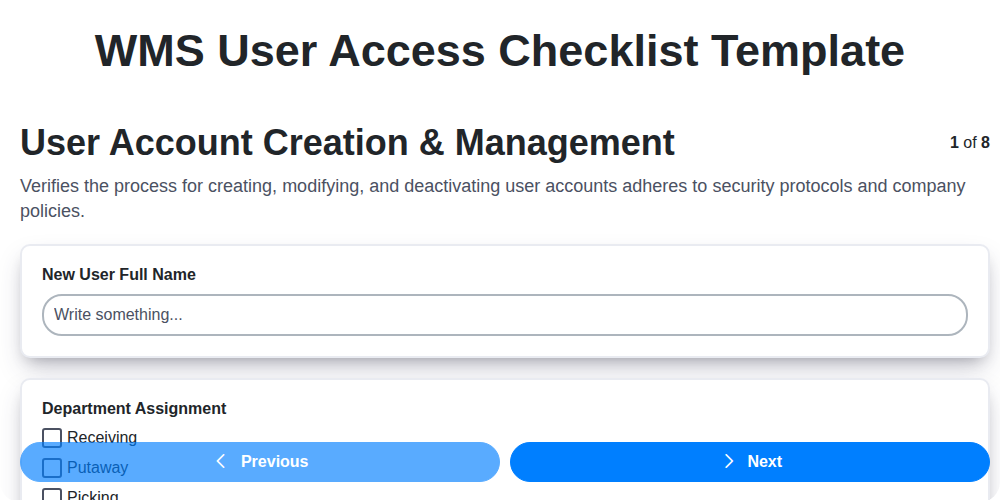
Table of Contents
- Introduction: Why WMS User Access Control Matters
- Understanding the Risks of Insufficient Access
- WMS User Access Checklist Template Overview
- 1. User Account Creation & Management
- 2. Role-Based Access Controls (RBAC) - The Foundation of Security
- 3. Enforcing Strong Password Policies
- 4. Managing Privilege Escalation Risks
- 5. Implementing Multi-Factor Authentication (MFA) for Enhanced Security
- 6. User Activity Logging & Monitoring: Tracking Every Action
- 7. Periodic Access Review & Certification: Ensuring Accuracy
- 8. Integration Access Control: Securing External Connections
- 9. Checklist Best Practices: Going Beyond the Basics
- 10. Automation Opportunities for User Access Management
- Conclusion: Maintaining a Secure WMS Environment
- Resources & Links
TLDR: Worried about unauthorized access to your Warehouse Management System (WMS)? This checklist template is your fast track to tighter security! It guides you through critical steps like user account management, role-based access, strong passwords, and ongoing monitoring - ensuring only the right people have the right access to protect your warehouse operations and data. Download it and simplify your WMS security!
Introduction: Why WMS User Access Control Matters
In today's complex warehouse environments, your Warehouse Management System (WMS) is the central nervous system of your operations. It manages inventory, directs workflows, and facilitates order fulfillment - all critical functions impacting efficiency, accuracy, and ultimately, profitability. But with great power comes great responsibility, and that's where robust user access control becomes absolutely essential.
Imagine a scenario where employees have access to data and functionalities they don't need to perform their roles. This creates significant risk - from accidental data corruption and theft to intentional misuse and security breaches. Weak or absent user access controls can expose your entire operation to vulnerabilities, leading to costly errors, regulatory non-compliance, and reputational damage.
This isn't just about IT security; it's about operational integrity. Properly managed user access ensures that only authorized personnel can perform specific tasks, minimizing errors, improving accountability, and streamlining workflows. A well-defined and enforced WMS user access control framework is the foundation for a secure, efficient, and compliant warehouse operation. The checklist we'll be exploring will help you build that foundation.
Understanding the Risks of Insufficient Access
Insufficient access control in your Warehouse Management System (WMS) isn't just an inconvenience - it's a significant risk with potentially devastating consequences. Imagine a scenario where unauthorized personnel can modify inventory data, approve shipments without proper verification, or even manipulate order fulfillment processes. The fallout could include:
- Financial Loss: Errors in inventory, incorrect shipments, and fraudulent activities can lead to direct financial losses.
- Operational Disruptions: Incorrect data and unauthorized actions can halt operations, impacting order fulfillment and customer satisfaction.
- Compliance Violations: Many industries have strict regulatory requirements for data security and access control. Failing to comply can result in hefty fines and legal repercussions.
- Reputational Damage: Data breaches and operational errors erode customer trust and damage your company's reputation.
- Security Vulnerabilities: Weak access controls create opportunities for malicious actors to infiltrate your systems and compromise sensitive data.
The reality is, a WMS manages a critical part of your business. Neglecting access control is essentially leaving the door open for potential disaster. Proactive and rigorous access management, as outlined in the checklist below, is vital for protecting your warehouse operations and mitigating these serious risks.
WMS User Access Checklist Template Overview
A robust Warehouse Management System (WMS) is only as secure as its user access controls. This checklist template provides a structured approach to ensuring that only authorized personnel have the appropriate level of access to your WMS, minimizing risk and maintaining operational integrity. It moves beyond simple user creation to encompass a comprehensive framework encompassing user lifecycle management, granular permissioning, and continuous monitoring.
This template isn't just a box-ticking exercise; it's a proactive tool designed to identify and mitigate vulnerabilities within your WMS access protocols. It's built around industry best practices and aims to align with compliance requirements. By diligently working through this checklist, you'll establish a clear audit trail, improve data security, and ultimately strengthen your warehouse operations against unauthorized access and potential data breaches. Each section outlined below represents a critical component of a secure WMS environment and includes key considerations for implementation and ongoing maintenance.
1. User Account Creation & Management
The cornerstone of a secure Warehouse Management System (WMS) lies in how you manage user accounts. A haphazard approach can quickly lead to vulnerabilities and data breaches. This section outlines critical practices for robust user account creation and ongoing management.
Initial Account Creation: Don't just let users be created; define a formal request process. This should include:
- Justification: Require a clear business reason for each new account.
- Approval Workflow: Implement a tiered approval process, ensuring appropriate stakeholders sign off on account requests.
- Standardized Naming Conventions: Establish clear and consistent naming conventions for user accounts. This improves manageability and reduces confusion.
- Automated Provisioning (where possible): Utilize automated provisioning tools to streamline the account creation process and reduce manual errors.
Ongoing Management: Account creation isn't a one-time event. Regularly review and manage existing accounts:
- Account Deactivation/Deletion: Promptly disable or delete accounts of departing employees or those who no longer require access. This is critical.
- Regular Audits: Periodically audit user accounts to verify accuracy and relevance.
- Centralized Account Management: Consolidate user account management within a single system for better control and visibility.
- Least Privilege Principle: Assign only the necessary permissions to each user account based on their role and responsibilities. (This ties directly into the next section, Role-Based Access Controls).
2. Role-Based Access Controls (RBAC) - The Foundation of Security
Role-Based Access Control (RBAC) isn't just a nice-to-have; it's the bedrock of a secure Warehouse Management System (WMS). Instead of assigning permissions directly to individual users, RBAC defines roles - collections of permissions bundled together. Users are then assigned to these roles.
Think of it like this: instead of giving John access to everything related to receiving, you create a "Receiver" role encompassing the necessary permissions (e.g., record receipts, update quantities, generate reports) and assign John to that role. This simplifies management tremendously.
Why is RBAC so crucial for WMS security?
- Reduced Risk of Over-Privileging: It minimizes the chance of granting users more access than they actually need, a common vulnerability.
- Simplified User Management: Onboarding new employees or changing job responsibilities becomes streamlined. Just assign the appropriate role instead of manually adjusting permissions.
- Improved Auditability: RBAC makes it clear which roles exist and which users are assigned to them, facilitating audits and demonstrating compliance.
- Consistency & Standardization: Enforces a standard approach to access control across the entire warehouse operation.
- Scalability: Easily adapt to changes in your workforce and the complexity of your warehouse operations.
Implementing a robust RBAC system requires careful planning. You'll need to:
- Identify Roles: Define roles that accurately reflect job functions within your warehouse (e.g., Receiver, Picker, Packer, Supervisor).
- Map Permissions: Determine the specific permissions required for each role.
- Document Role Definitions: Clearly document which permissions are included in each role to ensure consistency and maintainability.
- Regularly Review and Update Roles: As your warehouse operations evolve, your role definitions should too.
3. Enforcing Strong Password Policies
Weak passwords are a significant vulnerability in any Warehouse Management System (WMS). A compromised password can grant unauthorized access, leading to data breaches, operational disruptions, and financial losses. Therefore, robust password policies are a cornerstone of WMS security.
Your WMS user access checklist must include strict guidelines on password complexity and management. This goes beyond simply requiring a minimum length. Consider these essential components:
- Minimum Length: A baseline of at least 12 characters is recommended, but longer is always better.
- Complexity Requirements: Mandate a mix of uppercase and lowercase letters, numbers, and special characters. Avoid predictable patterns or dictionary words.
- Password History: Prevent users from reusing previous passwords. This deters brute-force attacks and reduces the risk of compromised credentials being recycled.
- Password Expiration: While controversial and potentially frustrating for users, regular password resets (e.g., every 90 days) can force users to update credentials and potentially identify compromised accounts. Carefully consider user impact vs. security benefit here.
- Prohibited Words/Phrases: Block common passwords, dictionary words, and personally identifiable information (PII) from being used.
- Secure Storage: Ensure passwords are stored securely using strong hashing algorithms with salting. Never store passwords in plain text.
- User Education: Train users on best practices for creating and protecting passwords. This helps foster a culture of security awareness.
Regular audits of password policy compliance are also crucial to ensure the system remains secure.
4. Managing Privilege Escalation Risks
Privilege escalation - the ability for a user to gain higher-level access than they're explicitly authorized for - is a significant security vulnerability within Warehouse Management Systems (WMS). It can lead to unauthorized data access, system modifications, and ultimately, substantial financial and reputational damage. Simply granting broad permissions just in case is a recipe for disaster.
Here's how to mitigate privilege escalation risks within your WMS:
- Least Privilege Principle: This is the bedrock of privilege escalation prevention. Grant users the absolute minimum permissions necessary to perform their job duties. Regularly review and adjust these permissions as roles evolve.
- Strict Separation of Duties: Segregate critical WMS functions between different users to prevent a single individual from having the ability to execute a complete, sensitive transaction. For example, the person who approves payments shouldn't also be able to initiate them.
- Regular Access Reviews with Focus on Elevated Privileges: While all access reviews are vital (covered in the Access Review & Certification section), pay extra attention to users with elevated privileges. Are these privileges still required? Have job roles changed, rendering some permissions obsolete?
- Audit Trails & Monitoring: Robust logging of all actions performed by users with elevated permissions is critical. This allows you to detect and investigate potential abuse. Look for patterns of activity that deviate from normal behavior.
- Automated Checks: Implement automated checks within your WMS to prevent unauthorized privilege elevation attempts. This could involve restricting certain functions based on user role or requiring supervisor approval for specific actions.
- Application-Level Controls: Ensure your WMS has built-in controls to prevent privilege escalation. Explore features that restrict access to specific modules or functionalities based on user roles.
5. Implementing Multi-Factor Authentication (MFA) for Enhanced Security
In today's threat landscape, relying solely on passwords for WMS user access is simply not enough. Multi-Factor Authentication (MFA) adds a critical layer of security by requiring users to provide multiple verification factors before granting access to the system. This dramatically reduces the risk of unauthorized access, even if a password is compromised.
Here's a breakdown of how to implement MFA within your WMS user access checklist:
- Choose Your MFA Methods: Explore various MFA options, including one-time passwords (OTPs) via SMS or authenticator apps, biometric scans (fingerprint, facial recognition), and hardware security keys (like YubiKeys). Consider user experience and your organization's security requirements when selecting.
- Prioritize High-Risk Users: Begin by enforcing MFA for users with elevated privileges, administrators, and those handling sensitive inventory data. Gradually expand implementation to all users.
- User Training & Support: Clearly communicate the benefits of MFA to users and provide comprehensive training on how to use the chosen method. Offer ongoing support to address any issues they encounter.
- Integrate with Your WMS: Ensure your MFA solution seamlessly integrates with your WMS platform for a streamlined login process.
- Regularly Review MFA Configuration: Periodically review and update your MFA policies to keep pace with evolving threats and technological advancements.
6. User Activity Logging & Monitoring: Tracking Every Action
In a warehouse management system (WMS), visibility into user actions is paramount for security, accountability, and troubleshooting. Comprehensive user activity logging and monitoring isn't just a "nice-to-have"; it's a critical component of a robust WMS security posture.
This section focuses on diligently tracking and analyzing user interactions within the WMS. What does this entail? It's about recording everything from logins and data modifications (inventory adjustments, order creations, shipment confirmations) to report generation and system configuration changes.
Key Elements of Effective Logging & Monitoring:
- Granular Logging: Don't just log that an action occurred; log who performed the action, what was changed, when it happened, and potentially why (if possible through user comments or system notes).
- Centralized Repository: Logs should be consolidated in a secure, centralized location for easy searching and analysis. Avoid scattering logs across multiple systems.
- Real-time Alerts: Configure alerts for suspicious activities like failed login attempts, unusual data modifications, or access from unexpected locations.
- Regular Review: Log data isn't helpful unless it's actively reviewed. Establish a schedule for regular log analysis to identify potential security breaches, operational inefficiencies, or training gaps.
- Audit Trails: Maintain a clear audit trail that demonstrates compliance with regulatory requirements and internal policies.
- Data Retention Policies: Define how long logs are retained, balancing security needs with storage constraints and regulatory guidelines.
Effective user activity logging and monitoring provides valuable insights for continuous improvement and proactive security management within your WMS.
7. Periodic Access Review & Certification: Ensuring Accuracy
Access isn't a set it and forget it scenario. User roles evolve, projects conclude, and employees transition - all impacting their required access levels. A robust WMS (Warehouse Management System) security posture necessitates regular access reviews and certifications.
This isn't just about ticking a box; it's a proactive process. It involves verifying that each user's assigned permissions are still appropriate for their current responsibilities. Here's how it should work:
- Defined Frequency: Establish a schedule (e.g., quarterly, semi-annually) for access reviews. The frequency should be dictated by risk tolerance and regulatory requirements.
- Accountability: Assign clear ownership for conducting and approving access reviews. This could be line managers, department heads, or a dedicated security team.
- Certification Process: Implement a formal certification process where users (or their managers) actively confirm the accuracy of their assigned permissions. This could be a self-attestation form or a more interactive review.
- Automated Tools: Leverage WMS functionality or integrate with Identity Governance and Administration (IGA) platforms to automate parts of the review process, such as identifying users with excessive permissions or those with inactive accounts.
- Remediation: Clearly defined procedures for handling access discrepancies. This includes promptly revoking inappropriate permissions and investigating any unusual activity uncovered during the review.
- Documentation: Maintain a record of access review activities, including who reviewed, what changes were made, and any exceptions granted. This provides an audit trail and demonstrates compliance.
Regular access reviews and certifications aren't just about security; they're about maintaining operational efficiency and reducing the risk of accidental or malicious misuse of the WMS.
8. Integration Access Control: Securing External Connections
Your Warehouse Management System (WMS) rarely operates in isolation. It likely integrates with numerous other systems - e-commerce platforms, accounting software, transportation management systems, and more. These integrations present a significant attack surface if not properly secured. Integration access control focuses specifically on minimizing the risks associated with these connections.
This isn't just about ensuring data can flow between systems; it's about ensuring it flows securely and only with the necessary permissions. Here's what to consider:
- Least Privilege for Integrations: Just like with individual users, integrations shouldn't have more access than they absolutely need. Determine the minimum required data and functionality each integration requires and restrict access accordingly.
- API Keys and Authentication: Robust authentication mechanisms are critical. Securely manage API keys, OAuth credentials, and other authentication tokens. Rotate these regularly and store them securely - ideally in a dedicated secrets management system.
- Network Segmentation: Consider isolating integration servers or network segments to limit the impact of a potential breach. If one integration is compromised, it shouldn't provide a gateway to your entire WMS.
- Input Validation & Data Sanitization: Integrations often receive data from external sources. Thoroughly validate and sanitize this data to prevent injection attacks and other vulnerabilities.
- Regular Security Audits of Integrations: These connections should be regularly audited to verify security controls are effective and to identify any new risks. This should include reviewing access logs and testing integration security.
- Documentation & Ownership: Clearly document all integrations, including purpose, data flow, and responsible parties for maintenance and security.
9. Checklist Best Practices: Going Beyond the Basics
Creating a WMS User Access Checklist is a fantastic first step, but truly robust security goes beyond simply ticking boxes. Here's how to elevate your checklist and ensure it's a living, breathing component of your security posture:
- Dynamic Updates: Your WMS environment will change. New features, integrations, and roles will emerge. Regularly review and update your checklist (at least quarterly, or more frequently with significant system changes) to remain relevant and effective.
- Automation is Key: Manually completing checklists is time-consuming and prone to error. Explore opportunities to automate checklist generation and validation where possible. Consider leveraging your WMS's built-in reporting capabilities or integrating with identity governance platforms.
- Training & Awareness: A checklist is only as good as the people using it. Provide training to all personnel responsible for managing user access, ensuring they understand the purpose of the checklist items and how to properly execute them.
- Documentation Matters: Don't just do the checklist items - document why decisions are made. Explain the rationale behind assigned roles and permissions. This creates a valuable audit trail and assists in future access reviews.
- Continuous Improvement: Treat your checklist as a living document. Solicit feedback from users and security teams to identify areas for improvement. Regularly evaluate the effectiveness of your access control measures and adapt accordingly.
- Link to Risk Assessments: Your checklist should be driven by risk. Tie checklist items directly to identified risks and vulnerabilities within your WMS. This demonstrates clear accountability and helps prioritize remediation efforts.
- Beyond the IT Team: Involve stakeholders from warehouse operations, finance, and other relevant departments in the checklist review process. This ensures access controls align with business needs and fosters a collaborative approach to security.
10. Automation Opportunities for User Access Management
Manual user access management is time-consuming and prone to errors. Fortunately, significant opportunities exist for automation within your WMS user access controls. Consider these areas:
- Automated Account Provisioning/Deprovisioning: Integrate your WMS with HR systems (or other identity providers) to automatically create, modify, and delete user accounts based on employee onboarding and offboarding workflows. This drastically reduces manual effort and ensures timely access changes.
- Dynamic Role Assignments: Leverage automation to dynamically assign roles based on factors like department, job title, or project involvement. This eliminates the need for manual role updates as employees move within the organization.
- Automated Password Resets & MFA Enrollment: Streamline the often-frustrating password reset process and automate MFA enrollment to improve user experience and security adherence.
- Periodic Access Review Reminders & Reporting: Automate reminders for access reviewers and generate pre-populated access review reports, simplifying the certification process and ensuring timely reviews.
- Workflow-Based Approval Processes: Implement automated workflows for access requests, routing them to appropriate approvers based on role or data sensitivity.
By embracing automation, you can significantly reduce administrative overhead, improve accuracy, and enhance the overall security posture of your WMS.
Conclusion: Maintaining a Secure WMS Environment
Ultimately, a robust WMS user access checklist isn't just a document; it's a cornerstone of a secure warehouse management system. Regularly reviewing and updating this checklist, and adhering to its guidelines, dramatically reduces the risk of data breaches, unauthorized access, and operational disruptions. Proactive management of user access, encompassing creation, roles, passwords, and ongoing monitoring, demonstrates a commitment to security best practices. Remember, security isn't a one-time project, but an ongoing process. By implementing and maintaining a comprehensive WMS user access checklist template, you're not just securing your data; you're safeguarding your entire warehouse operation.
Resources & Links
- National Institute of Standards and Technology (NIST): NIST provides cybersecurity frameworks, standards, and guidelines crucial for understanding and implementing robust access control policies. Their publications on identity and access management are invaluable.
- Center for Internet Security (CIS): CIS offers the CIS Controls, a prioritized set of actions that organizations can take to improve their security posture. Many of these controls directly relate to user access management in a WMS.
- Amazon Web Services (AWS) Identity and Access Management (IAM): While AWS is a cloud provider, their IAM documentation provides excellent explanations and best practices for role-based access control, principle of least privilege, and other key concepts applicable to WMS user access. Many WMS platforms utilize similar principles.
- Microsoft Security: Microsoft offers a wealth of resources on identity and access management, including documentation on Azure Active Directory (Azure AD) and password policies. Concepts are often transferable to WMS environments.
- SANS Institute: SANS provides cybersecurity training and certifications. Their resources offer insights into security best practices, including user access management techniques. Look for courses and whitepapers on identity and access management.
- Okta: Okta is a leading identity and access management provider. Their website contains helpful articles and webinars on topics like single sign-on (SSO), MFA, and user lifecycle management - all relevant to securing a WMS.
- OneFactor: A comprehensive Identity Governance and Administration (IGA) platform. Even without implementing their product, their site has helpful resources regarding access governance principles and processes.
- Gartner: Gartner provides research and insights on various technology areas, including identity and access management. While full access to reports often requires a subscription, their website offers a good overview of the market and trends.
- Atlassian: While known for project management tools, Atlassian's documentation on access controls within their products can offer insights into practical implementation of least privilege and role-based access.
- PagerDuty: PagerDuty focuses on incident response, but their blog and resources frequently discuss security considerations, including the importance of proper user access control and logging for effective incident investigation. Helps to underscore the 'why' behind secure access.
Frequently Asked Questions
What is a WMS and why is user access control important?
A Warehouse Management System (WMS) is software that helps manage and control warehouse operations, from receiving goods to shipping orders. User access control is crucial because it limits access to sensitive data and functions based on employee roles, preventing errors, fraud, and unauthorized modifications to inventory and processes.
What's the purpose of this User Access Checklist Template?
The checklist template is designed to help you systematically review and manage user access rights within your WMS. It helps ensure appropriate permissions are assigned, regularly audited, and kept aligned with employee roles and responsibilities, reducing security risks and improving operational efficiency.
Who should use this checklist?
This checklist is useful for warehouse managers, IT administrators, security personnel, and anyone responsible for managing user access and permissions within a WMS. It's a helpful tool for both initial setup and ongoing maintenance.
What kind of information does the checklist cover?
The checklist covers essential areas like user account creation, role definitions, permission assignments, segregation of duties, regular access reviews, and documentation of access control procedures.
Is this a one-time checklist or should it be used regularly?
This is an ongoing checklist. We recommend performing a full review at least annually, and ideally quarterly, or whenever significant changes occur within the warehouse or employee roles.
Can I customize the checklist template?
Absolutely. The template is designed to be customizable. You can add, remove, or modify checklist items to align with your specific warehouse processes, WMS configuration, and security policies.
What is 'segregation of duties' and why is it included in the checklist?
Segregation of duties involves dividing responsibilities so that no single person has complete control over a critical process. It's included to prevent fraud and errors. For example, the person receiving goods shouldn't also be the same person approving payments.
What is a 'least privilege' approach to user access?
The 'least privilege' principle dictates that users should only be granted the minimum level of access necessary to perform their job responsibilities. This template promotes this approach by guiding you to review and restrict unnecessary permissions.
What happens if we find an unauthorized access during a review?
Immediately revoke the unauthorized access. Investigate how the access was obtained, address the root cause (whether it's an error in provisioning, a compromised account, or a deliberate attempt to bypass security), and implement corrective measures to prevent recurrence.
Are there any legal or compliance requirements related to WMS user access control?
Yes, depending on your industry (e.g., healthcare, food & beverage, finance), there may be specific legal or regulatory requirements (like HIPAA, FDA, GDPR) that dictate how user access to data and systems must be controlled. This checklist can help you meet those obligations.
Comments
There are no comments yet. Be the first to add one!
WMS - Warehouse Management System Solution Demo
Optimize your warehouse operations & boost efficiency! ChecklistGuro's WMS streamlines inventory management, order fulfillment, and shipping. Reduce errors, improve accuracy, & maximize space utilization. Manage it all with our Work OS.
Related Articles

Seamless RFID Integration: Your WMS Checklist Template for Success

Mastering Warehouse Labeling: Your WMS Process Checklist Template
The Ultimate Supply Chain Inventory Accuracy Audit Checklist: A Step-by-Step Guide
Mastering Putaway: Your WMS Optimization Checklist

Mastering Your Yard: A Warehouse WMS Yard Management Checklist Template

Warehouse Data Integrity: Your WMS Checklist Template

WMS System Performance Monitoring Checklist: A Comprehensive Guide
Warehouse WMS Error Handling Checklist: A Proactive Guide to Minimizing Disruptions
We can do it Together
Need help with
Warehouse Management System (WMS)?
Have a question? We're here to help. Please submit your inquiry, and we'll respond promptly.