Mastering the Contract Lifecycle Management Workflow: A Step-by-Step Guide to Seamless Automation
Published: 05/31/2026 Updated: 10/05/2026
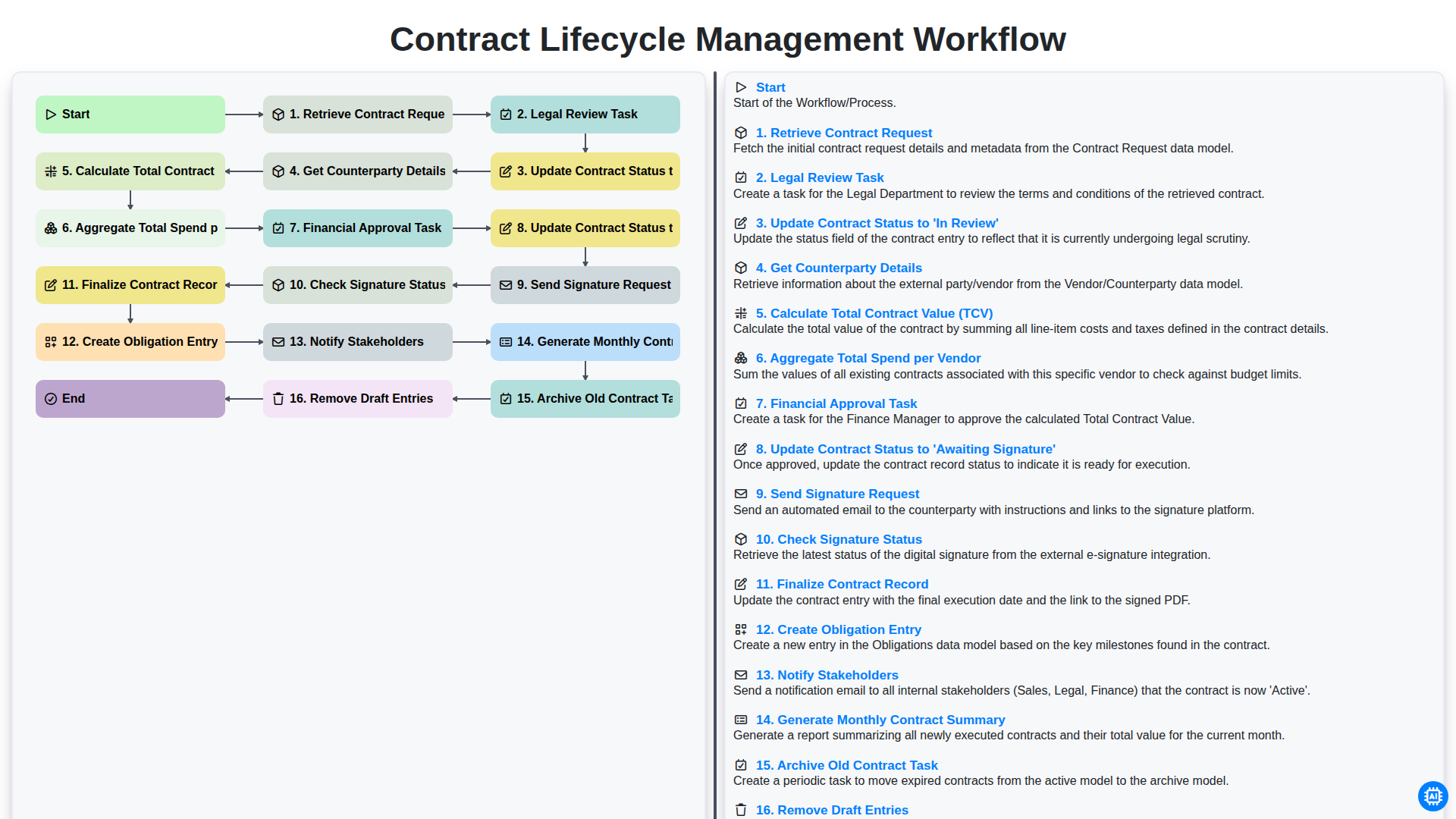
Table of Contents
- Introduction to Contract Lifecycle Management (CLM)
- Phase 1: Initiation and Intake
- Retrieving the Initial Contract Request
- Phase 2: Legal Review and Validation
- Executing the Legal Review Task
- Updating Contract Status to 'In Review'
- Phase 3: Data Enrichment and Financial Assessment
- Gathering Counterparty Details
- Calculating Total Contract Value (TCV)
- Aggregating Total Spend per Vendor
- Phase 4: Approvals and Internal Compliance
- Managing the Financial Approval Task
- Updating Contract Status to 'Awaiting Signature'
- Phase 5: Execution and Digital Signature
- Sending the Signature Request and Monitoring Status
- Phase 6: Post-Execution and Record Management
- Finalizing the Contract Record and Creating Obligation Entries
- Automated Stakeholder Notification
- Phase 7: Continuous Monitoring and Maintenance
- Generating Monthly Contract Summaries
- Archiving Old Contracts and Database Cleanup
- Conclusion: The Benefits of an Automated CLM Workflow
- Resources & Links
TLDR: Learn how to streamline your legal and procurement processes using our automated Contract Lifecycle Management (CLM) workflow. This guide explores how to automate everything from initial contract requests and legal reviews to financial approvals, signature tracking, and post-execution obligations, ensuring accuracy, reducing manual errors, and maintaining a centralized, audit-ready contract repository.
Introduction to Contract Lifecycle Management (CLM)
In the fast-paced modern business landscape, managing agreements is no longer just about storing signed papers in a filing cabinet. Contract Lifecycle Management (CLM) is a strategic, end-to-end process that encompasses every stage of a contract's life-from the moment a need is identified to the final moment the agreement expires or is renewed.
A well-structured CLM workflow acts as the backbone of organizational efficiency, ensuring that no critical clause is overlooked, no deadline is missed, and no financial obligation goes unmonitored. By automating the progression of a contract through various stages-such as legal review, financial approval, and signature collection-organizations can eliminate manual bottlenecks, reduce human error, and mitigate legal risks. Ultimately, an effective CLM workflow transforms contracting from a reactive administrative burden into a proactive driver of strategic value, enabling teams to maximize vendor performance and safeguard much-needed revenue.
Phase 1: Initiation and Intake
The lifecycle of a contract begins long before a signature is ever applied. The Initiation and Intake phase is the most critical stage for ensuring accuracy and setting the foundation for a legally sound agreement. This phase focuses on the systematic gathering of information and the preliminary assessment of the contract's scope.
The process kicks off with the Retrieve Contract Request step, where the initial need for a new agreement or an amendment is identified and logged. Once the request is captured, the workflow transitions into the Legal Review Task. During this stage, legal counsel examines the terms, conditions, and potential liabilities to ensure alignment with company standards. As this scrutiny takes place, the system must automatically Update Contract Status to 'In Review', providing real-time visibility to all stakeholders and preventing any ambiguity regarding the contract's current standing.
Parallel to the legal scrutiny, the workflow ensures all necessary data points are captured to inform downstream decision-making. This includes the step to Get Counterparty Details, ensuring that the entity entering the agreement is properly vetted and identified. Simultaneously, the system begins the computational heavy lifting by performing a Calculate Total Contract Value (TCV) task. By determining the financial magnitude of the agreement early on, the organization can immediately Aggregate Total Spend per Vendor, allowing procurement teams to understand the cumulative financial commitment to a specific partner and maintain a clear view of budget impact.
Retrieving the Initial Contract Request
The lifecycle of a contract begins long before a signature is ever applied to a document. It starts with the Retrieve Contract Request phase, which serves as the critical entry point for the entire workflow. This stage involves capturing the initial intent to enter into a new agreement or renew an existing one, typically triggered by a department head, procurement officer, or sales representative.
To ensure a seamless transition into the legal review stage, the retrieval process must be standardized. This involves gathering all necessary preliminary information-such as the purpose of the contract, the parties involved, and any specific terms requested by the business unit. By automating the retrieval of these requests through a centralized intake portal, organizations can eliminate the chaos of fragmented email chains and manual data entry. A well-structured retrieval process ensures that every subsequent step, from legal scrutiny to financial approval, is built upon a foundation of accurate and complete information.
Phase 2: Legal Review and Validation
Once the initial request is retrieved, the process moves into the critical stage of-Legal Review and Validation. This phase is where the integrity of the agreement is scrutinized to ensure all terms align with organizational standards and risk appetites.
The workflow triggers a specific Legal Review Task, prompting legal counsel to examine the document's clauses and compliance requirements. During this period, the system automatically performs an Update Contract Status to 'In Review', ensuring all stakeholders have real-time visibility into the progress. To facilitate an informed review, the workflow also works to Get Counterparty Details, providing the legal team with necessary context regarding the entity involved.
Simultaneously, the system handles the underlying data intelligence. It will Calculate Total Contract Value (TCV) and Aggregate Total Spend per Vendor, allowing the legal and procurement teams to understand the financial impact and historical context of the agreement. This data-driven approach ensures that the review is not just about legal wording, but about strategic financial alignment.
Executing the Legal Review Task
The Legal Review Task serves as the critical checkpoint in the contract lifecycle, where the focus shifts from administrative intake to substantive scrutiny. Once a contract request has been retrieved, the legal team must meticulously examine the terms and conditions to ensure they align with organizational standards, mitigate potential liabilities, and uphold regulatory compliance.
During this stage, legal professionals evaluate key clauses-such as indemnification, termination rights, and dispute resolution-to identify any deviations from the company's standard operating procedures. This is not merely a passive reading process; it is an active risk-assessment phase. Any identified discrepancies or unfavorable terms must be flagged for negotiation.
To maintain transparency and prevent bottlenecks, this stage is intrinsically linked to the broader workflow. As the legal team begins their deep dive, the system must automatically Update Contract Status to 'In Review'. This automated status update ensures that procurement, finance, and relevant stakeholders are instantly aware that the contract is undergoing scrutiny, preventing duplicate efforts and reducing the need for manual follow-up emails. This seamless transition from Request to Review is what transforms a chaotic manual process into a streamlined, high-visibility operation.
Updating Contract Status to 'In Review'
Once the legal review process has been officially initiated, the next critical step in the workflow is updating the contract status to 'In Review'. This transition is more than just a simple label change; it serves as a vital communication signal to all stakeholders involved in the procurement or legal departments.
By moving the status to 'In Review', you provide real-time visibility into the contract's lifecycle, effectively eliminating the need for manual follow-up emails to check on progress. This status indicates that the document has moved out of the request phase and is currently undergoing rigorous scrutiny by the legal team to ensure all terms, conditions, and liabilities are properly addressed. This step is essential for maintaining a single source of truth within your CLM system, ensuring that the sales, finance, and operations teams know exactly where the agreement stands in the pipeline.
Phase 3: Data Enrichment and Financial Assessment
Once the legal review is underway, the workflow shifts from mere administrative processing to deep-dive data enrichment. This stage is critical because it transforms a simple document into a strategic asset by embedding actionable intelligence into the contract record.
The process begins by automatically getting counterparty details, ensuring that all vendor or client information is accurately mapped to your existing master data. With these details verified, the system then performs a calculation of the Total Contract Value (TCV), providing an immediate snapshot of the financial commitment. To provide a broader perspective on procurement impact, the workflow also aggregates the total spend per vendor, allowing stakeholders to see how this new agreement fits into the larger context of existing vendor relationships.
This enriched data serves as the foundation for the Financial Approval Task. By presenting decision-makers with a comprehensive view of the TCV and cumulative spend, the approval process becomes data-driven rather than purely transactional. Once the finance team provides their sign-off, the system automatically updates the contract status to 'Awaiting Signature', bridging the gap between financial scrutiny and formal execution.
Gathering Counterparty Details
Once the initial contract request has been retrieved and the legal review process is underway, the workflow moves into a critical data-collection phase: Gathering Counterparty Details.
At this stage, the focus shifts from the internal request to the external entities involved. This step involves identifying and documenting all relevant information regarding the person or organization on the other side of the agreement. To ensure accuracy and mitigate risk, the system must systematically capture essential data points such as the legal name of the entity, registered business address, contact information, and tax identification numbers.
Collecting this information accurately is not merely an administrative task; it is a foundational requirement for the subsequent steps in the lifecycle. Without precise counterparty details, calculating the Total Contract Value (TCV) and aggregating total spend per vendor becomes prone to error. By automating the collection of these details during the review phase, you ensure that the contract record is populated with a single source of truth, which prevents downstream delays during the financial approval and signature stages.
Calculating Total Contract Value (TCV)
Determining the true impact of a contract requires moving beyond simple line items to understand the full financial commitment involved. As part of an automated lifecycle workflow, the Calculate Total Contract Value (TCV) step is critical for both budgeting and strategic procurement.
TCV represents the total cumulative value of all obligations, including fixed fees, variable costs, and any potential renewals or escalations over the entire duration of the contract term. By automating this calculation, organizations can move away from manual spreadsheet errors and gain immediate visibility into their financial commitments. This step ensures that every stakeholder-from procurement to finance-is working with a single, accurate figure that reflects the complete economic scale of the agreement, enabling more informed decision-making and better-aligned fiscal planning.
Aggregating Total Spend per Vendor
One of the most powerful advantages of a streamlined CLM workflow is the ability to move beyond simple document storage and toward true strategic intelligence. By integrating the Aggregate Total Spend per Vendor step into your automated workflow, you transform your contract repository from a passive archive into a dynamic financial tool.
As each contract is processed and the Total Contract Value (TCV) is calculated, the system automatically rolls these figures up into a holistic view of your relationship with each supplier. Instead of manually auditing individual files to understand your exposure, you gain real-time visibility into your cumulative commitments. This aggregation allows procurement and finance teams to identify patterns, detect potential cost-saving opportunities through volume discounting, and manage budget allocations with much higher precision. By consolidating spend data automatically, you eliminate the risk of manual calculation errors and ensure that every procurement decision is backed by a complete picture of your historical and current vendor engagement.
Phase 4: Approvals and Internal Compliance
Once the legal team has completed their review and the contract terms are finalized, the workflow transitions into the critical stage of internal governance. This phase is designed to ensure that every commitment made by the organization is vetted for financial feasibility and strategic alignment.
The process begins with the Financial Approval Task, where stakeholders review the extracted data-specifically the Total Contract Value (TCV) and the Aggregated Total Spend per Vendor. This step is crucial for preventing budget overruns and ensuring that the new agreement fits within the existing vendor ecosystem and departmental budgets.
During this stage, the system automatically triggers an Update Contract Status to 'Awaiting Signature', signaling to the legal and procurement teams that the negotiation phase is complete and the document is ready for formal execution. By automating the transition from review to approval, organizations can eliminate bottlenecks and ensure that no contract moves toward signature without meeting all predefined internal compliance benchmarks.
Managing the Financial Approval Task
The financial approval task serves as the critical gatekeeper in the contract lifecycle, ensuring that every commitment made by the organization aligns with its budgetary constraints and strategic goals. Once the legal review is complete and the total contract value (TCV) and aggregate spend per vendor have been calculated, the workflow automatically triggers this approval stage.
This step is not merely a formality; it is a rigorous validation process where finance stakeholders review the real-time impact of the contract on the company's bottom line. By integrating the calculated TCV and existing vendor spend data directly into the approval task, decision-makers can evaluate the contract in the context of the broader departmental budget. This transparency prevents budget creep and ensures that no contract moves toward the signature stage without explicit, data-driven authorization. Once the financial stakeholder provides their digital sign-off, the workflow seamlessly transitions the contract status to 'Awaiting Signature,' maintaining a continuous and audited trail of fiscal accountability.
Updating Contract Status to 'Awaiting Signature'
Once the financial approval is secured and the contract is ready for execution, the workflow moves into a critical transitional phase: updating the contract status to 'Awaiting Signature'.
This step serves as a vital signaling mechanism for both legal and procurement teams. By programmatically updating the status, you eliminate the ambiguity that often plagues manual processes. It informs all stakeholders that the negotiation phase is officially closed and that the document has moved from the review bucket to the execution bucket. This automated update ensures that no contract sits in a state of limbo, providing real-time visibility into the pipeline and preventing the common bottleneck where stakeholders are unsure whether a contract is still being negotiated or is simply waiting for a digital pen.
Phase 5: Execution and Digital Signature
Once the contract has cleared the final round of financial approvals, the workflow moves into the critical execution phase. At this stage, the status is automatically updated to 'Awaiting Signature', signaling that the document is ready for formal commitment.
The system then triggers the Send Signature Request action, dispatching the finalized document to the necessary parties via integrated e-signature tools. This step eliminates the friction of manual emailing and ensures that all signatories receive the correct version of the document simultaneously. To maintain real-time visibility, the workflow includes a continuous Check Signature Status loop, which monitors the progress of the signing process and alerts administrators if a document remains outstanding. This automated oversight prevents bottlenecks and ensures that the transition from pending to executed is seamless and transparent.
Sending the Signature Request and Monitoring Status
Once the contract has moved through the legal and financial approval stages and the status is updated to 'Awaiting Signature', the workflow transitions into the critical execution phase. At this point, the system triggers the Send Signature Request action, dispatching the finalized document to all necessary parties via an integrated e-signature platform. This automation eliminates the need for manual emailing and ensures that the correct signatories are identified and notified instantly.
The process doesn't end once the email is sent; continuous oversight is vital to prevent bottlenecks. The workflow automatically enters a loop to Check Signature Status, providing real-time visibility into whether the document is pending, viewed, or completed. This automated monitoring ensures that follow-up reminders are sent if a counterparty is unresponsive, significantly reducing the contract turnaround time and ensuring that legal commitments are finalized without manual intervention.
Phase 6: Post-Execution and Record Management
Once the signatures are secured, the workflow transitions from active negotiation to long-term governance. This phase is critical for ensuring that the data captured during the lifecycle remains actionable and that the organization remains compliant with contractual obligations.
The process begins with the Finalize Contract Record step, where all metadata is verified for accuracy. To ensure operational continuity, the system must Create Obligation Entry, translating contract terms into actionable tasks for project managers or procurement teams. To maintain transparency and alignment across the organization, the system will automatically Notify Stakeholders, ensuring that legal, finance, and relevant department heads are aware that the contract is now active.
Effective lifecycle management also requires rigorous data hygiene and reporting. To provide high-level visibility, the system will Generate Monthly Contract Summary reports, offering a bird's-eye view of active agreements and upcoming renewals. Simultaneously, to prevent data clutter and ensure your dashboard remains accurate, the workflow includes a task to Remove Draft Entries that did not reach execution. Finally, to maintain a clean and compliant repository, an Archive Old Contract Task is triggered for expired agreements, moving them out of active view while preserving them for audit purposes. This structured approach to post-execution ensures that your contract repository remains a single, reliable source of truth.
Finalizing the Contract Record and Creating Obligation Entries
Once the signatures are secured and the status is confirmed, the workflow moves into its most critical phase: transitioning from a legal document to an active operational asset. The process begins by performing a final audit to Finalize the Contract Record, ensuring that all metadata-such as effective dates, expiration dates, and parties involved-is accurate and complete within your management system. This step closes the loop on the negotiation phase and establishes the single source of truth for the agreement.
However, the workflow does not end with a signature. To ensure the contract delivers its intended value, the system must automatically Create an Obligation Entry. This step involves extracting key deliverables, milestones, and compliance requirements from the document and converting them into actionable tasks. By automating the creation of these entries, you bridge the gap between legal intent and operational execution, ensuring that no contractual commitment is overlooked. This proactive approach transforms a static PDF into a dynamic, trackable obligation, allowing your team to manage performance and mitigate risk throughout the entire life of the contract.
Automated Stakeholder Notification
In a complex Contract Lifecycle Management (CLM) ecosystem, manual communication is often the weakest link, leading to bottlenecks and missed deadlines. Automated Stakeholder Notification eliminates this friction by ensuring that the right people are alerted at every critical juncture of the workflow.
Instead of relying on manual emails or follow-up meetings, the system proactively triggers alerts based on real-time status changes. For instance, as soon as the Legal Review Task is completed or the status shifts to Awaiting Signature, relevant stakeholders-from legal counsel to department heads-receive instant updates. This automation ensures that everyone remains aligned, prevents information silos, and guarantees that no contract sits idle simply because a key decision-maker was unaware it was pending their action. By automating these touchpoints, you transform your workflow from a reactive process into a proactive, high-velocity engine.
Phase 7: Continuous Monitoring and Maintenance
Once the contract is fully executed, the workflow shifts from execution to long-term governance. This final phase is critical for ensuring that the value negotiated during the legal review is actually realized and that your data remains clean and actionable.
The post-signature process begins with the Finalize Contract Record step, where the executed document is officially integrated into your centralized repository. This is immediately followed by the Create Obligation Entry task, which extracts key milestones, renewal dates, and deliverables to ensure no contractual commitment is overlooked. To ensure transparency across the organization, the Notify Stakeholders step automates alerts to relevant department heads, procurement, and finance teams, ensuring everyone is aligned with the new terms.
Effective lifecycle management also requires proactive data hygiene and reporting. To maintain high-level visibility, the system will Generate Monthly Contract Summary reports, providing leadership with insights into new agreements and upcoming expirations. Simultaneously, to prevent data bloat and maintain a single source of truth, the workflow includes an Archive Old Contract Task to move expired agreements to long-term storage and a Remove Draft Entries step to purge incomplete or abandoned requests. By automating these maintenance tasks, you transform your contract repository from a static storage folder into a dynamic, high-integrity strategic asset.
Generating Monthly Contract Summaries
To maintain full visibility into your organization's contractual commitments, the workflow includes an automated step to Generate Monthly Contract Summary. Rather than manually scouring folders and spreadsheets to understand your current liabilities, this automated process aggregates all contract data processed during the preceding month into a single, comprehensive report.
This summary provides leadership with a high-level snapshot of contractual activity, including new agreements finalized, upcoming renewals, and total value commitments. By automating this report, you eliminate the risk of human error and ensure that stakeholders are always aligned with the company's financial and legal landscape. This proactive layer of reporting transforms your CLM from a simple storage repository into a strategic intelligence tool, enabling data-driven decision-making and preventing unexpected budget overruns.
Archiving Old Contracts and Database Cleanup
To maintain a high-performing and organized CLM system, the workflow does not end once a contract is signed. A critical, yet often overlooked, final phase involves the Archive Old Contract Task and the Remove Draft Entries process.
Effective lifecycle management requires regular database hygiene to prevent data bloat and ensure that your team is only working with relevant, actionable information. Archiving old contracts ensures that expired or terminated agreements are moved out of your active workspace into long-term storage, preserving the audit trail without cluttering your current dashboard. Simultaneously, removing outdated draft entries prevents confusion during the renewal or renegotiation phases, ensuring that legal and procurement teams aren't accidentally referencing obsolete versions of a document. By automating these cleanup steps, you ensure your contract repository remains a single source of truth, optimized for quick searching and accurate reporting.
Conclusion: The Benefits of an Automated CLM Workflow
Implementing an automated Contract Lifecycle Management (CLM) Workflow is more than just a technical upgrade; it is a strategic shift toward operational excellence. By replacing manual, fragmented processes with a structured, automated sequence-from the initial Retrieve Contract Request to the final Archive Old Contract task-organizations can eliminate the bottlenecks that typically plague legal and procurement departments.
The benefits of this automation extend far beyond simple time savings. A streamlined workflow ensures unparalleled data integrity through automated steps like Calculating Total Contract Value (TCV) and Aggregating Total Spend, providing leadership with real-time visibility into financial commitments. Furthermore, by automating critical touchpoints such as Financial Approval Tasks, Signature Requests, and Stakeholder Notifications, you significantly reduce the risk of human error and contract leakage.
Ultimately, a robust CLM workflow transforms your legal department from a reactive cost center into a proactive strategic partner. By automating repetitive administrative burdens-such as updating statuses or removing draft entries-your team is freed to focus on high-value negotiations and complex legal analysis, ensuring that every contract is not just signed, but managed effectively throughout its entire lifecycle.
Resources & Links
- Gartner Contract Management Research: In-depth industry reports and market analysis regarding the evolution of Contract Lifecycle Management technology and best practices.
- PwC Legal & Contract Automation Insights: Expert perspectives on streamlining legal workflows and managing enterprise-wide contract compliance and risk.
- Forbes Business Technology: Articles focusing on the digital transformation of business processes and the ROI of workflow automation.
- WorldCC (World Commerce & Contracting): Global resources and standards for contract management professionals, focusing on commercial excellence and risk mitigation.
- McKinsey Operations Insights: Strategic frameworks for optimizing supply chain management and the financial impact of automated spend analysis.
- ZDNet Enterprise Software Guides: Technical deep-dives into digital signature integration and the implementation of automated document workflows.
Frequently Asked Questions
What is Contract Lifecycle Management (CLM) and why is it important?
Contract Lifecycle Management (CLM) is the process of managing a contract from its initial creation through negotiation, execution, and eventual renewal or termination. It is important because it ensures compliance, reduces legal risks, and optimizes operational efficiency by preventing missed deadlines and manual errors.
What are the key stages of a CLM workflow?
A standard CLM workflow typically includes request/intake, drafting, negotiation, approval, execution (signing), storage, and post-execution monitoring/renewal.
How does automation improve the contract lifecycle?
Automation streamlines repetitive tasks, such as routing documents for approval, notifying stakeholders of upcoming expirations, and extracting key data from clauses. This reduces manual workload, minimizes human error, and accelerates the entire contracting cycle.
What is the role of a single source of truth in CLM?
A single source of truth refers to a centralized digital repository where all contract versions, amendments, and related communications are stored. This ensures that all stakeholders are working with the most recent and accurate information, preventing disputes and confusion.
What should businesses look for when choosing a CLM automation tool?
When selecting a tool, businesses should prioritize ease of integration with existing systems (like CRM or ERP), user-friendly interface, robust template management, automated alert capabilities, and strong security/compliance features.
Comments
There are no comments yet. Be the first to add one!
Case Management Solution Demo
Streamline your casework & improve outcomes! ChecklistGuro centralizes case details, tasks, & communication. Enhance efficiency, ensure compliance, & deliver exceptional service. Manage it all with our Work OS.
Related Articles
Streamline Your Deals: The Ultimate Real Estate Case Management Checklist Template
Streamline Your Debt Collection: A Case Management Checklist Template
Cybersecurity Incident Response: Your Checklist Template for Success
Streamline Your Case Management: The Ultimate Checklist Template
Mastering IP: Your Intellectual Property Case Management Checklist Template
HR Case Management Checklist Template: Your Guide to Fair & Compliant Investigations
Streamlining Veteran Care: Your Comprehensive Case Management Checklist Template
Mastering Investigations: Your Case Management Checklist Template Guide
Need help with
Checklists?
Have a question? We're here to help. Please submit your inquiry, and we'll respond promptly.