The Ultimate Software Implementation Checklist for Accounting Teams: A Step-by-Step Guide to a Seamless Transition
Published: 07/12/2026 Updated: 10/05/2026
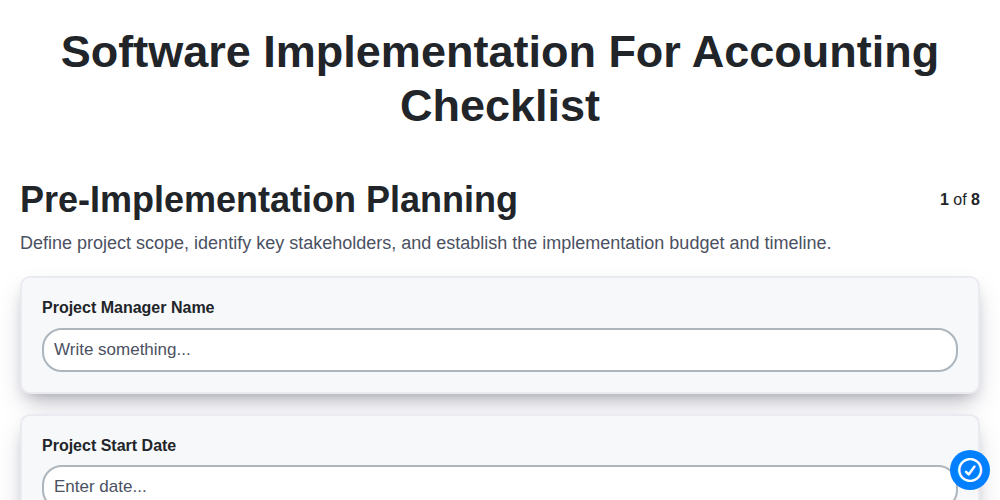
Table of Contents
- Introduction: Why a Structured Implementation Strategy Matters
- Phase 1: Pre-Implementation Planning and Project Scoping
- Phase 2: Requirements Gathering & Vendor Selection
- Phase 3: Data Migration & Cleanup: Preparing Your Financial Records
- Phase 4: System Configuration & Setup
- Phase 5: Integration & Interface Testing
- Phase 6: User Acceptance Testing (UAT)
- Phase 7: User Training & Documentation
- Phase 8: Go-Live: The Transition to the New System
- Phase 9: Post-Implementation Review & Continuous Improvement
- Conclusion: Ensuring Long-Term ROI for Your Accounting Department
- Resources & Links
TLDR: Transitioning to new accounting software can be a high-stakes endeavor for any finance department. This guide provides a comprehensive, step-by-step checklist-from initial pre-implementation planning and vendor selection to data migration, testing, and post-go-live reviews-designed to help accounting teams mitigate risks, ensure data integrity, and achieve a seamless, error-free system deployment.
Introduction: Why a Structured Implementation Strategy Matters
Implementing a new accounting software is far more than just a technical upgrade; it is a fundamental transformation of your organization's financial backbone. While the promise of automation, real-time reporting, and streamlined workflows is incredibly compelling, the transition period is often fraught with operational risks. Without a clear roadmap, companies frequently encounter common pitfalls such as data silos, broken integrations, and significant downtime that can paralyze financial operations.
A structured implementation strategy serves as your blueprint for success, ensuring that every stakeholder is aligned and every technical requirement is met. Rather than treating the rollout as a single switch-flip event, a methodical approach allows you to manage the complexities of data integrity, system configuration, and team adoption. By following a predefined checklist, you move from a reactive state of fixing errors as they arise to a proactive state of ensuring seamless continuity, ultimately protecting the accuracy of your financial records and maximizing your return on investment from day one.
Phase 1: Pre-Implementation Planning and Project Scoping
Before a single line of code is configured or a single vendor is contacted, the success of your accounting software implementation depends on the foundation you build during the planning phase. Skipping this step is the most common reason why software transitions exceed budgets and miss deadlines.
The goal of this phase is to define the why and the how of your project. You must establish a clear project vision and assemble a dedicated implementation team. This team should not just consist of IT professionals, but also key stakeholders from the finance department-specifically those who understand the day-to-day complexities of your general ledger, accounts payable, and accounts receivable processes.
During this stage, you should focus on three critical pillars:
- Defining Objectives: What specific pain points are you trying to solve? Are you looking to automate manual reconciliations, improve real-time reporting, or enable multi-entity consolidation? Clear objectives serve as your North Star throughout the implementation.
- Resource Allocation: Determine your budget, not just for the software licenses, but for implementation consultants, data cleansing efforts, and potential hardware upgrades. Identify who will lead the project and how much time internal staff can realistically dedicate to the transition.
- Establishing a Timeline: Create a high-level roadmap with realistic milestones. While you may not know every detail yet, you need a framework that accounts for the complexity of data migration and the necessity of user training.
By investing time in thorough scoping, you transform the implementation from a reactive IT project into a strategic business upgrade.
Phase 2: Requirements Gathering & Vendor Selection
Once you have defined your implementation goals, the next critical step is to translate those high-level objectives into technical and functional specifications. This phase is about bridging the gap between what we want to achieve and what the software must actually do.
To navigate this phase successfully, focus on these two primary components:
1. Detailed Requirements Gathering
Avoid the mistake of looking for a one-size-fits-all solution. Instead, audit your existing workflows to identify specific needs. Your requirements should cover:
- Functional Requirements: What specific accounting tasks must the software perform? (e.g., multi-currency support, automated bank reconciliations, automated tax calculations, or specific depreciation schedules).
- Reporting Needs: Identify the exact financial reports your management team requires (e.g., P&L, Balance Sheets, Aging Reports) and whether the system must allow for custom report building.
- Compliance & Security: Define your necessary audit trail capabilities, user permission levels, and data encryption standards to meet industry regulations.
- Scalability: Ensure the software can handle your projected transaction volume and departmental growth over the next 3-5 years.
2. The Vendor Selection Process
With a comprehensive list of requirements in hand, you can begin evaluating potential partners. This is not just about comparing prices; it is about finding a partner that aligns with your operational DNA.
- Request for Proposal (RFP): Send your requirements list to shortlisted vendors. This ensures you receive standardized answers that allow for an apples-to-apples comparison.
- Demoing with Real-World Scenarios: Never settle for a generic canned demo. Provide vendors with a specific, complex use case from your actual accounting cycle and ask them to demonstrate exactly how their system handles it.
- Vendor Viability & Support: Research the vendor's reputation, their implementation track record, and the quality of their ongoing customer support. A software error during month-end close is a crisis that requires immediate expert assistance.
- Total Cost of Ownership (TCO): Look beyond the initial subscription fee. Account for implementation costs, data migration fees, integration expenses, and potential costs for additional modules or seats.
Phase 3: Data Migration & Cleanup: Preparing Your Financial Records
Moving your financial history from an old system to a new one is often the most critical-and most daunting-stage of the implementation process. The integrity of your new accounting software is entirely dependent on the quality of the data you move into it. If you migrate dirty or inaccurate data, you are simply automating your existing errors, which can lead to disastrous reporting inaccuracies and reconciliation nightmares later.
To ensure a smooth transition, treat data migration as a two-part process: Cleanup and Migration.
The Cleanup: Scrubbing Your Records
Before a single byte of data is transferred, you must audit your existing records. An implementation is the perfect opportunity to perform financial hygiene. Focus on these key areas:
- Audit your Chart of Accounts (COA): Review your current accounts. Identify and retire obsolete accounts, merge duplicates, and ensure the structure is optimized for your new system's capabilities.
- Validate Vendor and Customer Master Data: Scan your lists for duplicates, incomplete addresses, or outdated tax information. Ensure that every vendor and customer entry is current and accurate.
- Reconcile Outstanding Balances: Ensure your accounts payable and accounts receivable sub-ledgers match your general ledger. There is no point in migrating unbalanced figures.
- Prune Old Data: Decide on a cutoff point. Do you need to migrate every transaction from the last ten years, or just the opening balances and recent history? Reducing the volume of unnecessary data simplifies the migration and improves system performance.
The Migration: The Actual Transfer
Once your data is clean, the migration begins. This involves mapping your old data fields to the new software's architecture.
- Mapping Fields: Ensure that Customer Name in your old system aligns perfectly with the Client Name field in the new one.
- Trial Migrations: Never attempt a big bang migration on go-live day. Perform several test migrations using a subset of data to identify mapping errors or broken links.
- Verify Integrity: After the transfer, perform a rigorous reconciliation. Your trial balances in the new system must match your legacy system exactly.
By prioritizing the cleanup phase, you ensure that your new software becomes a single source of truth rather than a digital archive of old mistakes.
Phase 4: System Configuration & Setup
Once your chosen software is ready for deployment, the focus shifts from planning to action. The System Configuration & Setup phase is where the software is tailored to mirror your organization's specific accounting workflows and internal controls. This is not merely about installing a program; it is about architecting a digital environment that ensures accuracy and compliance.
During this stage, your technical team and accounting leads should focus on the following key activities:
- Chart of Accounts (COA) Re-engineering: This is the most critical step. You must decide whether to migrate your existing COA or redesign it to better support new reporting needs, departmental tracking, or multi-entity management.
- Defining User Roles and Permissions: To maintain strict internal controls and satisfy audit requirements, you must establish precise access levels. Ensure that segregation of duties is hardcoded into the system-for example, ensuring the person who initiates a payment cannot also be the one to approve it.
- Setting up Dimensions and Cost Centers: Configure the tags, classes, or departments necessary for granular reporting. This allows you to track profitability and expenses by specific business units or projects.
- Establishing Workflow Rules: Define the automated approval hierarchies for expenses, purchase orders, and journal entries to ensure a seamless, paperless audit trail.
- Currency and Tax Configuration: For businesses operating across borders, ensure all multi-currency settings and regional tax engines (VAT, GST, or Sales Tax) are accurately mapped to prevent compliance errors from day one.
Properly configuring your system during this phase acts as the foundation for your entire financial ecosystem. Mistakes made here can lead to significant manual workarounds or reporting inaccuracies later in the implementation process.
Phase 5: Integration & Interface Testing
Once your accounting software is configured, the next critical step is ensuring it can communicate effectively with your existing technology stack. In a modern finance department, your accounting system rarely operates in a vacuum; it serves as the central hub for a much larger ecosystem of data.
Integration and interface testing involve verifying that data flows seamlessly between your new accounting platform and other essential business tools, such as your CRM, inventory management software, payroll systems, and banking portals. The goal is to ensure that when a transaction occurs in one system, the corresponding entry is accurately reflected in your general ledger without manual intervention.
During this phase, your team should focus on three key areas:
- Data Mapping Validation: Confirm that data fields from external systems (e.g., a Customer ID in your CRM) align perfectly with the corresponding fields in your new accounting software to prevent data corruption.
- API and Connector Stability: Test the automated bridges (APIs) that link your software to third-party apps to ensure they trigger correctly and do not fail during high-volume periods.
- Error Handling & Alerting: Determine what happens when an integration fails. Does the system send an automated alert to your IT or finance team, or does the error go unnoticed, leading to reconciled discrepancies?
Thoroughly testing these interfaces prevents the silo effect, where fragmented data leads to manual workarounds and increased risk of human error. Successfully completing this phase ensures that your new software acts as a single source of truth for your entire organization.
Phase 6: User Acceptance Testing (UAT)
Before you officially switch to your new accounting system, you must ensure it actually works for your specific business processes. User Acceptance Testing (UAT) is the final dress rehearsal where the actual end-users-your accounting team-test the software in a controlled environment to ensure it meets their daily operational needs.
Unlike technical testing, which focuses on whether the software is bug-free, UAT focuses on usability and accuracy. During this phase, your team should execute real-world scenarios, such as processing a complex multi-currency invoice, running a month-end closing report, or reconciling a bank statement.
Key objectives during UAT include:
- Verifying Workflow Integrity: Ensuring that the software follows your company's specific approval hierarchies and accounting workflows.
- Identifying Edge Cases: Spotting errors that only occur during rare but critical transactions.
- Validating Data Accuracy: Confirming that the migrated data appears correctly within the new interface and calculates totals accurately.
- User Confidence: Giving your staff hands-on experience to reduce change anxiety before the official launch.
If discrepancies or errors are found, they must be documented and resolved by the vendor or your implementation team before moving to the training phase. Moving forward without a successful UAT is the most common cause of post-implementation failure.
Phase 7: User Training & Documentation
Even the most sophisticated accounting software is only as effective as the people using it. Once the system is configured and tested, the focus must shift from technical deployment to human adoption. This phase is critical to preventing resistance to change and ensuring that your team can leverage the new tool's full capabilities from day one.
Comprehensive User Training Training should not be a one-size-fits-all event. Instead, tailor your approach to different user roles. Your accounts payable team needs deep dives into invoice processing and vendor management, while your CFO requires mastery of reporting modules and dashboard analytics. Consider a blended learning approach:
- Instructor-Led Sessions: Live workshops (in-person or via webinar) for complex workflows.
- Hands-on Sandbox Training: Allow users to practice in a non-production environment where they can make mistakes without impacting actual financial data.
- Quick-Reference Guides: Develop cheat sheets for common daily tasks like period-end closing or generating tax reports.
Developing Robust Documentation Standard Operating Procedures (SOPs) are your safeguard against knowledge loss during employee turnover. Create a centralized digital repository containing:
- Process Maps: Visual flows showing how data moves from entry to the general ledger.
- System-Specific Manuals: Step-by-step instructions for unique configurations or custom workflows established during the setup phase.
- Troubleshooting Logs: A simple guide documenting common errors and the internal steps to resolve them.
The goal of this phase is to transform the software from a new tool into a seamless part of your company's operational DNA. When users feel confident and supported, the risk of costly manual errors and operational downtime is significantly minimized.
Phase 8: Go-Live: The Transition to the New System
The Go-Live phase is the culmination of all your hard work, marking the official moment your team transitions from the old system to the new accounting software. This is a high-stakes milestone that requires precision,-focused attention, and a clear cutover plan to ensure minimal disruption to your financial operations.
To ensure a smooth transition, your Go-Live strategy should include the following critical actions:
- The Cutover Execution: Follow your predefined schedule to halt entries in the legacy system, perform the final data sync, and officially open the new platform for live transactions.
- System Verification: Perform a sanity check immediately after deployment. Verify that all master data, opening balances, and recent transactions have been accurately reflected in the new environment.
- Real-Time Support: Establish a war room or a dedicated support channel. During the first few days, your accounting team will encounter minor hurdles; having immediate access to technical support or a designated internal expert is vital to prevent bottlenecks.
- Continuous Monitoring: Closely monitor your financial outputs-such as trial balances and aging reports-to ensure the system is processing calculations correctly under live conditions.
While the initial excitement of a new system is high, remember that the Go-Live isn't just about turning the software on; it is about ensuring your financial integrity remains intact as you move into a new era of digital accounting.
Phase 9: Post-Implementation Review & Continuous Improvement
The journey doesn't end once the Go-Live button is pressed. The final phase of a successful software implementation is the Post-Implementation Review, a critical period where you evaluate the transition and ensure the system is delivering the promised value.
Once your team has settled into the new workflow, schedule a formal review session to assess the implementation against your original objectives. This is the time to identify what went well and, more importantly, where the friction points lie. Ask your users: Are there specific tasks that take longer than before? Are there certain features that remain underutilized? Are there any bugs that emerged only under full-load usage?
Use these insights to create a roadmap for Continuous Improvement. Software implementation is an iterative process, not a one-time event. Use this phase to:
- Audit Data Integrity: Ensure that the migrated data remains accurate and consistent after a period of active use.
- Refine Workflows: Adjust system configurations or permissions based on real-world usage patterns discovered during the first month.
- Identify Training Gaps: If certain errors are recurring, it may signal a need for a follow-up training session or updated documentation.
- Optimize Integrations: Monitor the performance of connected third-party tools to ensure data is flowing seamlessly between your new accounting core and your existing ecosystem.
By treating the post-implementation phase as an opportunity for optimization rather than just a closing task, you transform your software from a mere tool into a powerful, evolving asset for your finance department.
Conclusion: Ensuring Long-Term ROI for Your Accounting Department
Implementing new accounting software is far more than a one-time IT project; it is a fundamental transformation of your financial ecosystem. While the technical migration and configuration are critical milestones, the true measure of success lies in how well the system serves your team and your business objectives long after the initial Go-Live date.
To ensure a lasting return on investment, view this checklist as the foundation for continuous improvement. A successful implementation reduces manual errors, accelerates month-end closes, and provides the real-time visibility needed for strategic decision-making. However, this value is only realized if the software is properly leveraged through ongoing training, regular audits of your data migration integrity, and periodic reviews of your system configurations.
By following this structured approach-from meticulous pre-implementation planning to rigorous post-implementation review-you move beyond simply replacing an old tool with a new one. Instead, you are building a scalable, automated, and high-integrity financial engine that empowers your accounting department to transition from transactional processing to becoming a true strategic partner within your organization.
Resources & Links
- AICPA (American Institute of Certified Public Accountants): Expert guidance and industry standards for accounting professionals regarding financial software compliance and best practices.
- Gartner: Comprehensive research and technology frameworks to assist in software vendor selection and IT implementation strategies.
- Project Management Institute (PMI): Resources and templates for effective project scoping, risk management, and implementation planning.
- Accounting Today: Latest news and insights on accounting technology trends and digital transformation in the finance sector.
- Forbes Advisor: Strategic business insights on calculating ROI and managing the organizational change during software transitions.
- Software Advice: Tools and comparison guides for evaluating accounting software features and vendor capabilities during the selection phase.
Frequently Asked Questions
What is the first step in implementing new accounting software?
The first step is defining your requirements and objectives. Before looking at vendors, identify the specific pain points in your current workflow and determine which features are non-negotiable for your accounting team.
How can accounting teams minimize data migration errors?
To minimize errors, perform a thorough data cleansing before the migration begins. Remove duplicate entries, fix formatting inconsistencies, and validate all data in a sandbox environment before the final transition to the live system.
How long does a typical software implementation take?
The timeline varies depending on the complexity of your organization, but a seamless transition typically ranges from three to six months, accounting for vendor selection, configuration, data migration, and team training.
How can we ensure high user adoption rates among the accounting staff?
Involve key stakeholders early in the decision-making process, provide comprehensive hands-on training sessions, and designate 'super users' within the team to provide peer support during the transition period.
What role does testing play in the implementation checklist?
Testing is critical. You should perform User Acceptance Testing (UAT) to ensure that all accounting workflows, such as reconciliations, accounts payable, and financial reporting, function correctly within the new software environment before going live.
Comments
There are no comments yet. Be the first to add one!
Accounting Management Solution Demo
Move beyond rigid, one-size-fits-all software. Leverage a fully programmable accounting environment designed to adapt to your unique workflows, complex hierarchies, and evolving business logic.
Related Articles
Mastering Global Consolidation: The Ultimate Intercompany Reconciliation Checklist Template
The Ultimate Payroll Processing & Compliance Checklist: A Step-by-Step Guide to Error-Free Payroll
Mastering Financial Control: The Ultimate Departmental Budget Monitoring Checklist
The Ultimate Financial Statement Review Checklist: A Step-by-Step Guide to Ensuring Accuracy and Compliance
The Ultimate Inventory Valuation & Audit Checklist: A Step-by-Step Guide to Accuracy and Compliance
The Ultimate Year-End Audit Preparation Checklist: A Step-by-Step Guide to a Stress-Free Audit
The Ultimate Accounts Receivable Collections Checklist: A Step-by-Step Guide to Streamlining Your Cash Flow
The Ultimate Financial Data Integrity Audit Checklist: A Step-by-Step Template for Precision and Compliance
We can do it Together
Need help with
Accounting Management?
Have a question? We're here to help. Please submit your inquiry, and we'll respond promptly.